
Indeed Career Scout promises AI-powered career coaching right inside the Indeed app. It’s free, it helps you explore careers, and it assists with applications. For job seekers already using Indeed, it sounds like a natural next step.
But here’s the thing: Career Scout is an assistant, not a complete AI agent for job search. You’re still doing most of the work.
This review breaks down how Career Scout actually works, what it does well, and where it falls short. We’ll cover the core features, the setup process, and the limitations you need to know about before committing.
If you’re looking for something that doesn’t just assist but actually runs your job search for you, you might want to jump to our comparison with JobCopilot to understand why verified job sources and a true AI agent working 24/7 make a meaningful difference when you’re trying to land interviews faster.
Table of Contents
What is Indeed Career Scout?
Indeed Career Scout is Indeed’s AI-powered career coaching tool built directly into the Indeed mobile app. It’s designed to help you explore career paths, find jobs, optimize your resume, and practice for interviews through a chat-based interface.
The tool is free for now and only available on the Indeed app. You can’t access it from desktop or mobile web.
Automate Your Job Applications with AI 🚀
Try the leading AI Agent for job seekers – autonomous, safe, fully personalized, and trusted by 100,000+ users to land interviews faster.
Core Features
Career Path Discovery
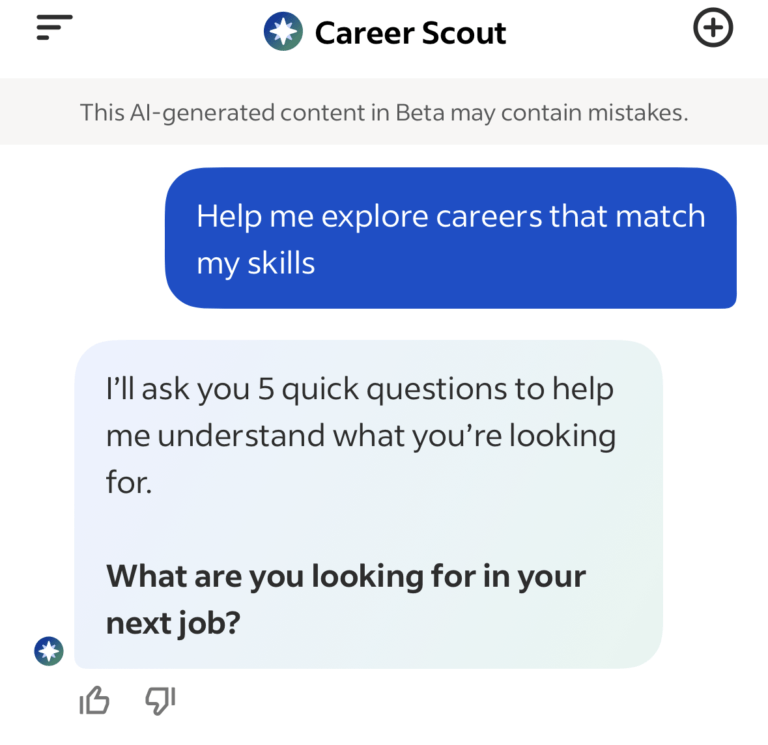
Career Scout offers a career exploration quiz that analyzes your skills and interests to suggest potential career paths. It shows you job responsibilities, salary ranges, and skills needed for different roles.
The system can recommend careers outside your current field. It provides transition plans with specific next steps if you want to make a career change.
AI Job Search Assistant
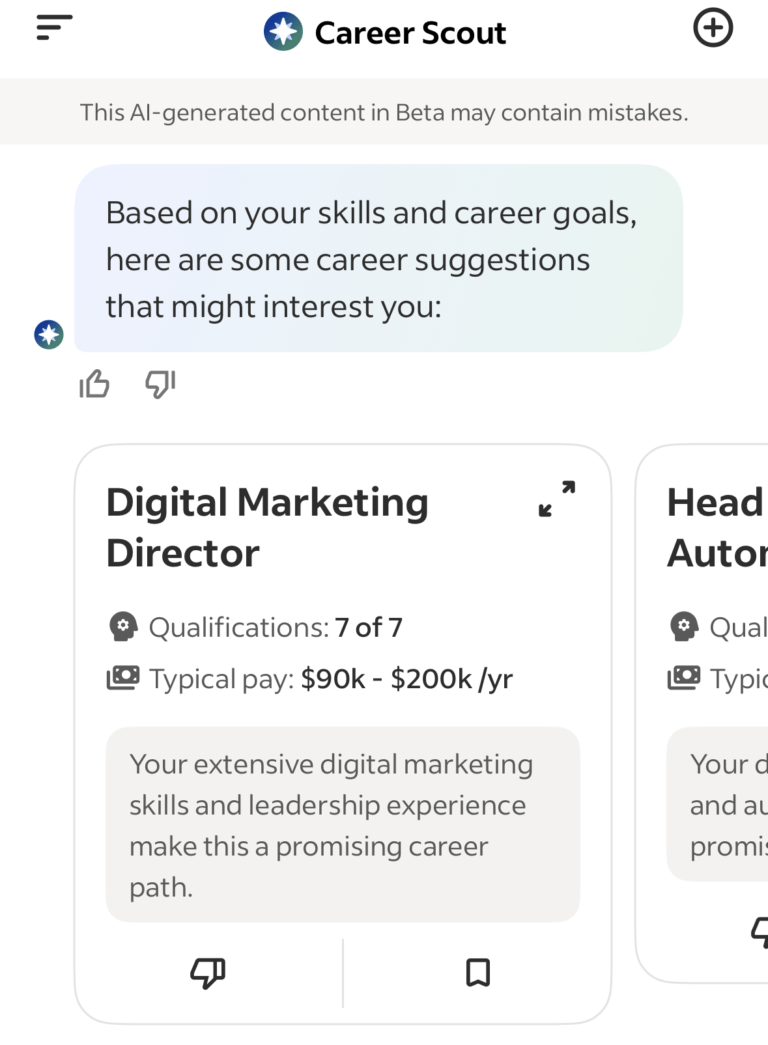
You search for jobs by chatting in natural language instead of using traditional filters. The AI interprets what you’re looking for and suggests matching positions.
You can ask questions like “Show jobs in my area with part-time schedules” or “Help me find remote jobs in software development.” The system pulls from Indeed’s job database and filters results based on your conversation.
Mock Interview Practice
You search for jobs by chatting in natural language instead of using traditional filters. The AI interprets what you’re looking for and suggests matching positions.
You can ask questions like “Show jobs in my area with part-time schedules” or “Help me find remote jobs in software development.” The system pulls from Indeed’s job database and filters results based on your conversation.
AI Resume Builder
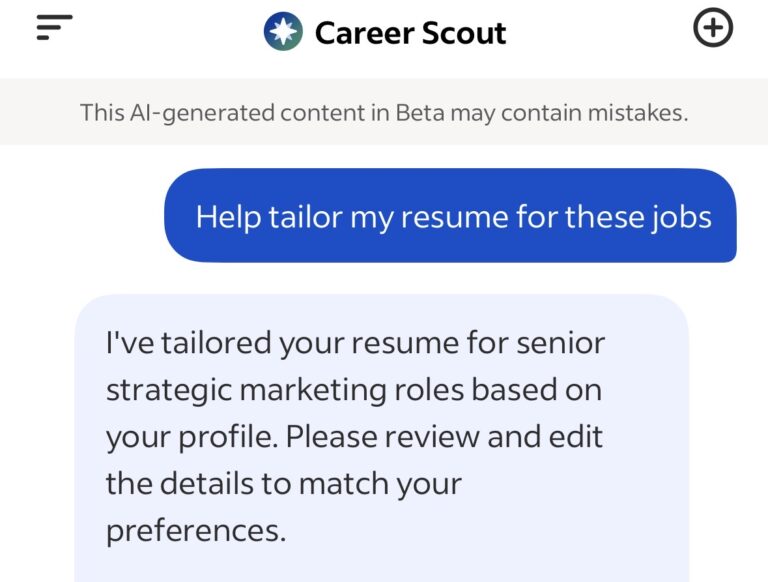
The platform generates resumes based on your profile and tailors them to specific job descriptions. It adds relevant keywords and adjusts your experience to match what employers want.
Resumes created through Career Scout save directly to your Indeed profile. They replace any existing Indeed resume you have.
Application Auto-Fill
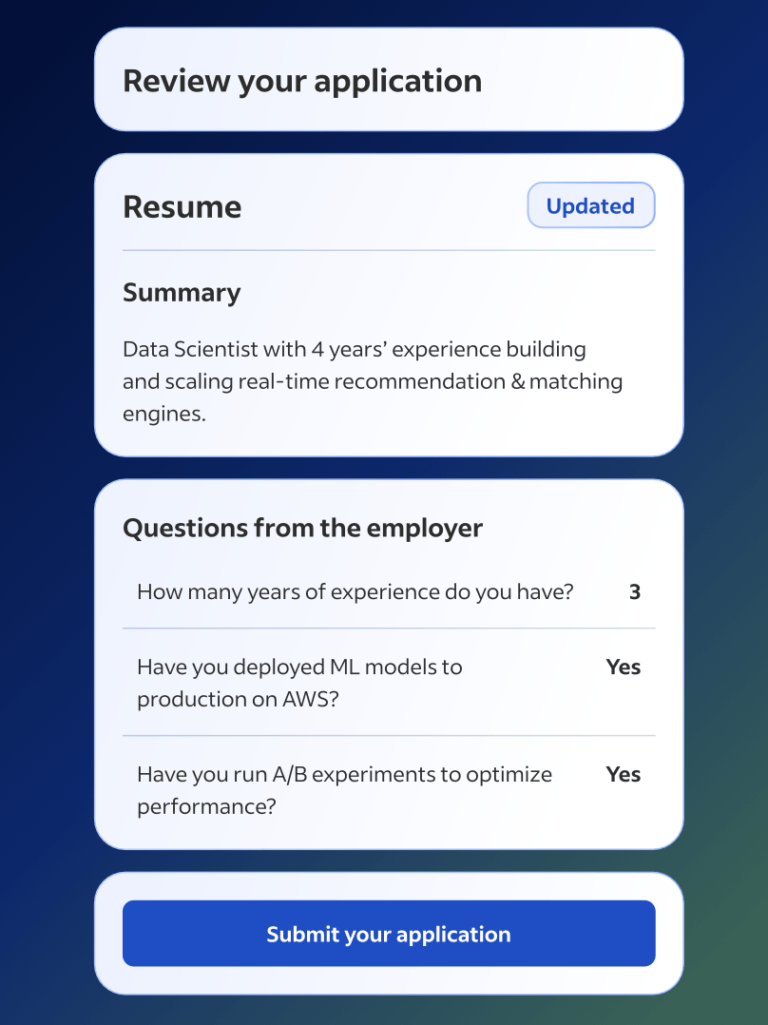
Career Scout can automatically fill out job applications using information from your Indeed profile. This works for jobs that match your qualifications.
You still need to review applications before submission. The feature saves time on repetitive form fields but doesn’t fully automate the application process like dedicated auto-apply platforms.
Application Tracking
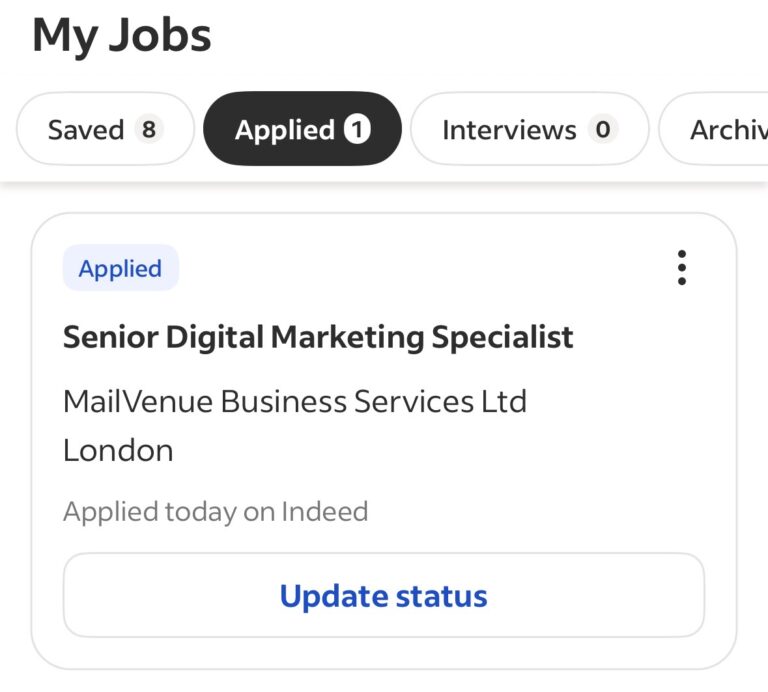
You can monitor your application status through the My Jobs dashboard. It centralizes all your Indeed applications in one place.
The tracking shows which jobs you’ve applied to and any responses you’ve received. You can also schedule interviews directly through the interface.
Pricing
Career Scout is free for now – no subscription or payment required. It includes career exploration, job search, resume building, mock interviews, and application auto-fill.
However, Indeed has plans to introduce a paid version. The platform will likely shift to a freemium model where some features stay free while others require payment.
Even while it’s free, you’re working within constraints. You’re limited to Indeed’s job database, mobile-only access, and you still manually review and submit every application yourself.
Free sounds good until you hit the limitations.
How Does Career Scout Work?
Step 1: Download the Indeed Mobile App
Career Scout is only available on mobile. You’ll need to download the Indeed app from the App Store (iOS) or Google Play (Android).
If you already have the Indeed app, make sure it’s updated to the latest version. Career Scout won’t appear in older versions.
Step 2: Create or Complete Your Indeed Profile
You need an Indeed account to use Career Scout. If you don’t have one, sign up through the app.
The more complete your profile, the better Career Scout performs. Add your work experience, skills, education, and any certifications you have.
Step 3: Enable Employer Visibility
Navigate to your profile settings and toggle “Employers can find you” to on. This should show as green when active.
This step allows Career Scout to match you with relevant opportunities. You’ll also set your basic job preferences here.
Step 4: Set Your Job Preferences
Define what you’re looking for: job titles, location, work type, schedule, and salary expectations. Career Scout uses these parameters to filter job recommendations.
You can adjust these preferences later. They’re not locked once you set them.
Step 5: Access Career Scout
Tap the Career Scout button in the bottom menu of the Indeed app. It’s clearly labeled and easy to spot.
You’ll see a chat interface with options to find jobs, explore careers, get company insights, or try a mock interview. Choose where you want to start.
Step 6: Interact Through Chat
Career Scout works through conversation. Type your questions or select from suggested prompts to guide the interaction.
The AI will ask clarifying questions to narrow down what you need. Answer them to get more relevant results.
Step 7: Review Job Matches
When Career Scout finds jobs, you’ll see them listed with match percentages and key details like salary, location, and company ratings. Scroll through the options.
Click on any job to see the full description. You can save jobs for later or apply immediately.
Step 8: Apply or Auto-Fill Applications
For jobs you want to pursue, Career Scout can auto-fill the application using your profile information. Review what it filled in before submitting.
Some applications require additional information the AI can’t complete. You’ll need to fill those sections manually.
Step 9: Track Your Applications
All your applications appear in the My Jobs dashboard. You can see which companies you’ve applied to and check for responses.
Interview invitations and employer messages show up here too. You can schedule interviews directly through the interface.
Pros & Cons
We’ve summarized the strengths and limitations to help you decide if it’s the right fit.
✅ Pros of Indeed Career Scout
- Free (for now) – No subscription fees.
- Career exploration tools – Help you discover new paths and roles.
- Mobile-first design – Job hunt directly from your phone.
- Mock interview practice – Get detailed feedback reports.
- Auto-fill basic fields – From your Indeed profile to save time.
- Integrated ecosystem – Applications, messages, and scheduling in one place.
❌ Cons of Indeed Career Scout
- Mobile-only access – Can’t use on desktop or mobile web.
- Limited to Indeed’s job database – Missing jobs posted directly on company career pages.
- Still requires manual work – You review and submit every application yourself.
- Basic filtering through chat – No advanced options like timezone or keyword searches.
- Doesn’t learn from your behavior – No adaptation based on which jobs you apply to or skip.
- One search at a time – No parallel job hunts with different criteria.
- Locked to Indeed only – Can’t help with jobs found on other platforms.
- Chat can feel repetitive – Sometimes asking questions it should already know.
Should You Use Indeed Career Scout?
Career Scout works well if you’re exploring career options or need help figuring out what jobs match your skills. The career quiz and path recommendations are genuinely useful for that.
It’s also solid if you’re already spending most of your time on Indeed and want some AI assistance with applications. The auto-fill feature saves a bit of time, and the mock interview practice is decent preparation.
But if you’re serious about landing interviews quickly, Career Scout is too limited. You’re stuck on mobile, locked to one job board, and still submitting every application manually. There’s no real automation.
JobCopilot is built for people who want an AI agent that actually runs their job search – not just assists with it. Verified jobs from company career pages, true automation with review options, machine learning that adapts to your preferences, and the ability to run multiple searches simultaneously.
Career Scout is a helpful assistant. JobCopilot is a complete job search solution.
JobCopilot: The Best Indeed Career Scout Alternative 🎯
Career Scout is a useful tool if you’re exploring career options or need help finding jobs on Indeed. But if you want actual automation that saves you hours every week, JobCopilot is built for that.
JobCopilot doesn’t just help you apply faster. It finds jobs, pre-fills applications, and gives you full control over whether to review before submission or let it apply automatically.
True 24/7 Automation With Your Level of Control
Career Scout helps you fill out applications faster, but you still need to review and submit everything manually. You’re doing the work with AI assistance.
JobCopilot offers two modes: save jobs for review (so you can train your copilot and fine-tune it) or enable auto-apply to let it submit while you sleep. You choose how hands-on or hands-off you want to be.
Verified Jobs From Company Career Pages
Career Scout pulls from Indeed’s job board. That means duplicates, scams, expired postings, and roles listed by recruiters who don’t work at the company.
JobCopilot searches 500,000+ verified company career pages directly. You’re applying to real openings at the source. No middlemen, no fake listings.
Machine Learning That Adapts to You
Career Scout matches jobs based on your static profile. What you fill out is what you get.
JobCopilot’s AI learns from your behavior. Every time you edit an application answer, it picks up your preferences about which experiences to highlight, how you position yourself, and what matters most for different roles. When you apply to a job or discard one, it understands what you’re actually looking for and adjusts future recommendations.
Run Multiple Job Searches Simultaneously
Career Scout handles one search at a time through chat. If you’re exploring different roles, you need to start new conversations.
JobCopilot lets you run multiple copilots in parallel. Each one can have its own CV, role criteria, and filters. You can search for senior product manager roles while also targeting product owner positions, or explore both contract and full-time opportunities.
Advanced Filtering Options
Career Scout offers basic chat-based preferences. You tell it what you want, and it interprets.
JobCopilot gives you precise control: filter by timezone (perfect for remote work), industry, seniority level, job description language, specific keywords, and custom match settings. You decide exactly how selective the AI should be.
Chrome Extension for Jobs Anywhere
Career Scout only works inside the Indeed app. If you find a job on LinkedIn, a company website, or another job board, you’re on your own.
JobCopilot includes a Chrome extension that uses your profile to auto-fill and apply to jobs found anywhere on the web. You’re not limited to one platform. And you guessed it… also Indeed. 😉
LinkedIn Networking Assistant
Career Scout drafts messages for employer communications. That’s helpful but limited.
JobCopilot’s networking assistant recommends specific people at companies you should connect with on LinkedIn to follow up on applications. It includes ready-to-use message templates that feel personal, not generic.
Proactive Job Scanning Every 2 Hours
With Career Scout, you initiate searches by chatting with the AI. You need to check in regularly.
JobCopilot scans for new jobs every 2 hours automatically. When a fresh role appears that matches your criteria, you’re among the first to apply. Speed matters in competitive markets.
Answer Screening Questions Once
Career Scout auto-fills basic application fields from your profile. When employers ask screening questions, you answer them each time.
JobCopilot lets you answer common screening questions once. The system reuses those answers accurately across all future applications. You’re not typing the same responses repeatedly.
Comprehensive Career Tools Suite
Career Scout offers job search, resume building, and mock interviews. It’s focused on those core features.
JobCopilot includes a full suite of AI career tools: CV builder, cover letter generator, interview roleplaying (via chat and audio), salary benchmarks, career path recommendations, upskilling suggestions, market intelligence reports, and more. Everything you need is in one platform.
Automate Your Job Applications with AI 🚀
Try the leading AI Agent for job seekers – autonomous, safe, fully personalized, and trusted by 100,000+ users to land interviews faster.
Frequently Asked Questions
What is Indeed Career Scout?
Indeed Career Scout is an AI-powered career coaching tool built into the Indeed mobile app that helps you explore careers, find jobs, build resumes, and practice interviews.
How is Career Scout different from regular Indeed?
Career Scout adds AI assistance through chat for career exploration, resume tailoring, application auto-fill, and mock interviews – regular Indeed just shows job listings.
How much does Career Scout cost?
Career Scout is free for now with no subscription fees, though Indeed has plans to introduce a paid version in the future.
Is Career Scout available on desktop?
No, Career Scout is only available on the Indeed mobile app for iOS and Android.
Does Career Scout automatically apply to jobs for me?
No, Career Scout auto-fills application fields but you still need to review and submit each application manually.
Can I use Career Scout with jobs found outside Indeed?
No, Career Scout only works with jobs posted on Indeed’s platform.
Will Career Scout replace my existing Indeed resume?
Yes, if you save a resume created by Career Scout to your profile, it will replace any existing Indeed resume.
Can I see my previous conversations with Career Scout?
Yes, tap the three lines in the top left corner of the Career Scout tab to view your chat history.
Do I need to complete my Indeed profile to use Career Scout?
Yes, the more complete your profile is, the better Career Scout can personalize job recommendations and assistance.