
Jobscan is one of the most recognized names in resume optimization since 2013. It effectively invented the ATS match rate score and claims to help over a million job seekers tailor their resumes to specific job postings.
But the resume scanner is only the part everyone knows. Jobscan has quietly grown into a much broader job search suite, adding tools like auto-apply, interview practice, and a job tracker that get far less attention than the scanner it’s famous for. Those newer features are the ones nobody’s really tested, so they’re the ones I was most curious about.
In this article, I ran my own resume through Jobscan, tested the scanner and the tools it bundles, checked the pricing against its own pages, and weighed it all through the lens of an active job hunt. Let’s get started.
TL;DR
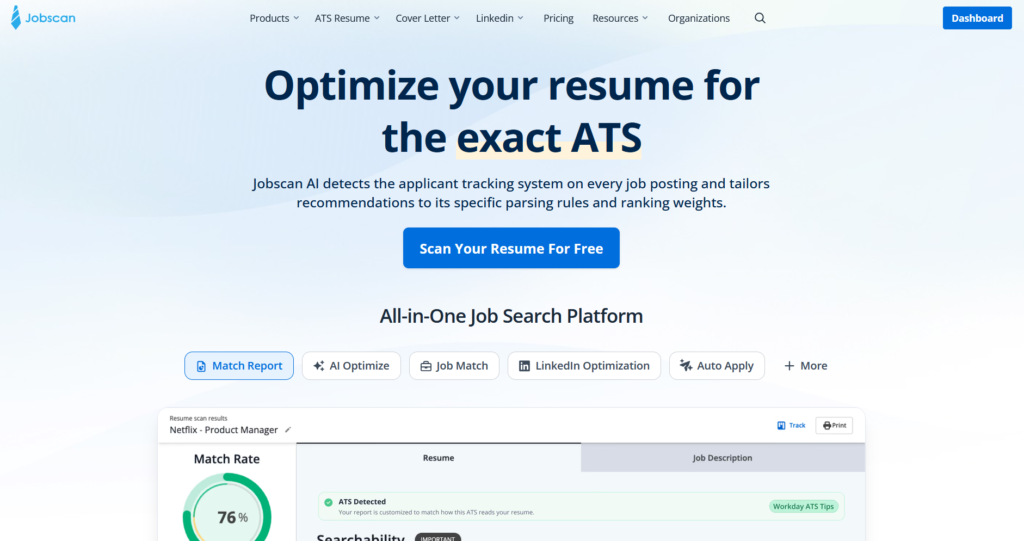
Jobscan is one of the best resume scanners in the business, and that’s exactly what you’re paying for. Paste in your resume and a job posting, and it returns a match rate plus the specific keywords and skills you’re missing, with genuinely useful ATS detection and a LinkedIn optimizer on top.
The catch is what it doesn’t fix. A high match rate isn’t the same as getting interviews, as several users applying to 100-plus jobs with zero responses found out. The newer Auto Apply and Interview Practice tools sit behind extra paywalls, and Auto Apply offers no filtering beyond location.
Who it’s best for:
- Job seekers getting filtered out by ATS keyword screening
- People who tailor a fresh resume for every application
- Applicants targeting large, ATS-heavy corporate employers
- Anyone who wants to polish their LinkedIn profile alongside their resume
Key features at a glance
| Feature | Jobscan |
| Resume scanner | Best-in-class match rate report with keyword and skill gaps |
| ATS detection | Identifies the employer’s ATS (via company name and URL) and tailors tips |
| LinkedIn optimizer | Section-by-section profile scan. Add-on, included after trial |
| Auto Apply | Newer add-on, pay-per-application credits, no filters beyond location |
| Interview Practice | Newer add-on, separate $14.99/month subscription |
| Job tracker | Kanban board, included on the free plan |
| Resume builder | ATS-friendly, from scratch, existing resume, or LinkedIn |
| Job coverage | Global, not just US, Canada, and Europe |
| Pricing | Free tier, $29.98/month quarterly or $49.95/month, add-ons cost extra |
Pros
- The resume scanner is the most detailed and reliable in the category
- ATS detection tailors advice to the employer’s specific system
- LinkedIn optimization that most resume tools ignore entirely
- Genuinely global job coverage, not fenced to Western markets
- Straightforward pricing with no weekly-billing tricks and a real free tier
- Over a decade in business with consistent 4-plus ratings across platforms
Cons
- A high match rate doesn’t translate to responses, as many users report
- Auto Apply and Interview Practice cost extra on top of any plan
- Auto Apply has no filtering beyond location, undercutting the whole feature
- Surprise auto-renewals and no reminder emails, per multiple reviews
- Priced near the top of the category at up to $49.95 a month
- Optimizes one resume at a time and leaves all the finding and applying to you
Why You Can Trust This Review
I’m not here to sell you Jobscan or scare you off it. I actually used it, which puts it ahead of half the “reviews” that are clearly just reworded versions of Jobscan’s own homepage.
Here’s what went into it:
- I ran my real resume through it: Pasted against real job postings, because a match rate means nothing until you’ve watched it judge your actual work and tell you your years of experience apparently don’t count.
- I poked at the new stuff, not just the famous scanner: The auto-apply and interview tools are the ones nobody talks about, so those got the hardest look.
- I checked every claim against Jobscan’s own pages: The “3x more interviews” type of stat gets treated as Jobscan’s claim, not gospel, and anything I couldn’t verify, I’ve said so.
Jobscan Pricing
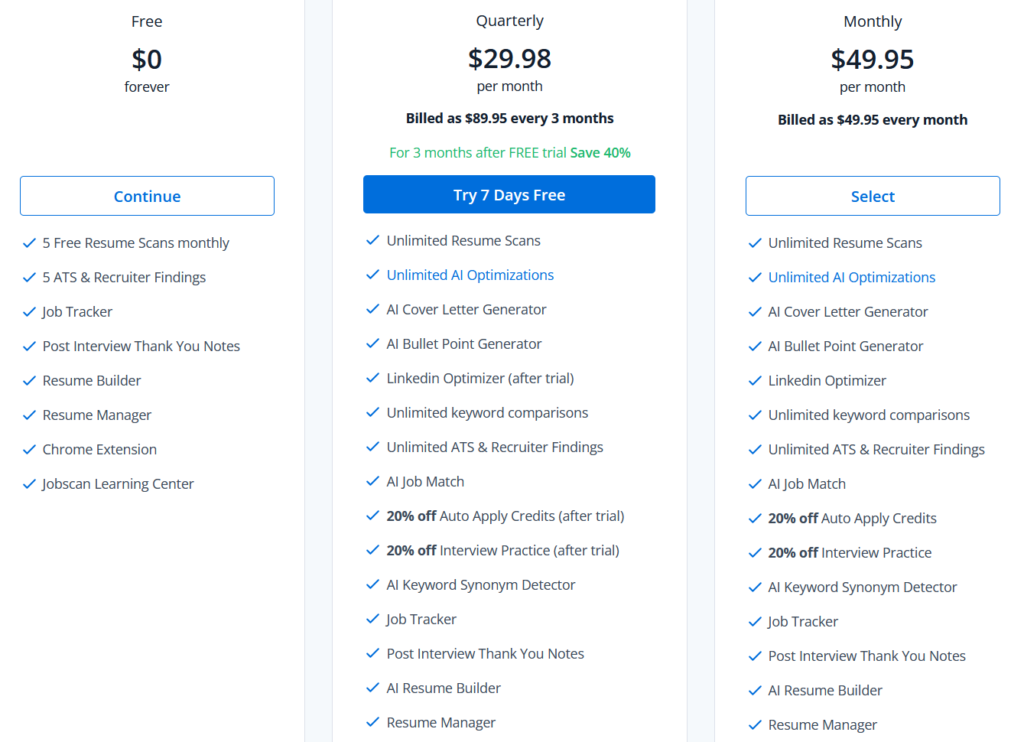
Jobscan runs on three plans, and the structure is refreshingly straightforward compared to some tools I’ve reviewed. Here are the tiers available:
- Free: 5 resume scans a month, 5 ATS and recruiter findings, plus the job tracker, resume builder, resume manager, thank-you note generator, Chrome extension, and learning center.
- Quarterly ($29.98/month, billed as $89.95 every 3 months): The value pick, which Jobscan flags as a 40 percent saving. Unlimited scans and AI optimizations, the AI cover letter and bullet point generators, LinkedIn optimizer, unlimited keyword comparisons, AI job match, keyword synonym detector, ATS-friendly templates, and more.
- Monthly ($49.95/month, billed monthly): The same feature set as Quarterly. You’re paying a $20 premium each month for the flexibility of not committing to a quarter.
The auto-apply and interview tools cost extra
Auto-apply and interview practice are not included in any subscription (sitting behind a second paywall). Even on the paid plans, all you get is a discount, and once you actually go to use them, the real prices show up.
Auto-apply runs on a credit system, bought separately. The packs are 5 credits for $8.50, 10 for $15, or 25 for $35, with the Premium discount shaving that to roughly $6.80, $12, and $28. Premium subscribers also get 2 free credits a month, and those don’t roll over. So auto-apply is a metered consumable you keep topping up, and one credit is one application.
Interview practice is its own separate subscription at $14.99 a month on top of your plan, billed monthly. For that, you get AI mock interviews, feedback on your answers, and unlimited practice sessions.
Keep that in mind when you weigh the sticker price, because the number on the pricing page isn’t close to the full cost if those are the tools you came for.
Key takeaways for your budget
- The free plan is a genuine trial: Five scans a month is enough to test the thing Jobscan is famous for before spending anything.
- Jobscan is priced above the pack. At up to $49.95 a month, it sits well above many rivals whose core ATS checks are similar or free. You’re paying for depth and the brand.
- Budget for the add-ons separately. Auto-apply and interview practice only get you a 20 percent discount, not free access. If those are your reasons for signing up, the real cost is higher than the plan price.
- Mind the trial fine print. The free Premium trial runs for 7 days, after which a quarterly plan bills automatically. Note there’s no trial if you opt in for LinkedIn Optimization access or pick the monthly plan, so cancel in time if you’re just testing.
Automate Your Job Applications with AI 🚀
Try the leading AI Copilot for job seekers – autonomous, safe, fully personalized, and trusted by 100,000+ users to land interviews faster.
Check Out JobCopilot →How Does Jobscan Work?
At its core, Jobscan is simple. You give it your resume and a job description, and it tells you how well the two match and what to fix. But the platform has grown well beyond that single scan, and it now bundles a stack of tools around it.
Let’s go through them one at a time, starting with the feature that made Jobscan famous.
Resume Scan
This is the feature that built Jobscan, and it’s still the heart of the platform. The setup is exactly as simple as promised. You upload your resume as a PDF or DOCX (or paste the text), drop the job description into the box beside it, and hit Scan. The free plan gives you five scans a month, with a running counter so you always know how many are left.
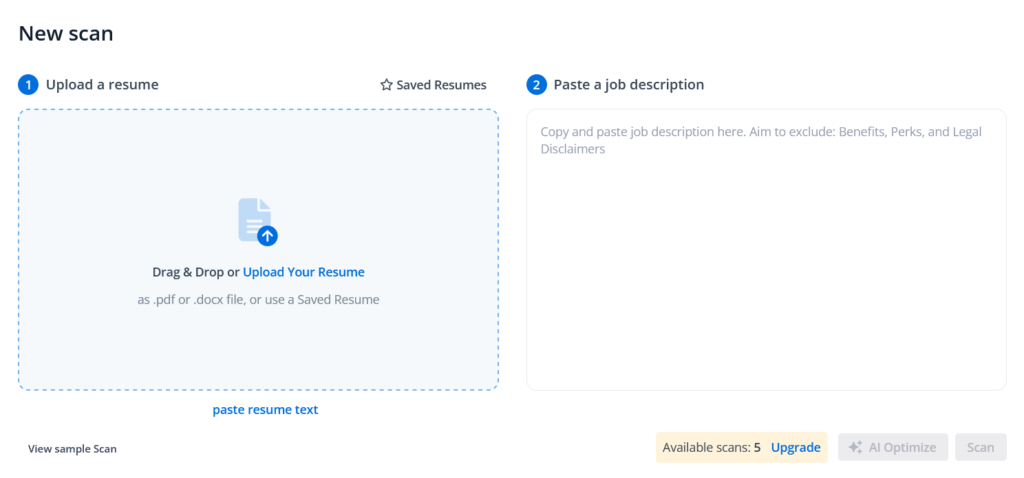
A few seconds later you get a Match Rate score and a full report. I ran my own resume, and it came back Low, which stings but is fair. One nice touch is ATS Detection.
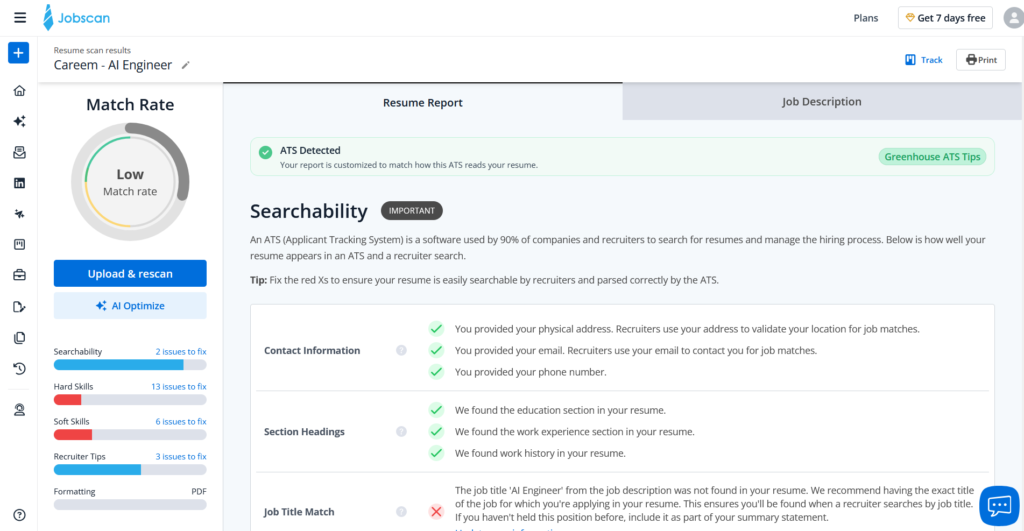
The report breaks into categories, each with a count of issues to fix:
- Searchability: whether an ATS can find and parse your resume
- Hard Skills: technical keywords from the posting that are missing
- Soft Skills: interpersonal keywords the job asks for
- Recruiter Tips: job title match, summary, measurable results, word count
- Formatting: fonts, layout, margins, and ATS-safe structure
Where Jobscan earns its reputation is the depth. It doesn’t just say “add keywords.” It told me the exact title “AI Engineer” was missing and why that matters for recruiter searches, flagged that I had no summary section, and noted my education didn’t match the listing.
It also confirmed what I got right, like properly formatted dates and five or more measurable results. Now the honest catch is that the best part is paywalled. The actual missing hard and soft skills, the keywords that would raise your score, are mostly blurred behind an “Upgrade to view” wall. The free scan shows you how the tool works, not the answers.
You can also print the Match Report and share it with your resume writers.
LinkedIn Optimizer
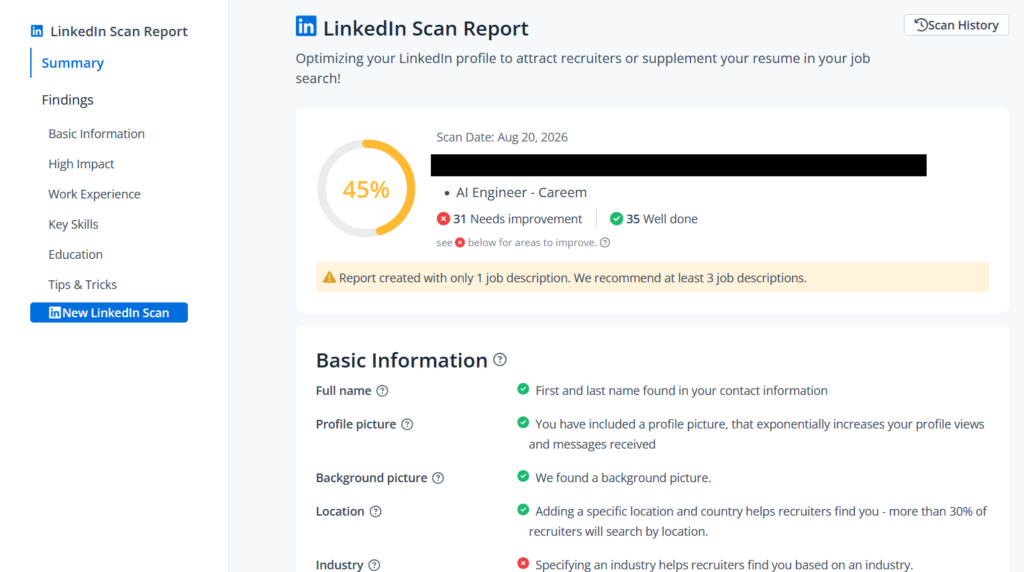
Jobscan applies the same scan-and-score logic to your LinkedIn profile. The report is organized into sections you can jump between:
- Basic Information: name, profile picture, background, location, industry, Open to Work status
- High Impact: headline, checked against the target title and key skills
- Work Experience, Key Skills, Education: matched against the posting
- Tips & Tricks: general profile advice
However, most of the sections aren’t available in the free version, and you’ll have to buy a premium plan to see the full report.
Jobscan optimizes your LinkedIn profile against a specific job posting, the same way it does your resume. That logic works for a resume, since you tailor a fresh copy for every application. Your LinkedIn profile is a single, public page. You can’t run a different version for every job you’re eyeing, so scoring it around one posting’s exact keywords doesn’t fit how LinkedIn actually works.
The tool even warns the report was built from only one job description and recommends at least three, which is really an admission that grading a permanent profile against a single job isn’t very meaningful.
Auto Apply
You pick a saved resume, set a location, and search. Jobscan returns a grid of matched jobs, each tagged by match quality (Top Match, Good Match), with an Auto Apply button on each card.
There are two modes in the preferences:
- Manual review mode: Lets you approve each application before it goes out
- Auto-submit mode: Skips the review and applies faster, with a warning that AI-filled details may occasionally need a correction.
A genuine plus is the coverage. The job results aren’t locked to the US, Canada, or Europe. When I searched, local and international roles showed up too, which is more than a lot of these tools manage. If you’re job hunting outside the usual Western markets, that alone sets it apart.
But the filtering is where it falls apart. There is no remote job filter. In fact, there are no filters at all beyond location. You can’t narrow by seniority, job type, salary, industry, or keywords. For a feature meant to apply on your behalf, that’s a serious gap, because the entire value of automated applying rests on it targeting the right roles.
Then there’s the cost. Auto Apply runs on credits, bought separately from your subscription, and one credit is one application. The applications add up fast if you’re job hunting at any real volume.
Job Tracker
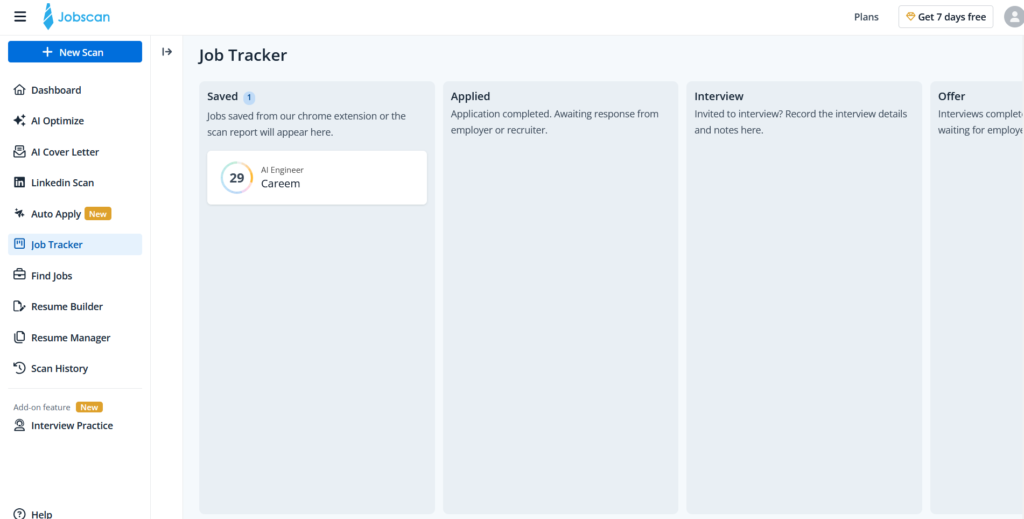
Jobscan also includes a Job Tracker, and it’s a familiar Kanban board with columns for Saved, Applied, Interview, and Offer. Jobs you save from the Chrome extension or a scan report land in the Saved column, and each card carries its match score, so you can see at a glance how well-tuned your resume was for that role before moving it along.
Other Features
Beyond the core scanner and the newer add-ons, Jobscan rounds out the suite with a few more tools worth a quick mention.
- Resume Builder: An ATS-friendly builder that lets you start from scratch, import an existing resume, or pull details from your LinkedIn profile. It’s included on the free plan and produces clean, parser-safe formatting.
- AI Cover Letter Generator: Generates a tailored cover letter for a given job, available on the paid plans. Handy if you want a first draft to edit rather than staring at a blank page.
- Interview Practice: A separate add-on subscription at $14.99 a month, offering AI mock interviews tailored to the role, feedback on your answers and pacing, and unlimited practice sessions. Like auto-apply, it’s a newer feature that sits outside your base plan, so it’s an extra cost on top rather than something your subscription covers.
What Are Customers Saying About Jobscan?
Jobscan has a genuinely strong reputation, and the ratings back that up.
| Platform | Rating |
| Trustpilot | 4.4 / 5 |
| Chrome Web Store | 4.3 / 5 |
| G2 | 4.1 / 5 |
Jobscan Pros
The resume scanner is best-in-class
This is the reason to use Jobscan. The match report breaks a posting down more granularly than anything else in the category, separating hard skills, soft skills, job title match, and recruiter tips, and pairing each flag with a clear reason.
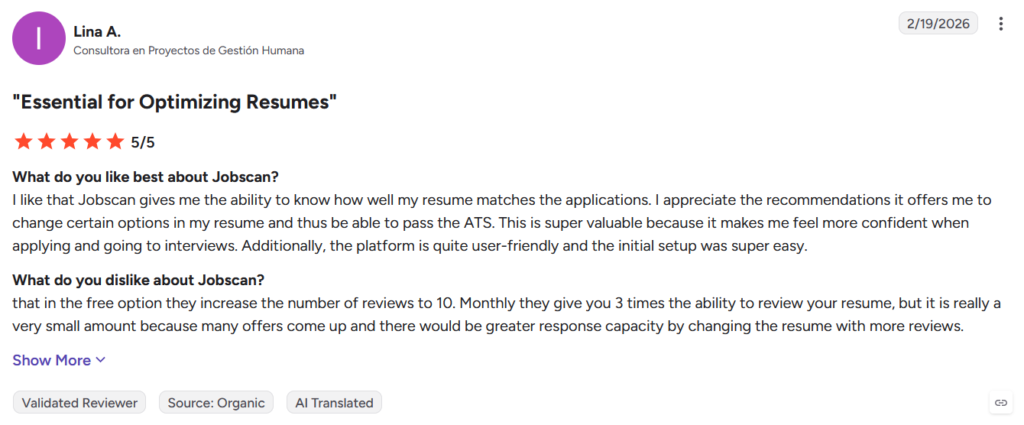
Reviewers agree, with one calling it essential for optimizing resumes and saying the feedback made her feel more confident applying.
Genuinely global job coverage
A pleasant surprise in the newer Auto Apply tool: the job results aren’t fenced to the US, Canada, and Europe. Local and international roles show up too, which is more than most tools in this space bother with. If you’re hunting outside the usual Western markets, Jobscan actually returns results.
Straightforward pricing and a real free tier
Credit to Jobscan for clean pricing, no weekly-billing tricks, plus a free plan that gives you five real scans a month. It’s enough to test the flagship feature properly before spending anything, which is more than a lot of other tools allow.
Trusted, established, and consistent
Over a decade in business, more than a million users, and steady 4-plus ratings across Trustpilot, the Chrome store, and G2. In a category full of thin AI wrappers and throwaway free tools, Jobscan is a real product with a real track record.
Jobscan Cons
A high match rate doesn’t mean responses
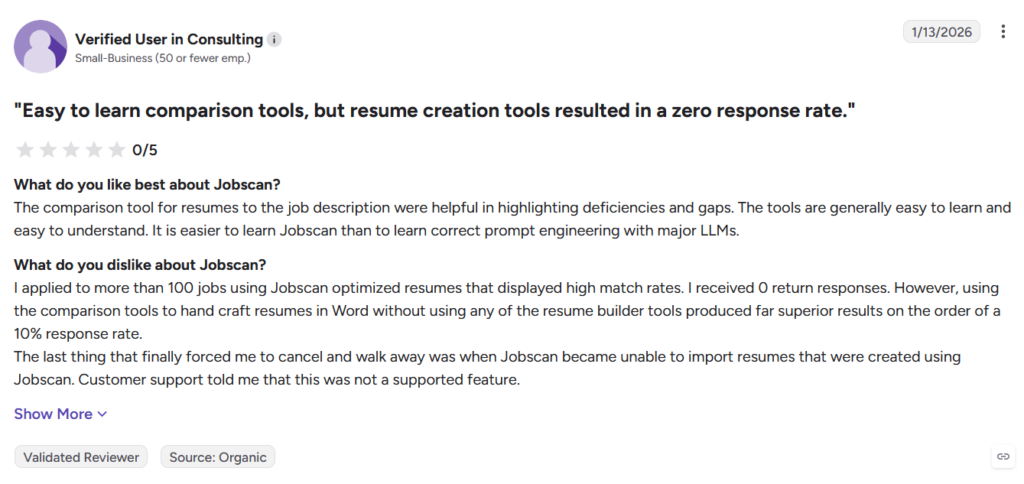
This is the complaint that comes up again and again, and it cuts right to the heart of what Jobscan is. One verified reviewer said they applied to more than 100 jobs using Jobscan-optimized resumes with high match rates and got zero responses, but hand-crafting resumes in Word using the comparison tool, without the builder, produced roughly a 10 percent response rate.
The match score is a proxy for keyword overlap, not a predictor of interviews, and chasing it can even work against you if it nudges your resume toward keyword-stuffed writing a human recruiter won’t warm to.
Users are experiencing surprise renewals and auto-billing
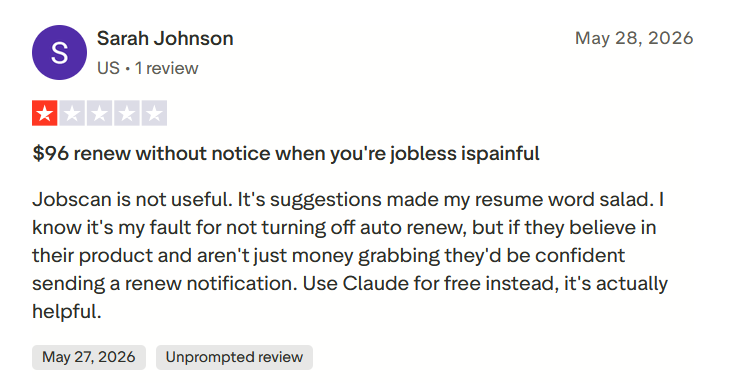
Several reviewers report being charged without warning. One described being hit with a $96 quarterly renewal while unemployed and with no reminder email, arguing that a company confident in its product would send a renewal notice.
The core value may be eroding
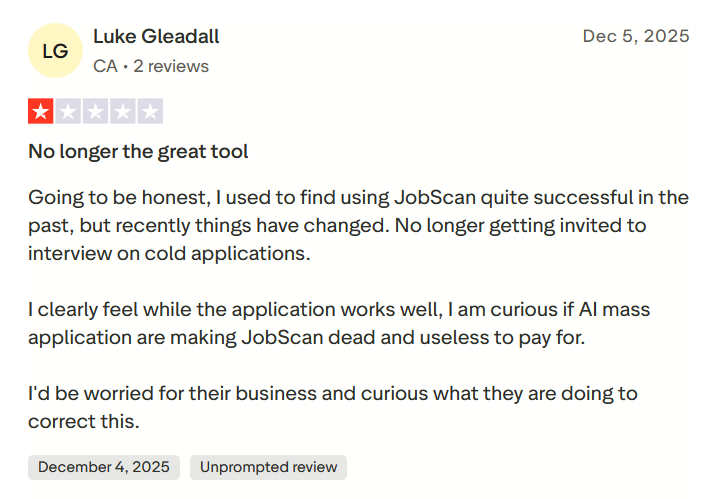
A subtler concern showing up in recent reviews is that Jobscan just isn’t working the way it used to. One long-time user said he used to find it successful but has stopped getting interviews from cold applications, and openly wondered whether the rise of AI mass-application tools has made a keyword-optimized resume less of an edge.
Whether or not that’s the cause, it’s worth knowing that a better-matched resume is a smaller advantage now than it was a few years ago.
The newer tools are paywalled twice, and thin
Auto Apply and Interview Practice are the fresh additions, but they sit outside every subscription. Auto Apply runs on pay-per-application credits, and even on a paid plan you only get a discount plus a couple of free monthly credits. Interview Practice is a separate $14.99 monthly subscription. Worse, Auto Apply has no filters beyond location, no remote toggle, no seniority, salary, or keyword controls, which undercuts the whole point of automated applying.
Jobscan is a genuinely good tool at one specific job, and a poor fit for another. Whether it’s right for you comes down to what part of the search you actually need help with. Here’s how to tell.
When to Use Jobscan and When to Switch
Choose Jobscan if:
- You want to beat the ATS keyword filter: If you keep getting filtered out before a human sees your resume, the match report tells you exactly which keywords and skills to add.
- You tailor a fresh resume for every application; The scanner shines when you’re customizing a document per job. That’s the workflow it was built around.
- You’re applying to large, ATS-heavy employers: The ATS detection and platform database are most useful when you’re targeting big corporates running Workday, Taleo, or iCIMS.
- You want to polish your LinkedIn too: The LinkedIn scan catches real profile gaps most resume tools ignore.
But what if the keyword score isn’t your bottleneck? What if you’re already getting filtered through fine and the real grind is finding roles, tailoring for each one, and applying over and over, dozens of times, with nothing coming back?
JobCopilot: The Best Jobscan Alternative
Jobscan perfects one resume against one posting, then hands all the actual work back to you. You still hunt down every listing, tailor for every job, and fill out every form yourself. And as more than one reviewer found, a high match rate doesn’t guarantee a single response.
That’s the gap JobCopilot is built to close. Instead of scoring your resume and leaving you to it, it works as an end-to-end job application system.
- It applies to relevant roles you define, not everything: You configure what you’re looking for and how selective the AI should be, and JobCopilot works within that. It automates applications to roles that genuinely match what you told it you want, so you stay active without spraying applications at jobs you’d never take.
- Real filtering: Unlike Jobscan’s Auto Apply, which offers nothing beyond location, JobCopilot lets you target by timezone, seniority, keywords, job description language, and more, so the roles it applies to are actually the ones you want.
- Verified jobs only: JobCopilot pulls roles directly from official company career pages rather than boards cluttered with scams and duplicates, so what you apply to is real.
- Applications are part of the plan, not metered: Where Jobscan charges per application through pay-as-you-go credits, JobCopilot builds applying into how it works, so you’re not topping up a balance every few applications.
- You stay in control: A review-first mode lets you see and edit the AI’s answers before anything goes out, and those edits teach your copilot your tone and preferences over time. You decide whether applications submit automatically or wait for your review.
- It learns what you actually want: Every job you apply to or discard is a signal your copilot uses to surface closer matches, so relevance improves the more you use it.
- A full career toolkit too. Beyond applications, JobCopilot bundles a CV builder, cover letter tools, interview practice, salary benchmarks, and more, so you get the resume and prep help Jobscan offers alongside the automation it lacks.
Consider JobCopilot the better fit if you:
- Want relevant applications handled for you rather than tailoring and submitting every one by hand.
- Need real filters, not just a location field, to decide which jobs get applied to.
- Care about applying only to verified roles from real employers.
- Want to review and edit each application while still saving the hours manual applying eats up.
Automate Your Job Applications with AI 🚀
Try the leading AI Copilot for job seekers – autonomous, safe, fully personalized, and trusted by 100,000+ users to land interviews faster.
Check Out JobCopilot →FAQs
Is Jobscan free?
There’s a free plan with 5 resume scans a month, the job tracker, resume builder, and Chrome extension. It’s enough to test the scanner, but unlimited scans and AI optimization require a paid plan.
Is a high Jobscan match rate the same as passing the ATS?
No. The match rate measures how well your resume’s keywords overlap with a job description. Real ATS platforms parse and store resumes and let recruiters filter them. They don’t auto-reject below a set score. Treat the match rate as a tailoring guide.
Does Jobscan apply to jobs for me?
Jobscan applies to jobs automatically only through its separate Auto Apply add-on, which runs on paid credits and offers no filtering beyond location. The core Jobscan product doesn’t apply for you. It optimizes your resume so you can apply yourself.