
Students apply for internships from different job boards. Some applications are submitted through job portals, some through LinkedIn, and others through referral links.
There’s also pressure in the background. Career advisors say volume matters, and friends are applying nonstop. One well-publicized case from a technology student showed that he submitted over 450 internship applications before finally landing a few offers.
At that point, the search becomes less about effort and more about control.
This article introduces a free Internship Tracker Spreadsheet you can download and start using immediately. It shows how to log applications, deadlines, resume versions, and recruiter responses in one place.
Free Internship Application Tracker Template (Download)
I’ll also explain when a spreadsheet starts to feel heavy and what kind of tracking setup makes sense once applications scale beyond a manageable number.
What to Track in an Internship Application Spreadsheet
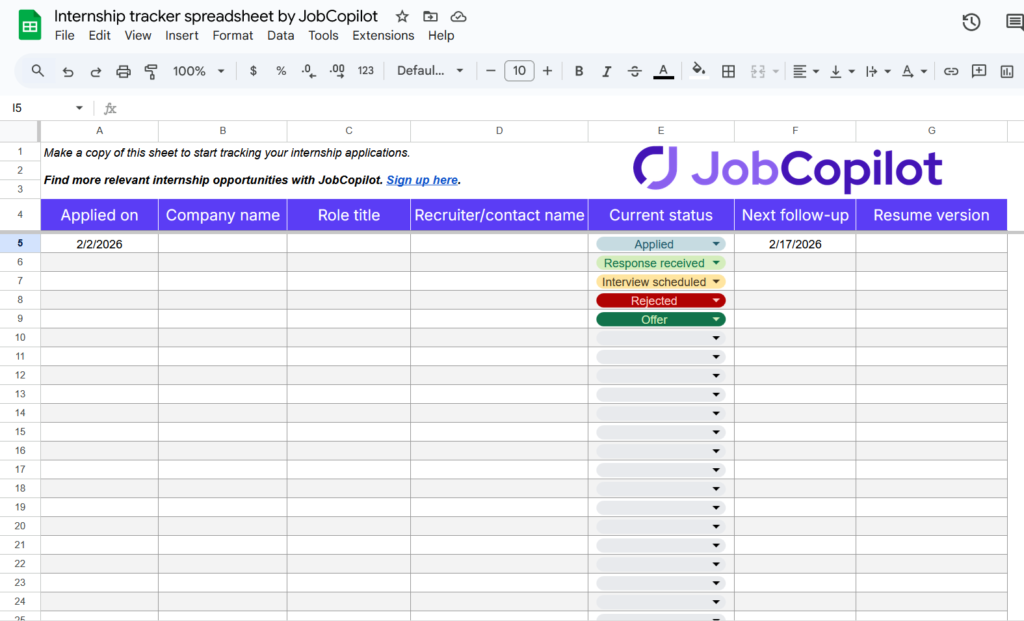
Tracking works best when it stays practical. If you try to record everything, the spreadsheet turns into work you avoid. If you track too little, it stops helping, and you’re back to guessing.
Below are the essentials worth tracking, and why they matter:
Application date
Add the exact date, not “last week.” When a recruiter replies, you instantly know whether a follow-up is overdue or premature.
Tip: Sort by application date once a week. Anything older than 10–14 days with no response is a follow-up candidate.
Company name
Use the official company name, not abbreviations you’ll forget later. If the company has multiple brands or divisions, note the division name in brackets.
Role title
Copy the role title exactly as written in the job post. Similar roles blur together quickly, especially in large companies.
If the title is generic, add one keyword you care about in parentheses, like “Data Intern (ML)” or “Marketing Intern (SEO).” It helps you recall why you applied.
Application status
Keep this simple:
- Applied
- Response received
- Interview scheduled
- Rejected
- Offer
Resume version used
Use short version labels like “v3-skills” or “v5-projects.” When you get interviews, you can trace which versions are working.
Recruiter or contact name
If you don’t have a name yet, leave it blank.
Follow-up date
Set follow-ups only for roles you actually care about. Not every application deserves one.
You can track more, but only if it helps you think faster later.
- Application source: Useful once patterns start forming. You’ll see which platforms lead to replies and which ones quietly go nowhere. If you’re early in the process, you can skip this.
- Cover letter: You don’t need the full text. A simple “yes/no” or a short label is enough. This helps you see whether tailored applications are actually paying off.
- Notes: Keep this short on purpose. Referral names, unusual requirements, or anything you’ll forget in two weeks.
If you’re still figuring out where to apply, here’s a list of the 10 Best Internship Search Sites for Students in 2026.
Tips to Use the Internship Tracker Spreadsheet
Here are some practical tips that actually make the tracker useful long-term:
- Start with one application, not all of them: Explain why backfilling everything at once creates friction. Suggest logging new applications first, then adding old ones only if they’re still active.
- Update it right after applying: Don’t wait until later. The job post, resume version, and role details are clearest while the tab is still open.
- Sort before you scan: Sort by application date or follow-up date instead of reading row by row. Let the sheet do the work.
- Review once a week: Daily checks add stress and rarely change anything. Weekly reviews are enough to stay on top of things.
- Duplicate the sheet monthly if volume gets high: Starting a fresh tab or copy keeps performance smooth and your view focused.
- Don’t delete rejected applications: They’re useful later for pattern spotting and avoiding repeat applications to the same teams.
“Applying to more internships doesn’t increase your chances if you can’t keep track of what you’ve already done.”
Common Problems With Internship Tracker Spreadsheets
Spreadsheets are helpful early on, but certain problems show up once applications increase, such as:
- Manual updates don’t scale: Every status change, follow-up, or outcome requires manual input. As the application count grows, keeping the sheet current becomes a task on its own.
- Follow-ups rely on discipline: Miss one update cycle, and follow-up dates quietly pass. There’s no built-in reminder or escalation when something needs attention.
- No central place for job details: Job descriptions live elsewhere. Reopening old links often leads to expired pages or broken postings.
- Not designed for review before action: Spreadsheets record what happened, but they don’t support reviewing or refining applications before they go out.
- Version tracking stays shallow: Resume or answer versions can be labeled, but there’s no easy way to compare what’s working and what isn’t without extra analysis.
- Becomes fragile over time: One accidental edit, a broken filter, or an overwritten row can quietly damage the system without being noticed.
- Requires constant motivation to maintain: When updates feel repetitive, the habit slips. Once that happens, the spreadsheet loses trust and usefulness quickly.
A Smarter Alternative to an Internship Tracker Spreadsheet
Once your application volume increases, the work shifts from applying to maintaining the tracker itself.
JobCopilot provides a job application tracker that brings job discovery, applications, tracking, and review into one place. You can see what’s been applied to, what’s queued, and what needs attention without jumping between inboxes, portals, and tabs.
It also changes how you interact with applications. Rather than sending everything blindly, you can review and adjust AI-generated answers, keep job details accessible, and build a clearer picture of what’s happening across your search.
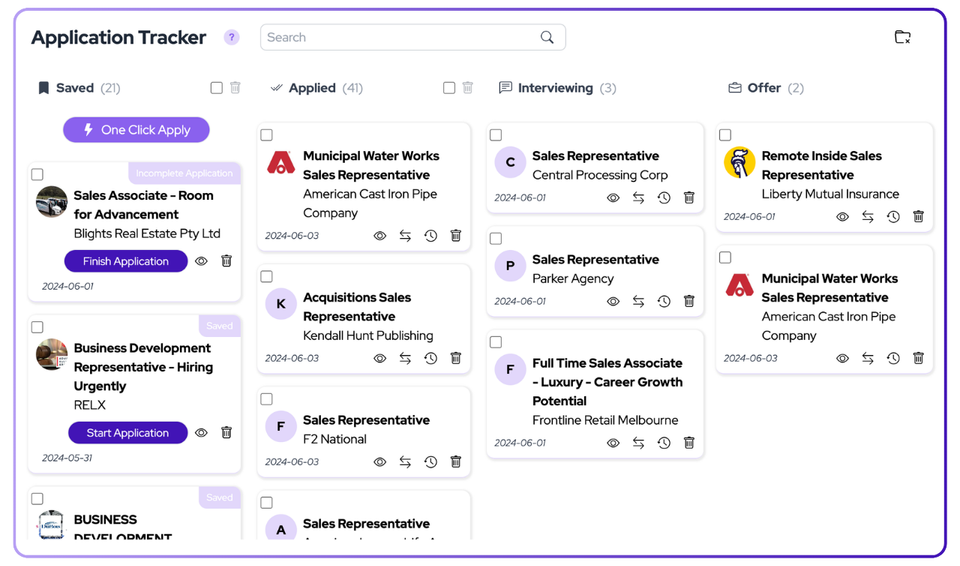
Here’s what you get beyond a spreadsheet:
- Centralized job tracking with live application status
- Full job descriptions available inside the tracker, even later
- Review mode to edit answers before applications are submitted
- Clear visibility into where each application sits in the process
- Less reliance on memory, emails, and manual notes
- Easier follow-ups without hunting for context
- A calmer workflow that stays usable even when motivation dips
- One system that supports search, apply, track, and review together
Spreadsheet vs. Internship Application Tracking Tool
The right setup depends on how active your search is and how much mental load you want to carry. A spreadsheet can be enough early on. At some point, the process asks for more than rows and cells.
Use the spreadsheet if:
- You’re just starting and testing the waters
- You want something lightweight with zero setup
- You’re applying occasionally and can update it manually
Use a tracking tool if:
- You’re applying with clear goals and timelines
- You want automation to reduce repetitive work
- You’re juggling many applications and conversations at once
Track, review, and manage applications in one place. Sign up for JobCopilot’s Application Tracker.
Automate Your Job Applications with AI 🚀
Try the leading AI Copilot for job seekers – autonomous, safe, fully personalized, and trusted by 100,000+ users to land interviews faster.
Check Out JobCopilot →FAQs
How often should I review my applications?
Once a week is usually enough. Daily reviews rarely change outcomes and add unnecessary stress.
Can a tracker improve my chances of getting an internship?
Indirectly, yes. It helps you respond faster, follow up on time, and stay organized during interviews.
When should I move on from a spreadsheet?
When updating, it starts feeling harder than applying, that’s usually the signal to move to an internship tracking tool.