
Is Jobright Worth It? Full Review & Alternative for 2026

Jobright Review and Best Alternative

Looking into Jobright.ai to automate your job search? You’re not alone.

With promises of AI job matching, resume tailoring, and auto-apply features, it’s quickly gained attention – but is it actually worth your time (or money)?

In this article, we’ll break down what Jobright offers, how it works, and what real users are saying about it.

And if you’re here to find the best alternative, you might want to jump to our comparison with JobCopilot to understand why it’s currently the stronger option for hands-free job applications.

Table of Contents

What is Jobright?

Jobright is an AI-powered platform that helps job seekers automate their job search. It matches you to open roles based on your resume, then helps you apply faster with AI-optimized resumes and insider referrals. The platform focuses on reducing manual work — from finding jobs to sending applications — using a mix of automation and smart recommendations.

Automate Your Job Applications with AI 🚀

Try the leading AI Agent for job seekers – autonomous, safe, fully personalized, and trusted by 100,000+ users to land interviews faster.

Check Out JobCopilot →

Jobright AI Core Features

1. AI Job Matching

Jobright scans your resume and suggests jobs that fit your actual skills – not just your title. Each job gets a match score, so you know how well you align with the role before applying. It also filters out spam and fake listings in real-time.

The platform uses data from over 10 million job descriptions to improve its accuracy. You can also tweak your preferences using filters like industry, location, or job level to get more personalized results.


2. AI Resume Editor

You can upload your resume and get instant feedback on how to improve it – from missing keywords to formatting issues. The tool also tells you what to add or remove based on the job you’re targeting.

Once edited, your resume becomes more ATS-friendly and tailored for each specific role. It’s a fast way to polish your application without starting from scratch every time.


3. Insider Connections

Jobright helps you find people already working at companies you’re targeting, like alumni or mutual connections. It then gives you ready-to-use email templates to reach out for referrals or insights.

You also get access to email addresses of recommended insiders, so you can skip the LinkedIn cold DMs. This feature is meant to increase your interview chances by getting your resume in the right hands.


4. Orion AI Copilot

Orion is a chat-based assistant that offers real-time career advice, whether you’re editing your resume, preparing for an interview, or feeling stuck in your job search. It’s designed to give smart, personalized support any time of day.

It also pulls in company-specific insights, like culture cues or what hiring managers might look for. This helps users go into interviews more informed and confident.


5. Jobright Agent

Jobright Agent is meant to be the platform’s automation engine, however it is only available in Beta for a small portion of users. It is meant to find jobs, customize your resume, fill out application forms, and submit them on your behalf. 

It tracks application statuses and updates your strategy based on what’s working. It’s built for users who want to apply consistently without spending hours online every day.

Jobright Pricing

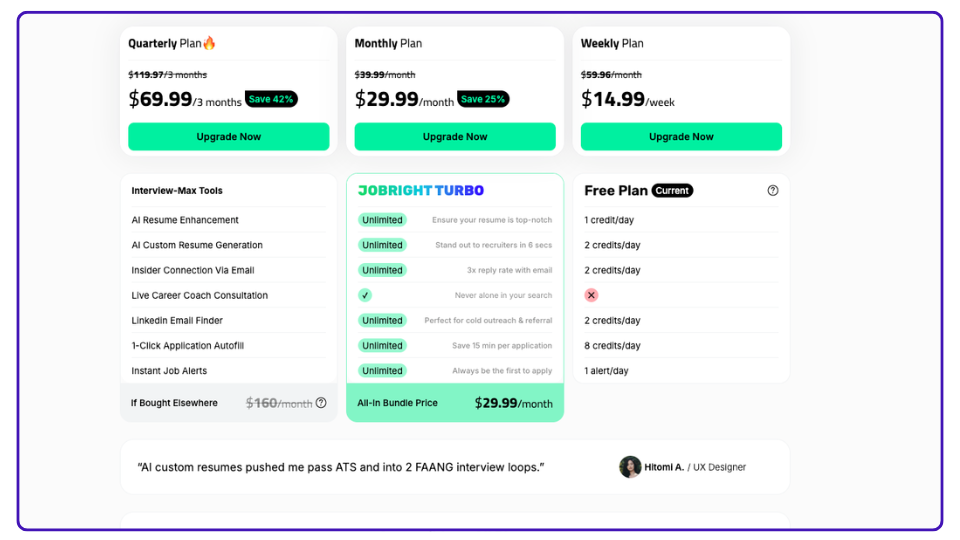
Jobright Turbo - Pricing Plans
All screenshots are from Jobright platform and are used for review and commentary purposes only.

Jobright keeps things simple with two plan types: Free and Turbo.

The free plan gives you limited daily credits to try out features like AI resume tools, insider emails, and job alerts. But most tools are capped – once you hit your daily limit, you’ll have to wait for credits to reset the next day.

If you want unlimited access, you’ll need to upgrade to the Turbo plan, which unlocks everything with no limits. That includes unlimited resume edits, insider referrals, one-click job applications, and more. You can pay weekly ($14.99), monthly ($29.99), or quarterly ($69.99) – same features, just different billing cycles.

How does Jobright.ai work?

Jobright kicks off with a slick onboarding flow that’s fast and focused. You set your preferences, upload a resume, and boom – the platform starts matching jobs to your profile. Here’s what the flow looks like, step by step.

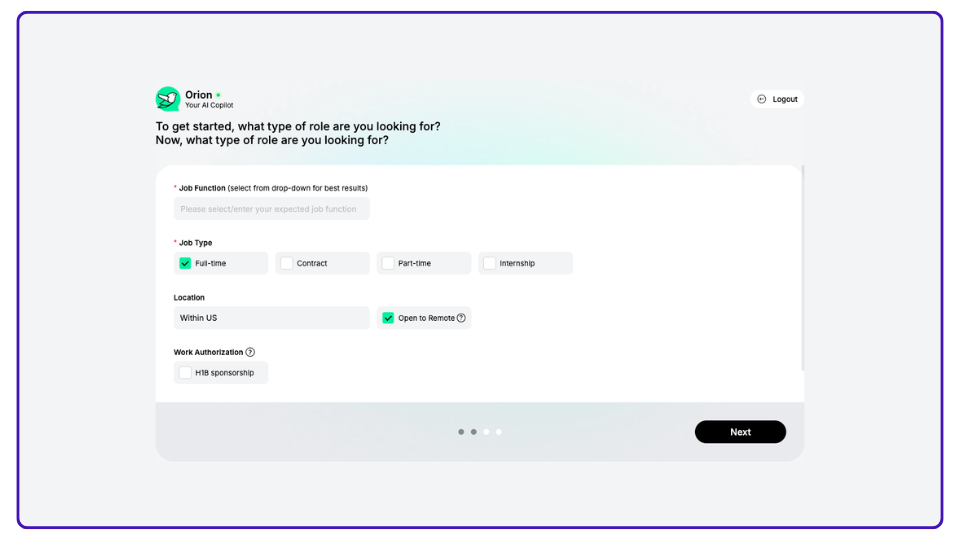
Step 1: Set Your Preferences

You start by telling Jobright what you’re looking for – job function, type (full-time, contract, etc.), and preferred location. There’s even a checkbox for H1B sponsorship if that’s on your radar.

The setup is quick, clean, and pretty intuitive. You don’t need to overthink it — just pick what fits and hit “Next.”

Jobright - Input Your Preferences

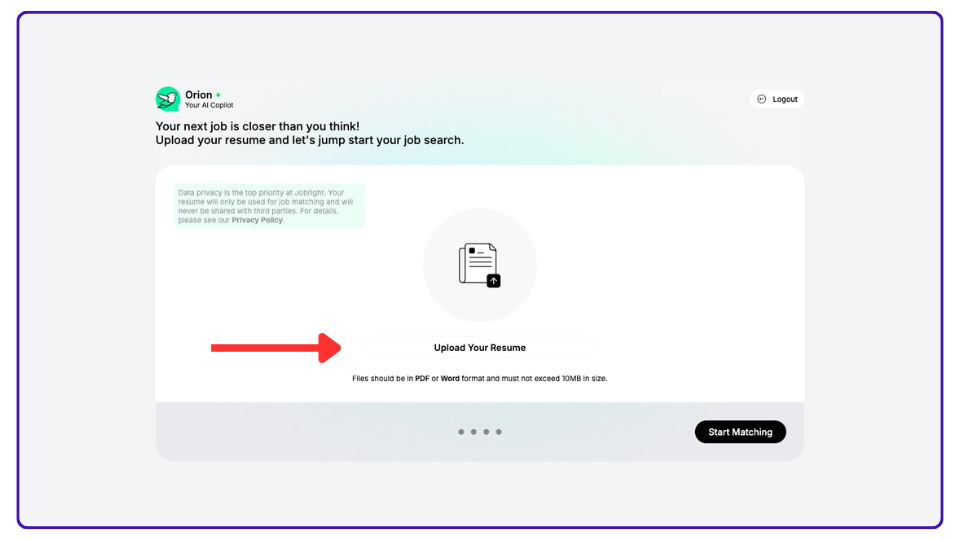
Step 2: Upload Your Resume

This is where the real work begins. Jobright’s entire system runs off your resume, so you’ll need to upload a PDF or Word doc to get moving.

They promise privacy – your file’s just for matching, not shared with third parties. Once it’s uploaded, you’re ready to start matching.

Jobright - Upload Your Resume

Step 3: Let the AI Match You to Jobs

After uploading, the platform analyzes your resume against thousands of job listings. It gives each match a score, so you can instantly see which roles fit you best.

The job feed is organized and filterable – think remote-only, senior-level, hybrid, etc. You also get details like pay ranges and how many others have applied.

Jobright - Matching Resume to Jobs

Step 4: Generate Tailored Resumes (Optional)

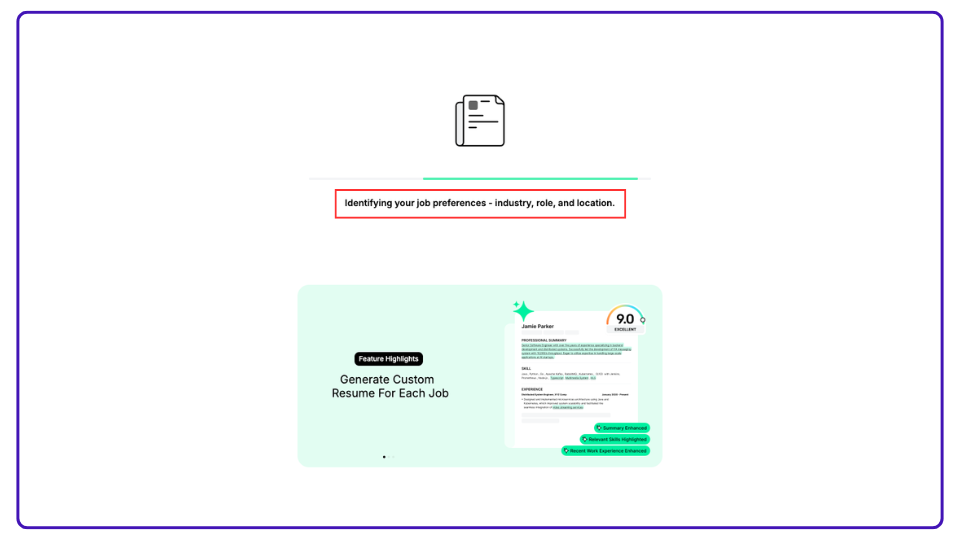
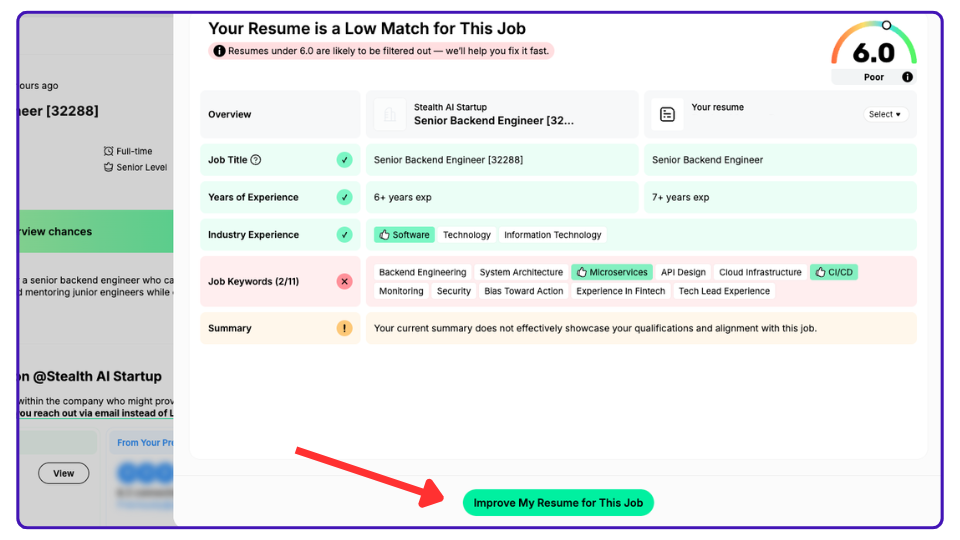
If you want, you can click into a job and generate a custom resume for that specific role. The AI will optimize your resume using keywords from the job description.

It’s designed to make your resume more “scanner-friendly” – especially helpful if you’re applying to a lot of corporate or ATS-heavy companies.

Jobright - Improve Your Resume

💡 Pro Tip: Completing your profile helps Jobright’s match engine work more accurately – and enables its autofill feature for job applications. It’s not required, but skipping it means missing out on what the tool is built to do.

Step 5: Apply Manually (or with Jobright Agent, in the future?)

Once you’ve found a job you like, you can click Apply and the system pulls in your tailored resume. It then opens a new tab with the employer’s application form when you need to manually fill-in the form and upload your tailored resume. What’s useful is that you’re able to easily tailor your resume for each job, but it still requires you to manually fill out job applications yourself, which can be very time-consuming and repetitive.

Jobright recently introduced an automation feature called Jobright Agent. It’s designed to take over the heavy lifting — filling out applications, customizing resumes, and tracking everything for you. In theory, it brings full job search automation to the platform, letting you focus more on interviews than clicking “Apply.” However Jobright Agent is currently in Beta and only available to a select few number of users. Access is being rolled out gradually and most users are placed on a waitlist for now.

We were able to test Jobright’s AI Agent ourselves and noticed its job database is also very limited. It is only able to apply to a very small fraction of available jobs.

If you’re looking for an AI Agent that will automatically fill-out Job Applications and submit them on your behalf, then Jobright is not what you’re looking.

Jobright AI Reviews

What does Reddit say about Jobright?

We took a scroll through Reddit to see what real users are saying about Jobright. The reviews are mixed — some like the free tools, others ran into issues with results, pricing, or support.

Here’s a snapshot of what people are actually experiencing.


Reddit user confirms receiving an interview request after applying with Jobright, sharing a positive outcome.

This user reported getting an interview after applying through Jobright. They shared that they received an interview request just a day after using the platform — a rare but positive result that shows some users are seeing traction.
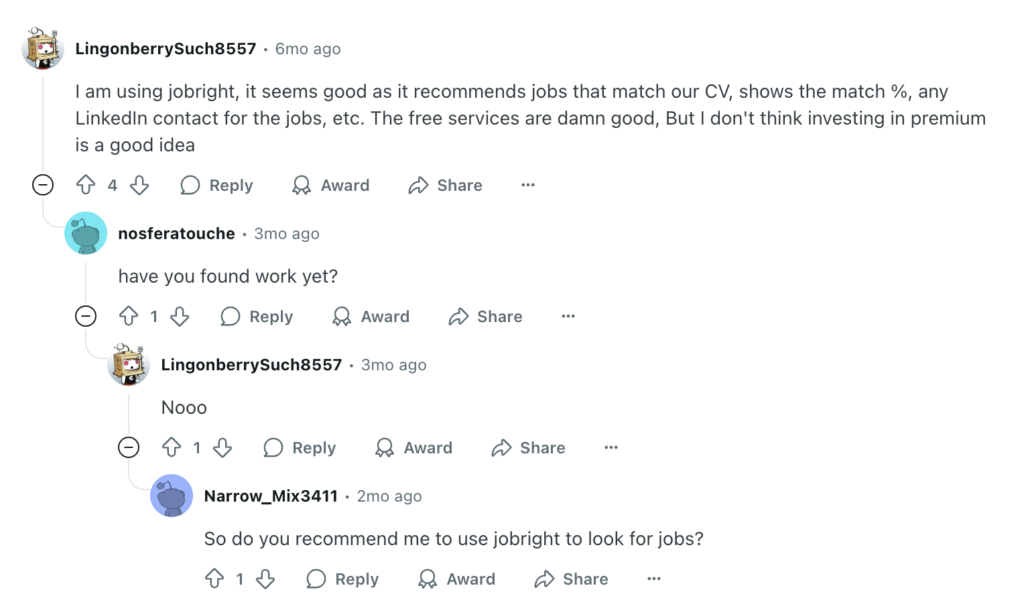

Reddit review of Jobright highlighting useful free features but questioning the value of premium after not getting hired.

This user found Jobright’s free features useful but didn’t get hired. They liked the job matching and LinkedIn contact integration, but didn’t think upgrading to premium was worth it – especially since they hadn’t landed a job through the platform.
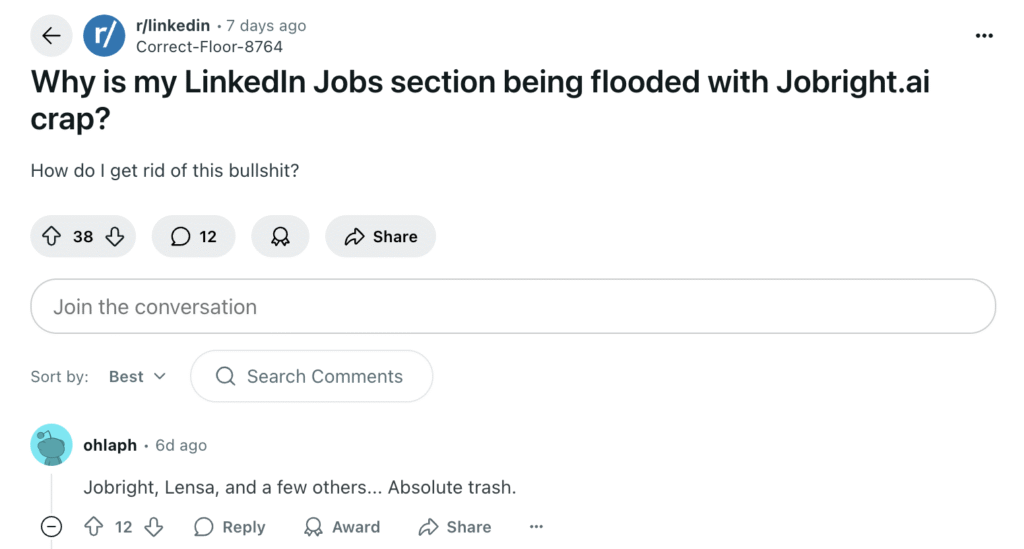

Reddit post criticizing Jobright.ai for flooding LinkedIn Jobs section with low-quality listings.

Some Reddit users are frustrated by Jobright listings cluttering their LinkedIn feeds. One post called it “crap” and grouped Jobright with other platforms they consider low quality. This highlights some growing annoyance around aggressive job syndication tactics.

Digging further, we found that Jobright is syndicating thousands of job listings on LinkedIn Jobs, where roles appear to be posted by Jobright itself. But in reality, these are reposts of employer jobs, likely scraped from major ATS platforms or job boards. When you click “Apply,” you’re redirected to Jobright’s site instead of applying directly on LinkedIn.
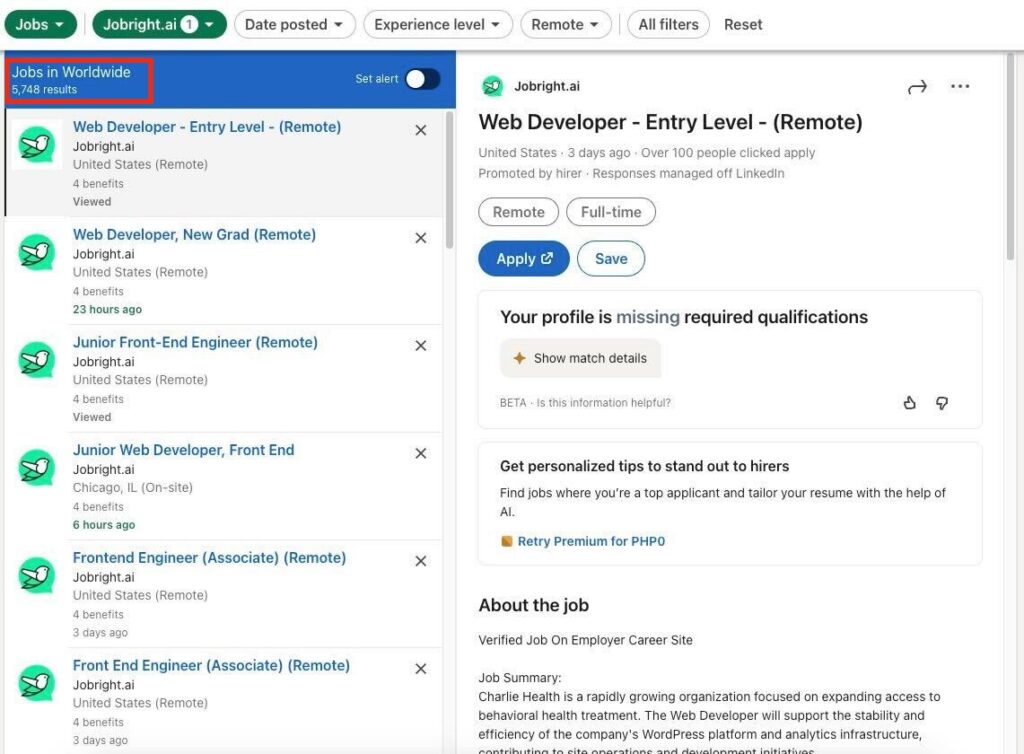

Screenshot showing Jobright.ai listings on LinkedIn Jobs, where employer jobs are reposted and redirect users to Jobright's platform.

This strategy is clever — it likely drives tons of traffic and visibility. But it also appears to be a direct violation of LinkedIn’s Job Posting Policies, which prohibit third-party job boards from reposting listings in this way.
Jobright Pros & Cons

Here’s a quick look at the pros and cons of using Jobright, based on features and real user feedback.

✅ Pros of Jobright

  • AI job matching with skill-based scoring – Users get a match percentage based on resume-to-job relevance, not just job titles.
  • Integrated resume and application tools – The platform includes resume optimization, auto-apply features, and networking tools like “Insider Connections.”
  • Free plan with daily credits – Offers limited daily access to core features like resume editing and job matches without needing to pay upfront.
  • Modern UI and fast onboarding – Clean, digital-native interface that makes setup and navigation easy, even for first-timers.

❌ Cons of Jobright

  • Resume customization may feel shallow – Some users say the resume edits focus more on keyword stuffing than deep personalization.
  • The “Auto-Apply” AI Agent functionality is not yet ready and feels hyped. It is in very early stage, with very limited scope. It’s not a feature that is ready to be used if you are seriously looking to send out job applications
  • Premium plan value questioned by users – Multiple reviews note that upgrading didn’t significantly improve results or outcomes.
  • Job listing syndication tactics raise concerns – Jobright reposts scraped jobs to platforms like LinkedIn, which appears to violate job posting policies.
  • Mixed results on actual job outcomes – While a few users report interviews, others say they applied to hundreds of jobs with no callbacks.

JobCopilot: The Best Jobright Alternative 🏆

JobCopilot - Best Alternative to LoopCV

If you’re looking for a true AI job search agent — one that doesn’t just find jobs but actually applies to them for you — JobCopilot delivers where it counts. It’s not just about automation; it’s about automation that gets smarter over time, with the flexibility to match your preferences and the scale to operate globally.

🧠 Intelligent Auto-Apply That Learns You

JobCopilot’s biggest strength? It learns and adapts. Every time you tweak a generated resume, edit a message, or skip a certain type of job, the system takes note. Over time, it shapes itself to your voice, your tone, and your goals — so even mass applications start to feel personal and human.

It’s not just blasting resumes. It’s building a smarter, more tailored application strategy every day you use it.


🌐 Built for Global Job Seekers

JobCopilot was designed to work anywhere in the world. Whether you’re job hunting in New York, Singapore, Berlin, or remote-only land, its auto-apply features operate seamlessly.

The platform handles different job markets, application formats, and even screening questions — making it a solid pick for international professionals, digital nomads, and anyone outside the U.S.


🔍 Real-Time Verified Job Discovery

Every two hours, JobCopilot scans over 500,000 verified company career pages and 3+ million jobs. That means you’re applying to live listings — not outdated ones, not recruiter reposts, and definitely not sketchy duplicates.

This sourcing method is a big deal for automation. When you’re applying at scale, the quality of listings matters just as much as the quantity.


🛠️ Control When You Want It, Automation When You Don’t

JobCopilot lets you choose: go full autopilot or turn on Review Mode to approve each application before it goes out. This kind of flexibility is rare — especially in AI tools.

Whether you want to apply to 100 jobs a week or 5 very carefully, JobCopilot meets you where you are.


🧾 Handles Forms and Screening Questions, Too

During onboarding, you can fill out common screening questions once, and JobCopilot will reuse those responses as it fills out job applications. That includes tricky stuff like years of experience, desired salary, and eligibility details.

It’s one more way JobCopilot reduces the grind — you’re not just skipping the resume uploads, you’re skipping the repetitive typing too.


🤖 Refined Automation Philosophy

JobCopilot isn’t just a tool — it’s a system that evolves with you. The more you use it, the better it gets. It doesn’t require micromanagement or constant prompts. The goal is simple: make automation smarter by default, and let the user drive only when needed.

That philosophy shows up everywhere — in the match scoring, the personalization engine, and how well the applications reflect you even when you didn’t write them manually.

Automate Your Job Applications with AI 🚀

Try the leading AI Agent for job seekers – autonomous, safe, fully personalized, and trusted by 100,000+ users to land interviews faster.

Check Out JobCopilot →

Frequently Asked Questions about AI Apply

Yes, Jobright is a real platform that offers AI-powered tools to assist with job searching and applications.

Jobright has a free plan with limited daily credits. Additional features and unlimited access are available through a paid upgrade.

Jobright offers AI features such as job matching, resume editing, and automated applications designed to support job seekers.

JobCopilot is a notable alternative on the AI Agent auto-apply front, offering global coverage, personalized learning, and flexible automation for job applications.

Share the Post: