
Job hunting today often means sending out dozens of applications and hearing back from very few. It’s no surprise that tools promising to handle the application for you are getting more attention.
JobAssist is one of the newer ones. It scans job listings, matches them to your profile, and fills out applications for you in one click.
As with most tools in this space, user experiences vary. Some people like how much effort it saves. Others have raised questions about job relevance and how the subscription works.
In this review, I’ll cover JobAssist’s pricing, how it works, what users are saying, and who it’s best suited for.
TL;DR
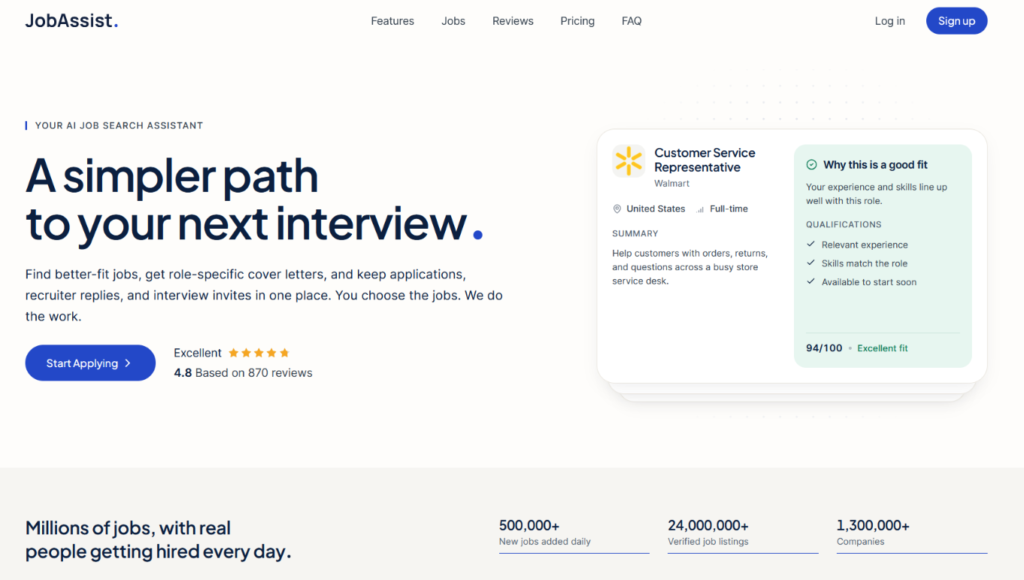
JobAssist is an AI job search tool that matches you with jobs, scores how well each one fits your profile, and fills out applications with a tailored cover letter in one click. It’s simple to use and can save time on repetitive forms, but every application still needs your approval, so it isn’t fully hands-off.
A few users complain about refunds that are hard to get, expired listings, and matches that ignore location or seniority filters. It also has no free plan or free trial.
Who it’s best for:
- Job seekers who want to choose every job themselves but skip the form filling
- People who find writing cover letters the slowest part of applying
- Candidates running broad searches across general roles rather than niche positions
- US-based job seekers, since most of its featured listings are US roles
- People who are organized about managing subscriptions and renewal dates
Key features at a glance:
| Feature | JobAssist |
| Job matching | AI matches based on your title, salary, location, and must-haves |
| Match scores | Each job scored 0 to 100, with a breakdown by role fit, title, and location |
| Auto Apply | One-click applications, each one needs your approval |
| Cover letters | AI-written for every role |
| Resume tailoring | Advertised on the homepage, but the FAQ says your resume isn’t rewritten |
| Job database | Claims 7M+ jobs from 1.3M+ companies; listings aren’t verified, per its terms |
| Application tracking | Dashboard for applications, recruiter replies, and interview invites |
| Pricing | Intro plans from $5.99, then $59.99/month or $149.99 every 3 months |
| Free plan or trial | Not available |
| Refunds | Case by case, not offered routinely |
| Data privacy | Says data is encrypted, never sold, and not used to train AI |
Pros
- Simple setup with no passwords to manage
- One-click applications save time on repetitive forms
- A role-specific cover letter for every application
- Match scores show why each job ranks where it does
- Applications, recruiter replies, and interview invites tracked in one place
- You approve every application before it’s sent
Cons
- No free plan or free trial
- Many users say the renewal caught them off guard
- Refunds may not be guaranteed and are handled case by case
- Users report expired listings and matches that ignore location or seniority filters
- Limited job coverage outside the US, based on user reviews
- Not fully automated, so you still need to review and approve each job
Why You Can Trust This Review
This review is written by a job seeker. I’ve been through the daily grind of searching, applying, waiting, and hearing nothing back. I know what’s worth paying for when money is tight and every week counts.
To keep it fair and useful, here’s what went into it:
- Fact-checked against official sources: Pricing, renewal terms, and feature claims were checked against JobAssist’s live pricing page, FAQ, and Terms & Conditions. Where those pages didn’t line up with each other, I pointed it out.
- Reviewed real user experiences: I went through recent reviews on Trustpilot and Reviews.io, including both positive and negative feedback.
- Evaluated through a job seeker’s lens: Each feature was judged on what actually matters during an active job hunt.
JobAssist: Claims vs. Fine Print
| What JobAssist says | What the fine print says |
| The FAQ promises “7M+ verified jobs” and the homepage mentions “AI-validated matches” | The terms say job postings come from third parties, and JobAssist doesn’t verify whether they’re accurate, current, or authentic |
| The homepage says JobAssist tailors your resume to each posting | The FAQ says your resume is entirely your own and JobAssist never rewrites it |
| Its Trustpilot profile says users can let it “automatically apply” for them | The FAQ says you choose every job and nothing is sent without your approval |
| The homepage lists 7M+ jobs | Its own press releases claim more than 10 million active listings |
| “Most people land a role within weeks” | The terms say JobAssist can’t promise interviews, offers, or any timeline for getting hired |
JobAssist Pricing
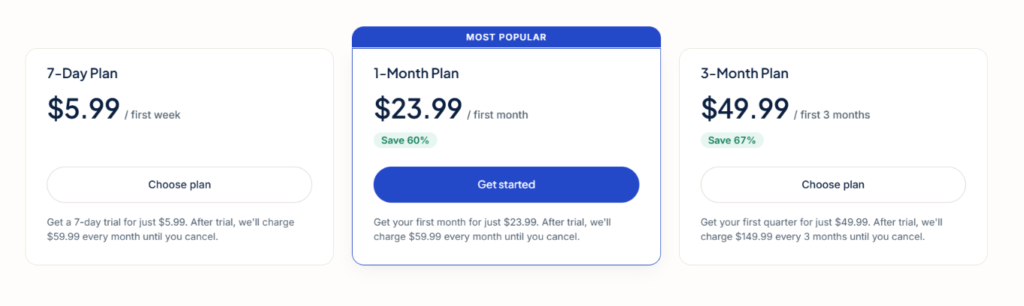
JobAssist doesn’t have a free plan or a free trial. Every plan starts with a discounted intro period, then renews at full price until you cancel.
There are three plans to choose from. Based on the pricing page, they differ in billing length and price, not in the features you get.
| Plan | Intro price | Renews at |
| 7-Day Plan | $5.99 for the first week | $59.99 |
| 1-Month Plan (Most Popular) | $23.99 for the first month | $59.99 |
| 3-Month Plan | $49.99 for the first 3 months | $149.99 |
Key takeaways for your budget:
The price that matters is $59.99 a month (not the intro price) since that’s what you will be charged after that.
Also note that the 7-Day Plan isn’t a weekly plan. After the first week, it renews at $59.99 a month. If you don’t cancel, you’ll pay $65.98 in about five weeks.
In my opinion, the 1-Month Plan is the better way to try JobAssist. At $23.99, it costs about $6 a week, almost the same as the 7-Day Plan, but you get a full month to judge the matches instead of one week.
The 3-Month Plan only makes sense once you’re confident the tool works for you. After the intro period, it comes to about $50 a month, roughly $10 less than paying monthly. Over the first year, that’s about $500 compared with about $684 on the 1-Month Plan. But it also locks in $149.99 every three months, which is a lot to commit to a tool you haven’t tested yourself yet.
Prices may also vary by region.
How JobAssist’s Pricing Compares
| Tool | Starting price | Ongoing price | Free plan | Billing options |
| JobAssist | $5.99 for 7 days | $59.99/month, or $149.99 every 3 months | No | Monthly or quarterly after the intro period |
| Wobo AI | Free plan | $24.99 to $53.99/month | Yes | Monthly or quarterly |
| LazyApply | $99/year | $149 or $999/year for higher tiers | No | Yearly |
| AIApply | About $29/month for the Pro Toolkit | Auto-apply sold separately as a paid add-on | Not listed | Monthly, quarterly, or annual |
Once the intro period ends, JobAssist is one of the pricier options here on a monthly basis. Its $59.99 renewal is higher than Wobo AI’s top plan, and over a full year it comes to about $720, more than LazyApply’s mid-tier yearly plan.
How Does JobAssist Work?
JobAssist is built around job matching. You tell it what you’re looking for, and it shows you a daily feed of roles ranked by how well they fit your profile. From there, you pick which jobs to apply to, and JobAssist handles the application.
Here’s how the process works, based on JobAssist’s website and help pages.
Signing up and onboarding
Signing up takes 21 steps. JobAssist starts by asking about your current employment status, with options like “Unemployed and need a job soon” or “Employed but open to offers.” It then walks you through questions about your job title, salary range, location, and must-haves, and has you upload your resume.
Pretty long setup for a tool you haven’t paid for yet.
Setting your preferences
You start by uploading your resume and telling JobAssist your job title, salary range, location, and any must-haves. JobAssist uses this to build your profile. You sign in with a one-time link sent to your email, so there’s no password to manage.
Daily job matches
JobAssist says it scans more than 7 million jobs from over 1.3 million companies every day. It compares each job’s requirements with your role, experience, skills, and preferences, then shows the best-fit roles first.
Each job gets a match score from 0 to 100. The score is broken down into parts like role fit, title, and location, so you can see why a job ranks where it does. JobAssist says the score updates as you refine your profile.
You can also react to each match with Like, Skip, or Dislike. JobAssist presents this as a way to refine your matches over time.
Auto Apply
Despite the name, Auto Apply isn’t fully hands-off. According to JobAssist’s FAQ, it’s a one-click action. You find a job you like, click Auto Apply, and JobAssist fills out the form, attaches a cover letter written for that role, and submits it. Nothing is sent without your approval, so you still choose every job yourself.
This is worth knowing before you sign up. If you’re expecting a tool that applies to jobs while you’re away, JobAssist works differently. It speeds up each application, but you still need to review your feed and approve each one.
Tailored cover letters
For each application, JobAssist writes a cover letter based on the job posting and your resume. It says the letters are written to match your voice and highlight the skills that fit the role. These features run on third-party AI, and JobAssist says your data isn’t used to train AI models.
Tracking applications and replies
JobAssist keeps your applications, recruiter replies, and interview invites in one dashboard. The homepage shows counts for jobs applied, viewed, and interviews, along with an inbox-style view of employer messages.
What the fine print adds
A few details on JobAssist’s own pages don’t fully line up, and they’re worth knowing before you pay.
- Verified jobs vs. unverified listings: The FAQ describes the job database as “7M+ verified jobs,” and the homepage mentions “AI-validated matches.” But JobAssist’s Terms & Conditions say job postings come from third parties and that it doesn’t verify whether they’re accurate, current, or authentic. The terms make researching each employer your responsibility.
- Resume tailoring: The homepage says JobAssist tailors your resume to each posting. The FAQ says your resume is entirely your own and that JobAssist never rewrites it. It isn’t clear which one applies, or whether “tailoring” means small edits rather than a rewrite.
- Review AI content before sending: The terms note that AI-generated content may be inaccurate or incomplete, and that checking it before it goes to an employer is your job. Since every application needs your approval anyway, it’s worth reading each cover letter before you click submit.
What Are Customers Saying About JobAssist?
JobAssist is a new product, so there isn’t a huge pool of reviews yet. Here’s where it stands on the two main review sites as of November 2026.
| Platform | Rating | Number of reviews |
| Trustpilot | 2.7/5 ⭐️ | 59 |
| Reviews.io | 4.8/5 ⭐️ | 870 |
What Users Like
It saves time and effort
The most common praise is that JobAssist makes applying easier. One US reviewer said it “does everything for you,” and another described applying to different employers as seamless. On Reviews.io, several users said it kept their search moving with little effort, even if results came slowly.

Some users get relevant matches
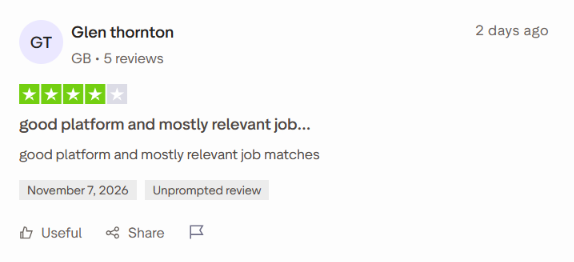
A few reviewers say their matches lined up with what they wanted. One UK user said the system only showed jobs that fit their skills, and another called the matches mostly relevant. Both were early in their search, so it’s too soon to say whether those matches led to interviews.
What Users Are Frustrated About
Trials that renew into full plans
This is the most common complaint by far. Many reviewers say they signed up for the 7-day trial and were then charged for a full monthly plan without expecting it. One Australian user reported paying AUD 4.99 for the trial, followed by a renewal of AUD 59.99. Similar stories come from users in Turkey, Kenya, South Africa, the UK, and the US.
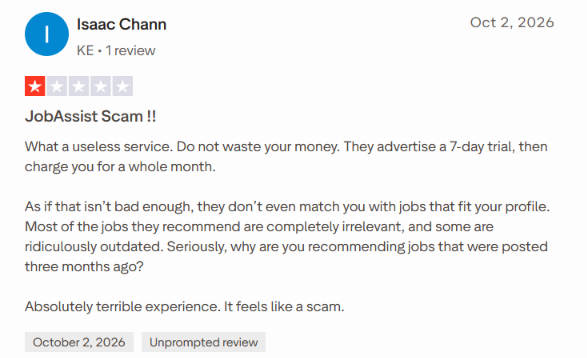
Refunds may be hard to get
Several reviewers say JobAssist refused their refund request, even when they asked on the day of the charge. This lines up with JobAssist’s terms, which say refunds aren’t offered as a routine matter and are reviewed case by case. Some users do get refunds, but it isn’t guaranteed.
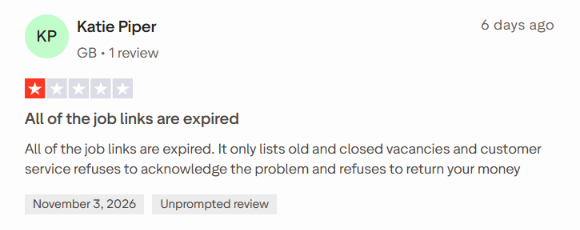
Expired and outdated listings
A recurring complaint is that many of the jobs are no longer open. One UK reviewer said all the job links they clicked were expired. Another user questioned why they were being shown jobs posted three months earlier.
Matches that ignore your filters
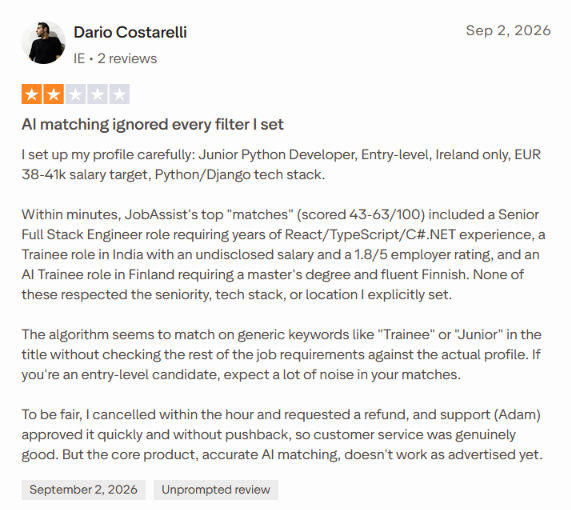
Some users say their matches don’t respect the settings they chose. The most detailed example comes from a user in Ireland who set up a profile for entry-level Python roles in Ireland only. Their top matches included a senior engineering role, a trainee job in India, and a role in Finland that required fluent Finnish. They concluded the matching seemed to rely on keywords like “Junior” or “Trainee” in job titles.
Other reviewers mention being shown jobs in countries they don’t live in, or local jobs when they asked for remote work.
Limited coverage in some regions and industries
An Australian user said JobAssist advertises in Australia but had no Australian jobs on the platform. JobAssist replied that it’s working on adding more. Another user looking for pharmaceutical roles said they couldn’t find a single one.
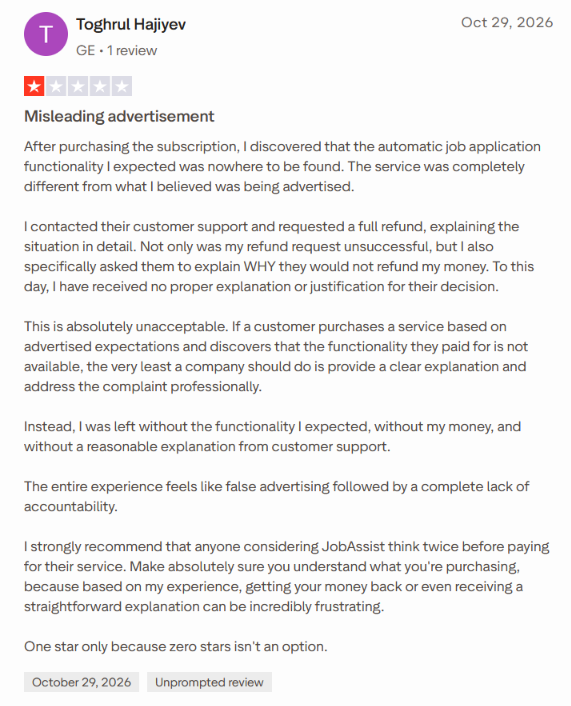
Confusion about what “Auto Apply” does
Some users expected JobAssist to apply to jobs on its own. One reviewer said the automatic application feature they expected wasn’t there after they paid. As explained in the “How It Works” section, Auto Apply is a one-click action that still needs your approval for each job.
JobAssist’s own Trustpilot description says it can “automatically apply” for you, which may be part of where the confusion comes from.
When to Use JobAssist and When to Switch
So, is JobAssist worth paying for in 2026? It can be, but only for a specific kind of job seeker.
If you’re in the US, running a broad search, and mainly want help with forms and cover letters, JobAssist can save you real time. The one-click applications and role-specific cover letters take a lot of the busywork out of applying.
Choose JobAssist if:
- You want to pick every job yourself: JobAssist doesn’t apply in the background. You go through your matches, choose a job, and click Auto Apply. If you like having the final say on each application but hate filling out forms, this setup works.
- Cover letters slow you down: JobAssist writes a role-specific cover letter for every application, so you’re not starting from a blank page each time.
- You’re running a broad search: Most of the positive feedback comes from people applying across general roles or exploring a career change. One Reviews.io user said it works best for broad searches rather than very specific roles.
- You’re job hunting in the US: The job examples on JobAssist’s homepage are almost all US roles, and most complaints about missing jobs come from users in other countries.
- You’re comfortable managing a subscription: Set a reminder before your renewal date, cancel a day or two early if you’re not staying, and the billing won’t catch you off guard.
But clicking apply faster only helps if the jobs are worth applying to.
If your matches include expired listings, roles in the wrong country, or jobs that ignore your seniority settings, you still have to sort through them yourself. That’s the part of the job search that actually wears people down.
And how you apply matters. Hiring teams are already buried in applications, and sending more of them to roles that don’t fit just adds to the pile.
So what if you need a tool that focuses on finding the right jobs first, and then applies to them?
JobCopilot: The Best JobAssist Alternative
If JobAssist helps you apply faster, JobCopilot helps you apply to the right jobs.
It’s an AI job search copilot that finds relevant jobs, tailors your application, and applies on your behalf. You stay in control of where it applies and what it sends.
Here’s what makes it a strong alternative to JobAssist.
- Relevant jobs, not random ones: You decide how selective your copilot should be, from broad searches to very targeted matches. It only goes after roles that fit what you’ve defined, so you’re not flooding employers with applications that miss the mark.
- Verified jobs from real companies: JobCopilot pulls jobs directly from official company career pages.
- Fresh listings, found early: Your copilot checks for new roles every 2 hours, so you see jobs while they’re still open and can be among the first to apply.
- Worldwide coverage: JobCopilot searches roles from 500,000+ companies in any country, which is a big deal if you’re job hunting outside the US or looking for remote work.
- It learns from you: Every edit you make to an application answer teaches your copilot your preferences. Every job you apply to or discard helps it understand what you’re actually looking for, so matches get better over time.
- Support after you apply: A built-in tracker logs every application in one place. The networking assistant suggests who to connect with on LinkedIn to follow up, with ready-to-use message templates. And the interview roleplay assistant lets you practice mock interviews by chat or audio with instant feedback.
Considering all this, JobCopilot can be the best JobAssist alternative if you:
- Are tired of sorting through expired or mismatched listings.
- Are job hunting outside the US, or in a niche field.
- Want detailed filters and control over how strict your matches are.
- Want to review and approve applications before they go out.
- Don’t mind spending some time upfront setting filters and checking your copilot’s work early on.
Automate Your Job Applications with AI 🚀
Try the leading AI Copilot for job seekers – autonomous, safe, fully personalized, and trusted by 100,000+ users to land interviews faster.
Check Out JobCopilot →FAQs
Is JobAssist legit?
JobAssist is a real, working product based in the United States. You can sign up, get job matches, and send applications through it.
Will employers know my application was made with AI?
JobAssist says no. According to its FAQ, employers see a normal application, and nothing flags it as automated. That said, its terms point out that AI-written content can contain mistakes, so read each cover letter before you approve it.
Does JobAssist charge in my local currency?
In some regions, yes. Where local currency isn’t available, JobAssist charges in US dollars. Any conversion fees come from your bank or card issuer, so your final charge may be slightly higher than the listed price.