
Jobgether has built a surprisingly healthy social media presence for a platform that’s barely covered in independent reviews. Most of what exists online is content clearly written without ever logging in. That gap is exactly what this review is here to fill.
I went through the full onboarding, tested the free tier hands-on, dug into their features, and cross-referenced their claims against real user feedback on Trustpilot.
In this review, I’ll walk you through how Jobgether actually works, what it gets right, where it falls short, and whether it’s worth your money (or your time).
TL;DR
Jobgether is a remote-focused job platform that leans more toward career positioning than fast, high-volume applying. The standout features here are the AI CV review and career diagnosis tool.
That said, the platform has real limitations. Auto-apply is Premium-only and capped at 10 applications per day, which is low compared to competitors. Match scores can be inconsistent, job matches sometimes skew toward the wrong seniority level entirely, and some apply links lead nowhere.
Para quem é recomendado:
- Remote-only job seekers who want AI-guided matching alongside their search
- Professionals who want specific, actionable feedback on their CV before they start applying
- People who are early in their search and want to understand how competitive their profile actually is in the current market
- Job seekers who are highly selective and don’t need more than 10 auto-applications a day
Principais caraterísticas num relance:
| Caraterística | Jobgether |
| Job database | Remote-focused listings |
| Aplicação automática | Premium only; capped at 10 applications/day |
| Correspondência de empregos | AI match score with skill gap context for each listing |
| CV review | AI-powered, side-by-side current vs. recommended version, with reasoning |
| Career Diagnosis | Skills vs. market benchmark; radar chart plus competitive “Market Reality” data |
| Company Matches | Tier-ranked company suggestions based on profile (Premium) |
| Profile Certification | Short video interview, manually reviewed; badge visible to recruiters |
| Free tier | 5 matches/week, manual apply only, no recruiter access |
| Preços Premium | Single tier; $29/month, $65/quarter, or $149/year |
| Refund policy | 14-day money-back guarantee |
Prós
- Strong, specific AI CV review
- Career Diagnosis tool maps your skills against real market demand for your target role
- Free tier is functional, not just a teaser
- 14-day money-back guarantee on Premium
- Profile certification adds a human-reviewed credibility signal recruiters can trust
Contras
- Auto-apply capped at 10/day on Premium
- Free tier is limited to 5 matches a week, which caps out fast if you’re actively searching
- Match scores can be inconsistent
- Job matches sometimes skew toward the wrong seniority level relative to the uploaded CV
- Some apply links redirect to generic, non-functional pages
- Remote-only focus — not built for on-site or hybrid job searches
Automatize as suas candidaturas a emprego com IA 🚀
Experimente o Copiloto de IA líder para quem procura emprego - autónomo, seguro, totalmente personalizado, e com a confiança de mais de 100.000 utilizadores para conseguir entrevistas mais rapidamente.
Verificar o JobCopilot →Porque é que pode confiar nesta análise
Most reviews of job search tools are written by people who’ve never actually used them — or worse, by affiliates with a financial reason to recommend one platform over another.
I work in the job search space professionally, which means I’ve spent a significant amount of time researching these tools, understanding how they work under the hood, and comparing them against each other.
To keep this review grounded and fair, here’s what went into it:
- pricing, feature claims, and plan details were verified directly against Jobgether’s live documentation and product pages.
- Real user feedback was pulled from Trustpilot and analyzed for patterns rather than cherry-picked.
- And every feature was evaluated on what actually matters to someone in an active job search
Jobgether Pricing
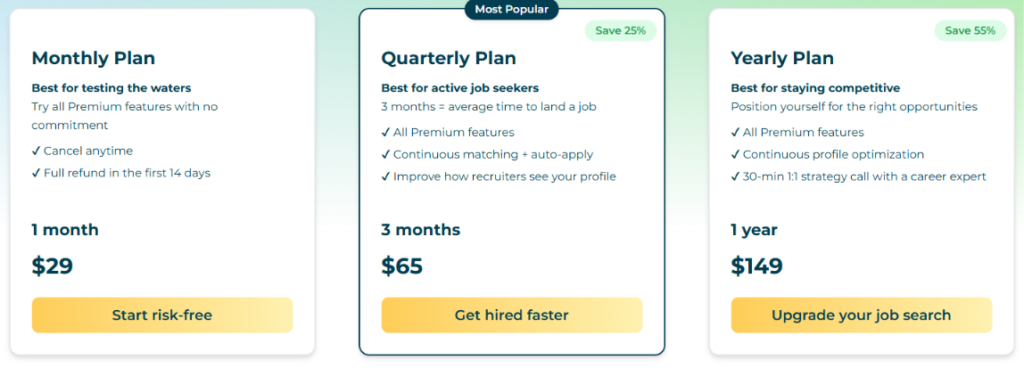
Unlike most tools in this space, Jobgether doesn’t split its paid offering into multiple feature tiers (Plus, Pro, Elite, etc.). There’s just one Premium plan. The difference between options is purely how long you commit to it, with longer commitments costing less per month.
| Plano | Price | Per Month |
| Mensal | $29 | $29/mo |
| Trimestral | $65 | ~$21.67/mo |
| Anual | $149 | ~$12.42/mo |
All three plans unlock the same Premium feature set:
- Continuous AI matching
- Auto-apply (up to 10 per day)
- CV and profile optimization
- Recruiter visibility.
The quarterly plan adds messaging around “improving how recruiters see your profile,” and the yearly plan throws in a 30-minute strategy call with a career expert. But functionally, you’re not unlocking new capabilities by paying more, just paying less per month for the same access.
Every plan comes with a 14-day money-back guarantee.
There’s also a free plan available with 5 matches per week, manual applications and no recruiter access.
Principais conclusões para o seu orçamento:
The single-tier structure is actually one of the simpler aspects of Jobgether. You’re not stuck guessing whether you need “Pro” or “Elite” to unlock the feature you actually want. Everything’s included from day one.
The catch is on the usage side, not the pricing side. Premium auto-apply is capped at 10 applications per day. That’s noticeably lower than competitors in this space, some of which allow 40–50 auto-applications daily. If you want to apply for 10+ jobs daily, Jobgether’s ceiling will start to feel restrictive fast, regardless of which billing plan you’re on.
So the real budgeting question isn’t “which plan” but “is 10 applications a day enough for how I’m searching.” If you’re being highly selective and only want the AI applying to a short list of well-matched roles, the cap won’t bother you.
How Does Jobgether Work?
The onboarding takes about one to two minutes. You can log in with an email, LinkedIn, or Google account.
Uploading Your CV
First of all, it asks you to upload your CV in PDF format (max 10MB). You also select your years of experience, which Jobgether uses to calibrate how it reads your background. The platform parses your CV automatically once uploaded.
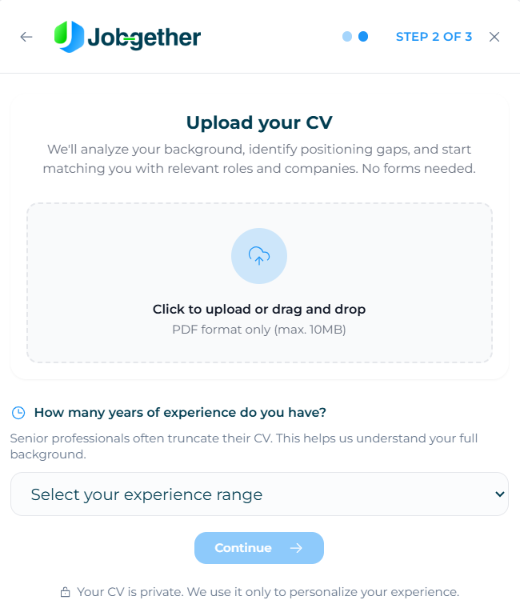
After upload, there’s a brief loading screen while Jobgether extracts skills, experience, and career trajectory from your resume.
Seting Your Job Preferences
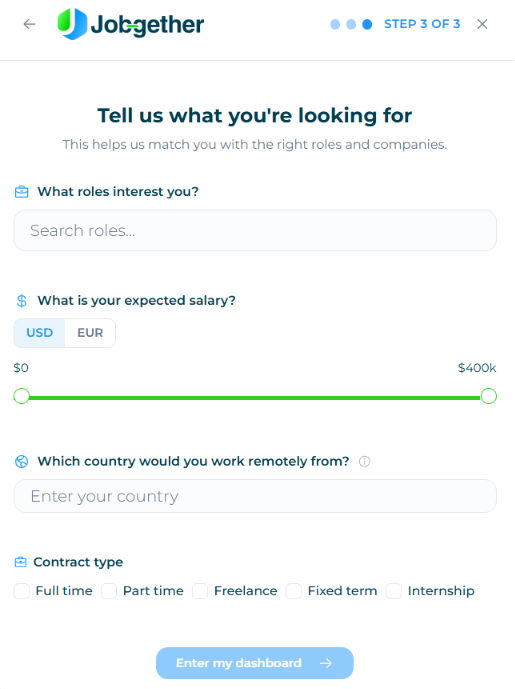
Next, the platform asks what roles interest you, your expected salary range (USD or EUR), the country you’d work remotely from, and contract type preferences (full time, part time, freelance, fixed term, internship).
Your Dashboard and Job Matches
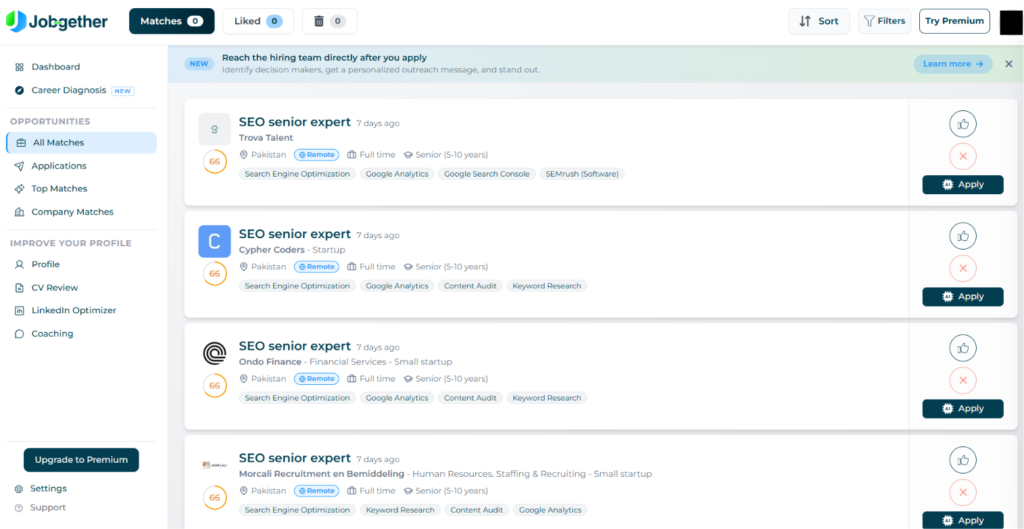
Once onboarding is complete, you land on a dashboard that shows your job matches, each with:
- AI match score (shown as a percentage)
- Skills tags
- Seniority level
- Location.
The matches I saw were predominantly for senior roles, despite uploading a CV targeting more junior or entry-level work. More on that in the cons section.
Two Ways to Apply
Once your profile and preferences are set, Jobgether gives you two ways to actually apply to the jobs it surfaces: manual or auto-apply.
On the free plan, you’re limited to manual applications. You review each match yourself and click apply when you want to. Auto-apply is locked behind Premium, which starts at $29/month. (This is capped at 10 applications per day on Premium).
There’s also a timing advantage built into the paid tier: Premium members see new job postings within the first 48 hours of them going live. Free members see the same listings, but only after that 48-hour window closes.
What Are Customers Saying About Jobgether?
Jobgether holds a 4.3/5 rating on Trustpilot across 458 reviews. Beyond the headline number, what’s more useful is looking at what users are actually saying, both the praise and the recurring complaints. Here’s what stood out to other users and me:
O que os utilizadores apreciam
Career Diagnosis Tool
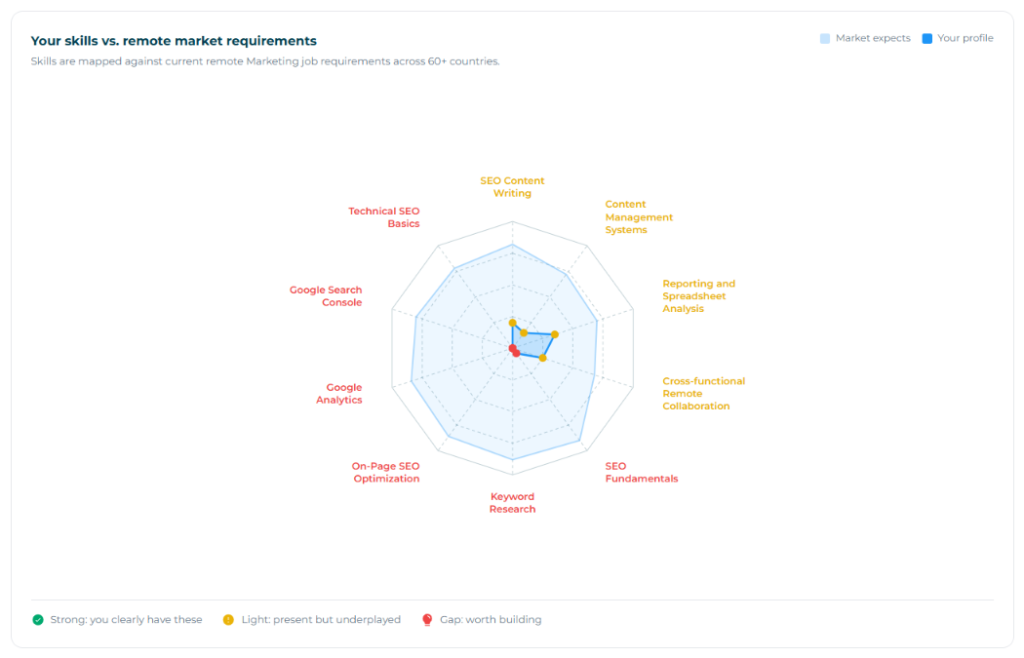
This is one of Jobgether’s more distinctive features. After uploading your CV, it runs a skills-vs-market analysis, mapping what you have against what remote employers in your target field are actually asking for. The output is a radar chart that shows where you’re strong, where skills are present but underemphasized, and where genuine gaps exist.
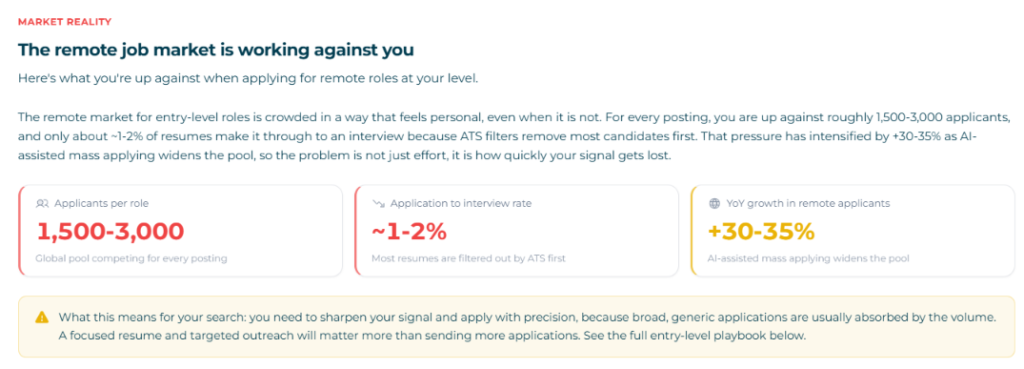
It also surfaces a ‘Market Reality’ panel showing how competitive the specific entry point you’re targeting actually is, including applicant-per-role ratios and how AI-assisted mass applying has shifted the competitive landscape.
Company Matches
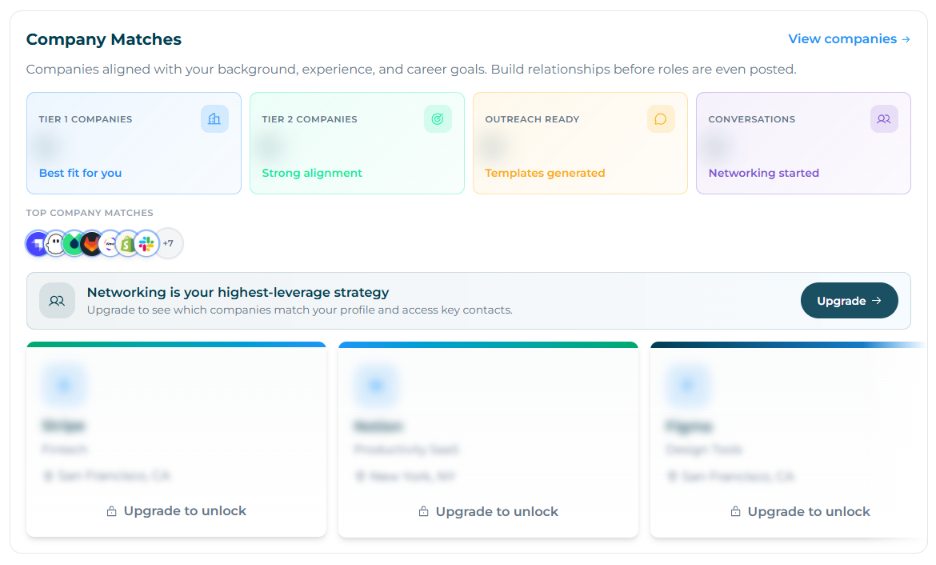
Based on your background and career profile, Jobgether suggests companies that are a strong fit, tiered by alignment level. The idea is to help you build relationships with companies before roles are even posted, not just apply reactively.
Company-level details and contact recommendations are Premium-only.
Profile Certification
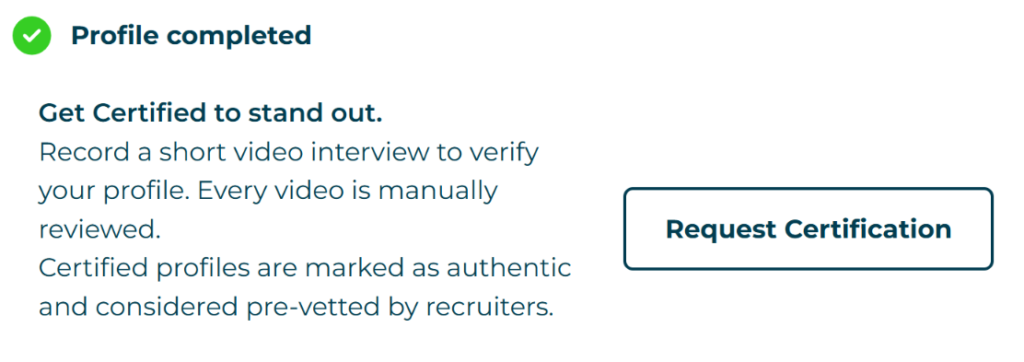
Once your profile is complete, Jobgether offers a certification option: record a short video interview, which gets manually reviewed by their team. Certified profiles display a badge that signals to recruiters that you’re authenticated and pre-vetted.
CV Review
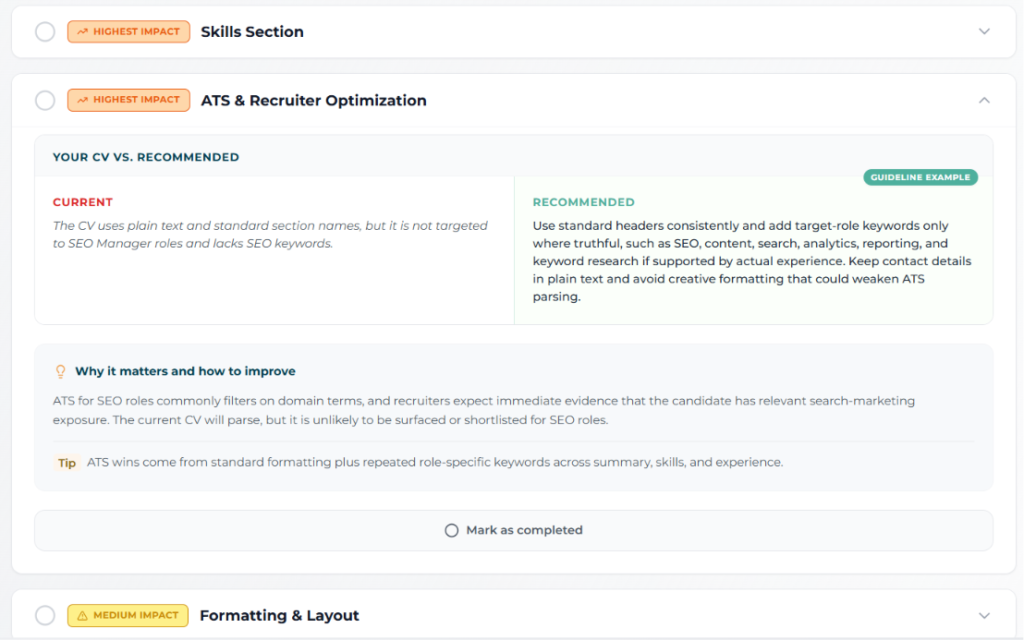
This is probably the feature users praise most, and with good reason. The AI CV review is unusually specific. It doesn’t just say ‘add more keywords.’ It shows your current CV section against a recommended version side by side, explains why the change matters, and tells you what impact it’s likely to have on your match rate.
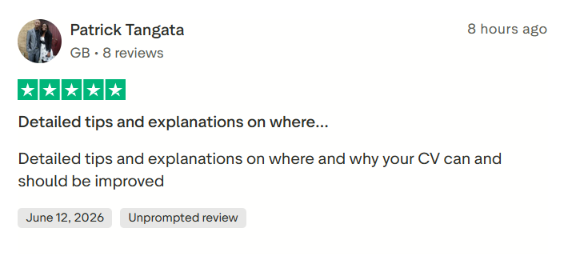
One Trustpilot reviewer put it well:
What Users Are Frustrated About:
Broken Apply Links
During my own testing, clicking ‘Apply’ on jobs in the free dashboard kept redirecting me to the same generic page.
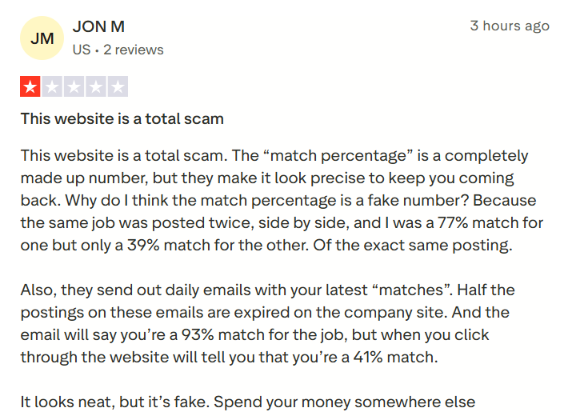
It looked like a dead end rather than an actual job application. This wasn’t an isolated experience. Multiple Trustpilot reviewers flag expired listings being surfaced, and one reviewer described seeing a job in their email showing a 93% match, then clicking through to the platform and seeing it listed as a 41% match.
Questionable Match Score Consistency
The match percentages look authoritative, but don’t always hold up. One Trustpilot reviewer noted that the exact same job posting, listed twice side by side, showed a 77% match for one and a 39% match for the other. It suggests the scoring algorithm may have meaningful reliability issues.
Irrelevant Job Matches
I uploaded a CV targeting intern-level roles. The matches I got were consistently for senior positions (5–10 years of experience). This is a fundamental mismatch because it makes auto-apply dangerous, not helpful, because you’d be submitting applications to jobs you’re not qualified for.
Concerns About Review Authenticity
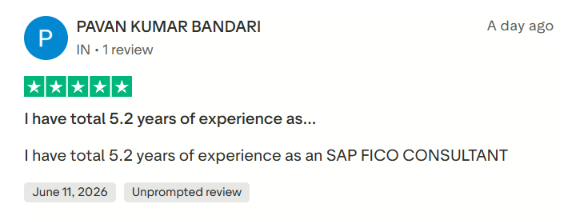
Several recent Trustpilot reviews read as unusual. The pattern (generic professional backgrounds, one-time reviewers, unprompted 5-star ratings posted within hours of each other) raises questions that are worth noting even if they can’t be confirmed. I’d weigh recent critical reviews more heavily than the aggregate score when forming an opinion.
Here’s an example below:
Bugs That Cost You Free Credits
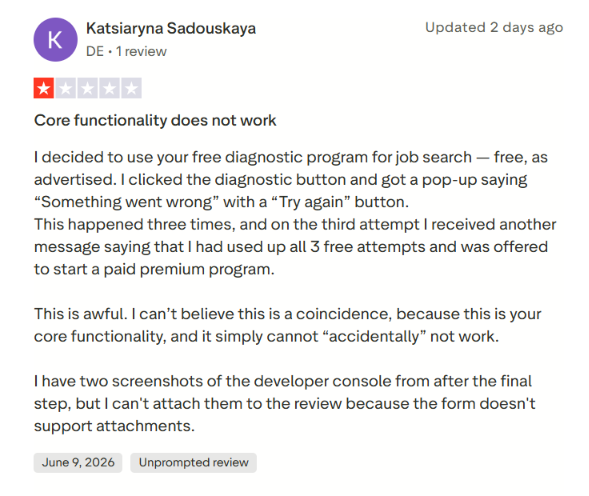
Users attempting to use the free Career Diagnosis tool may hit repeated ‘Something went wrong’ errors, and after the third failed attempt, were told they’d exhausted their three free tries, and prompted to upgrade.
When to Use Jobgether and When to Switch
Jobgether leans into remote-first career positioning, such as CV review, skills gap analysis, and recruiter visibility, designed to make you a stronger candidate before you apply.
Choose Jobgether if:
- You’re exclusively targeting remote roles and want AI-assisted matching with market context
- You want a CV review that goes beyond generic advice before you start applying
- You’re early in your search and want to understand how competitive your profile actually is
- The current cap on auto-applications fits how selectively you’re already searching
But if you need higher application volume, more predictable matching, or support for non-remote roles, Jobgether starts to feel underpowered.
JobCopilot: The Best Jobgether Alternative
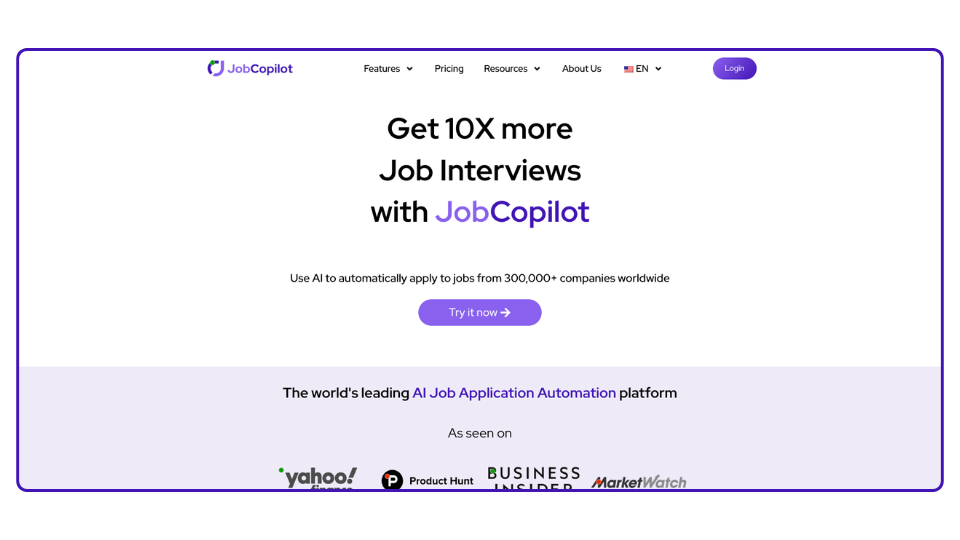
JobCopilot is an AI-driven job search platform that automates the application process from end to end. You upload your CV, set your preferences, and your copilot finds relevant openings and applies on your behalf, while continuously learning from your edits and decisions to get more accurate over time.
Here’s the main difference in philosophy:
- Jobgether focuses mainly on remote-first career positioning — helping you become a stronger candidate through CV review and market diagnosis.
- JobCopilot focuses on finding genuinely relevant matches worldwide and giving you full control over how each application goes out.
Smarter, Worldwide Job Discovery
One of the biggest differences is how jobs are discovered. Jobgether’s database leans remote-only. JobCopilot scans over 500,000 company career pages worldwide, across any country and industry, no matter how niche the role.
The system continuously monitors official company career pages and surfaces new roles automatically, rather than relying on a narrower, remote-focused job pool.
Mais controlo sobre a automatização
Jobgether’s auto-apply is capped and fairly rigid: it’s on, or it’s off, within that daily limit. JobCopilot lets users choose exactly how much automation they want.
Pode:
- Let the platform auto-apply to suitable jobs.
- Review and approve applications manually before they go out.
- Set detailed filters — timezone, seniority, job description keywords, and more, to control exactly how selective the AI is.
This gives users real control over their job search, rather than working within a single fixed cap regardless of how their search actually needs to flex.
Um conjunto de ferramentas de procura de emprego mais completo
Overall, JobCopilot acts as a full AI job search assistant, not just a remote-job matching tool. The platform includes:
- Worldwide automated job discovery
- Automatização da candidatura a emprego com IA with full review control
- CV builder and resume tailoring
- Geração de cartas de apresentação
- AI interview practice and roleplay
- Networking assistant with LinkedIn outreach templates
- Career insights, salary benchmarks, and market intelligence reports
Automatize as suas candidaturas a emprego com IA 🚀
Experimente o Copiloto de IA líder para quem procura emprego - autónomo, seguro, totalmente personalizado, e com a confiança de mais de 100.000 utilizadores para conseguir entrevistas mais rapidamente.
Verificar o JobCopilot →FAQs
Is Jobgether free to use?
Yes. You can sign up, upload your CV, get a CV review, and receive up to 5 job matches per week at no cost. Auto-apply, recruiter introductions, and unlimited matches require a Premium subscription.
Is Jobgether good for non-remote or hybrid jobs?
Not really. Jobgether is built around remote-first job matching. If you’re targeting on-site or hybrid roles, the platform’s job database and matching logic aren’t designed for that use case.
Does Jobgether work for all experience levels?
In theory, yes. But in practice, the AI matching can struggle to calibrate correctly for entry-level or intern profiles. My own experience showed senior-level roles being surfaced against an intern-targeted CV. If you’re early-career, keep a close eye on what the algorithm is actually sending you before enabling auto-apply.