
Quand j'ai commencé à me renseigner sur FastApply, cela m'a semblé prometteur en raison de ses fonctionnalités d'application automatique et de création de CV. J'ai donc suivi le processus d'intégration moi-même, testé la fonctionnalité d'application automatique, examiné la tarification et recherché ce que disaient les vrais utilisateurs indépendants.
L'image est plus contrastée que ce que le marketing suggère. Il y a de véritables atouts ici, mais aussi des points de friction qui ne sont mentionnés nulle part.
Voici tout ce que j'ai trouvé.
TL;DR
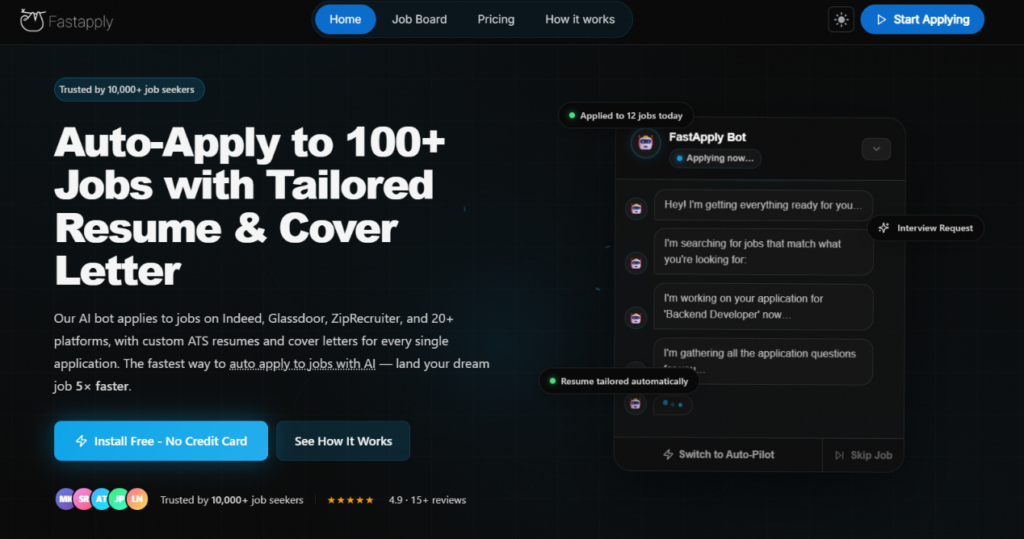
FastApply est une plateforme de candidature d'emploi basée sur l'IA qui automatise les candidatures sur plus de 20 plateformes, avec des CV et des lettres de motivation personnalisés par l'IA pour chaque soumission. Le prix d'entrée est bas, et l'essai gratuit (5 candidatures, pas de carte bancaire requise) est un moyen vraiment peu risqué de le tester.
Mais le modèle basé sur le crédit peut devenir coûteux plus rapidement que prévu, l'automatisation LinkedIn a été retirée pour des raisons de conformité, et l'expérience d'application automatique ressemble davantage à un remplissage automatique intelligent qu'à une véritable automatisation sans intervention.
Automatisez vos demandes d'emploi grâce à l'IA 🚀
Essayez le Copilote IA leader pour les demandeurs d'emploi - autonome, sûr, entièrement personnalisé, et qui a bénéficié de la confiance de plus de 100 000 utilisateurs pour décrocher des entretiens plus rapidement.
Check Out JobCopilot →À qui il est destiné :
- Les demandeurs d'emploi qui souhaitent postuler sur plusieurs plateformes sans avoir à remplir manuellement les mêmes formulaires à plusieurs reprises.
- Les personnes postulant à un large éventail de postes sur de multiples tableaux d'offres d'emploi simultanément.
- Candidats à l'emploi à l'aise avec la gestion d'un système basé sur le crédit et le suivi de son utilisation.
Les principales caractéristiques en un coup d'œil :
| Fonctionnalité | Application rapide |
| Application automatique | Oui — plus de 20 plateformes dont Indeed, Glassdoor, ZipRecruiter, Dice, Greenhouse, Lever, Workday, et plus encore |
| Adaptation du CV | IA personnalisée par application (plans Pro et Élite) |
| Lettre de motivation | IA générée par poste (plans Pro & Élite) |
| Volume d'application | 200/mois (Starter), 500/mois (Pro), 1 000/mois (Elite) |
| Mode copilote | Oui — passer en revue et approuver avant chaque soumission |
| Mode pilote automatique | Oui — soumission entièrement autonome |
| Suivi des emplois | Tableau de bord intégré de style kanban |
| Créateur de CV | Oui — téléchargez le CV + collez la description du poste pour générer une version personnalisée |
| Profils d'emploi multiples | Oui — créez et gérez des profils distincts pour différents rôles |
| Essai gratuit | 5 applications gratuites, aucune carte de crédit requise |
| Programme de parrainage | Gagnez 50 crédits par parrainage réussi |
Pour
- 5 applications gratuites sans carte de crédit requise
- Couverture de
- Plusieurs profils d'emploi vous permettent d'exécuter différentes recherches en parallèle avec différents CV.
- Le programme de parrainage vous permet de gagner des crédits en invitant d'autres personnes
Cons
- L'automatisation LinkedIn a été temporairement supprimée pour conformité aux conditions d'utilisation.
- L'expérience d'application automatique s'apparente davantage à un remplissage automatique basé sur le navigateur en mode automatique qu'à une véritable automatisation en arrière-plan.
- Le téléchargement du CV lors des candidatures peut échouer.
- L'IA peut parfois halluciner et remplir des champs que vous n'avez pas spécifiés.
- Le service client a reçu des plaintes concernant son manque de réactivité.
- Les critiques indépendantes sont rares.
Pourquoi vous pouvez faire confiance à cet avis
J'ai testé personnellement l'intégration de FastApply, j'ai suivi le processus de candidature automatique sur une offre d'emploi réelle, et j'ai recoupé leurs prix et leurs affirmations sur les fonctionnalités par rapport à leur page de tarification publique et leur FAQ.
J'ai également consulté les avis d'utilisateurs indépendants sur Trustpilot, Reddit et des sites de comparaison tiers.
Là où je n'ai pas pu vérifier quelque chose, je l'ai indiqué. Là où mon expérience différait du marketing, je l'ai signalé.
Tarifs FastApply
La tarification de FastApply est vraiment l'une des plus abordables dans ce domaine. Les plans sont basés sur des crédits d'application mensuels — et surtout, vous pouvez commencer avec 5 applications gratuites et sans carte de crédit.
| Plan | Prix (mensuel) | Applications/Mois | Profils du curriculum vitae | Caractéristiques principales |
| Essai gratuit | $0 | 5 (une seule fois) | 1 | Auto-appliquer, Suivi des emplois, accès de base |
| Pack de démarrage | $14/mois | 200 | 3 profils, 3 téléversements de CV | Toutes les 12+ plateformes d'emploi, suivi intelligent des candidatures, assistance par e-mail |
| Pack Pro | $29/mois | 500 | 7 profils, 5 téléchargements de CV | Toutes les fonctionnalités de démarrage + lettre de motivation personnalisée par IA par emploi |
| Pack Élite | $49/mois | 1,000 | 10 profils, 10 téléchargements de CV | Toutes les fonctionnalités Pro + CV personnalisé par IA pour chaque emploi, support prioritaire |
| Entreprise | Personnalisé | Illimité | Personnalisé | Fonctionnalités Elite + gestion d'équipe, intégrations personnalisées, responsable de compte dédié, accès API, authentification unique |
Points clés pour votre budget :
La formule « Starter » $14 semble bon marché sur le papier. Mais 200 crédits par mois correspondent à environ 6 à 7 candidatures par jour, ce qui est moins que ce que l’on pourrait croire si vous recherchez activement un emploi. Plus important encore, les crédits peuvent expirer à la fin de chaque mois de facturation, quelle que soit votre utilisation. Si vous avez une semaine creuse, ces crédits ne sont pas reportés. Vous payez pour un plafond que vous n'utiliserez peut-être jamais entièrement.
La formule Pro, à $29 par mois, inclut la génération de lettres de motivation par l'IA pour chaque candidature ; c'est là que FastApply commence à se démarquer véritablement de la méthode manuelle.
La formule Elite, à $49 par mois, est la première formule qui inclut la personnalisation du CV et de la lettre de motivation pour chaque candidature. Pour une recherche d'emploi sérieuse et active, c'est la formule la plus pertinente.
Le programme de parrainage vous permet de gagner 50 crédits gratuits pour chaque ami qui termine la configuration et active l'application automatique. Son ami reçoit 10 crédits gratuits lors de l'inscription, et vous en gagnez 20 supplémentaires lorsqu'il passe à un forfait payant. C'est un moyen légitime d'augmenter votre pool de crédits si vous connaissez d'autres chercheurs d'emploi.
Comment fonctionne FastApply ?
FastApply s'exécute en tant qu'extension Chrome, et non en tant qu'application autonome. Une fois installé et configuré, il surveille les sites d'emploi et postule en votre nom (Auto-Pilot) ou pré-remplit les candidatures pour que vous puissiez les examiner et les soumettre (Co-Pilot). Voici comment l'intégration et l'expérience se sont réellement déroulées.
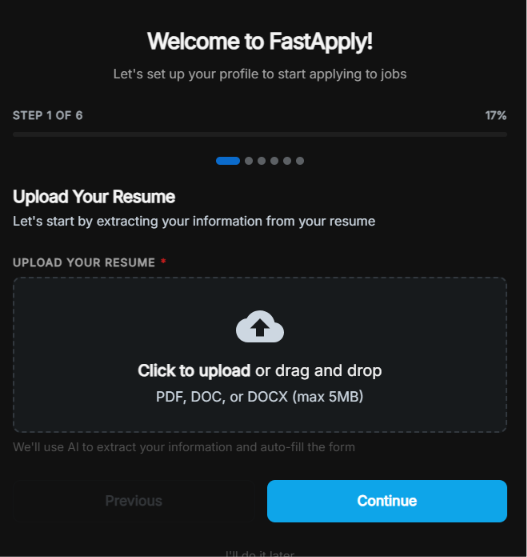
Étape 1 : Téléchargez votre CV
Le premier écran vous demande de télécharger votre CV au format PDF, DOC ou DOCX (maximum 5 Mo). FastApply utilise l'IA pour extraire vos informations et pré-remplir la configuration du profil qui suit. Vous pouvez ignorer cette étape et remplir manuellement, mais le téléchargement accélère l'ensemble du processus.
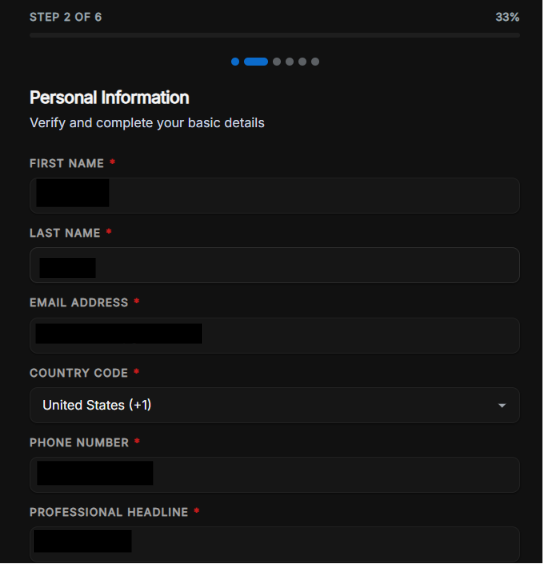
Étape 2 : Informations personnelles
La deuxième étape rassemble les informations de base : prénom, nom, adresse e-mail, code pays, numéro de téléphone et un titre professionnel. Ces informations sont pré-remplies à partir de votre CV dans la mesure du possible. Notamment, elle demande également votre titre professionnel dès le départ, ce qui influence la manière dont l'IA formule vos candidatures.
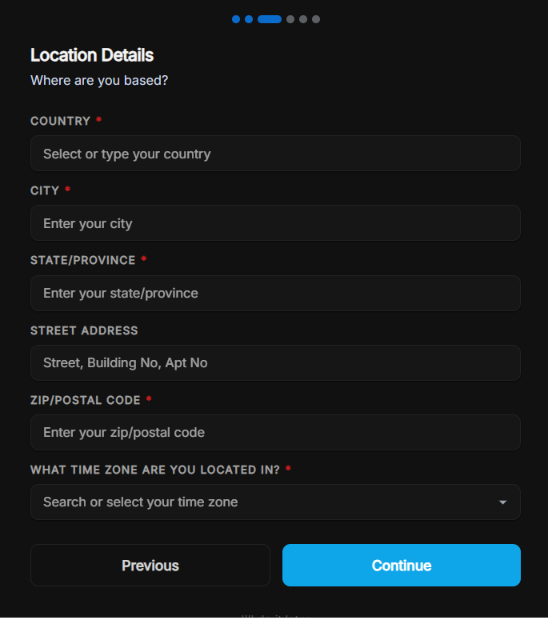
Étape 3 : Détails de l'emplacement
FastApply collecte votre localisation complète : pays, ville, état/province, adresse de rue, code postal et, surtout, votre fuseau horaire.
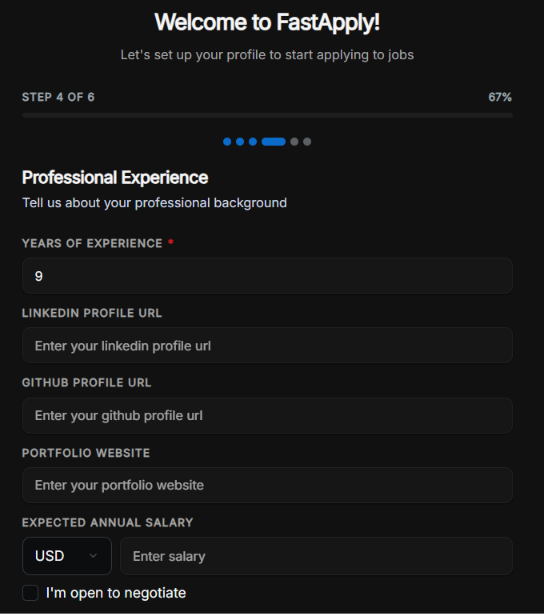
Étape 4 : Expérience professionnelle
Cette étape couvre les années d'expérience, l'URL du profil LinkedIn, l'URL du profil GitHub, le site web du portfolio et le salaire annuel attendu. Vous pouvez également cocher “ Je suis ouvert à la négociation ” pour laisser le champ du salaire flexible. Plus cette section est complète, plus l'IA remplit avec précision les formulaires de candidature en votre nom.
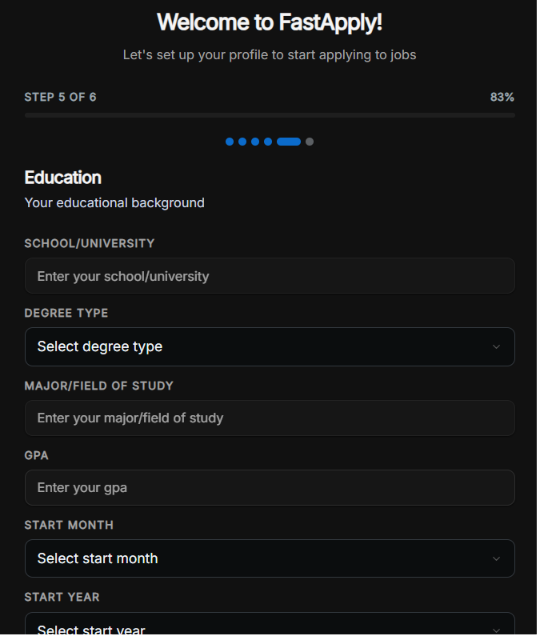
Étape 5 : Éducation
École ou université, type de diplôme, matière principale ou domaine d'études, moyenne générale (GPA), et dates de début et de fin. La GPA est un champ plus récent. FastApply l'a ajoutée spécifiquement pour améliorer la précision des candidatures qui la demandent. Laisser des sections vides ici peut amener l'IA soit à ignorer ces champs, soit, dans certains cas, à inventer une valeur. Plus d'informations à ce sujet ci-dessous.
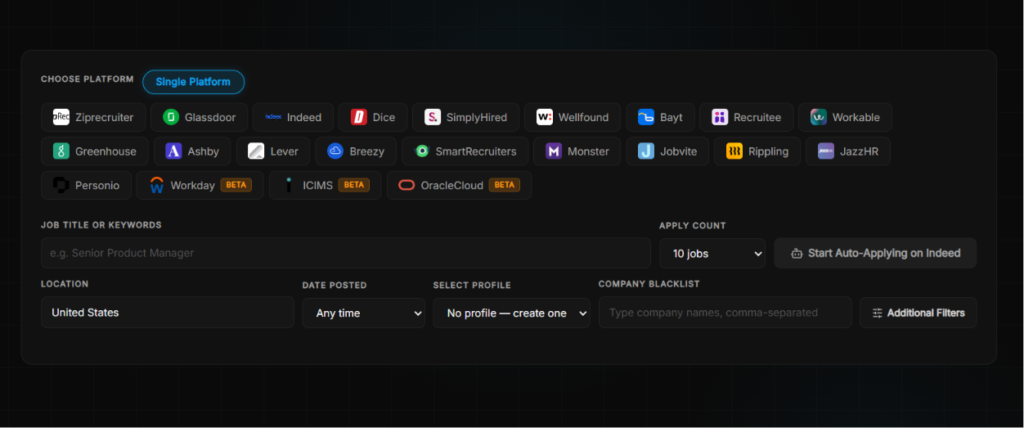
Étape 6 : Sélection de la plateforme et application automatique
Après la configuration, vous sélectionnez les plateformes à cibler, entrez votre titre de poste ou des mots-clés, définissez votre localisation et choisissez le nombre d'offres d'emploi auxquelles postuler par session. Le sélecteur de plateformes affiche tous les tableaux pris en charge.
Vous avez également un champ liste noire d'entreprises où vous pouvez taper les noms d'entreprises à exclure.
Ce qui se passe réellement lors de l'application automatique
C'est là que je dois être honnête quant à l'écart entre le marketing et l'expérience.
Le bot FastApply ne fonctionne pas discrètement en arrière-plan pendant que vous vaquez à vos occupations. Il ouvre une nouvelle fenêtre de navigateur, navigue vers l'offre d'emploi et commence à remplir les champs un par un. Vous pouvez le voir se dérouler en temps réel. Le bot parcourt le formulaire de candidature de manière méthodique, en puisant des informations dans votre profil pour remplir chaque champ.
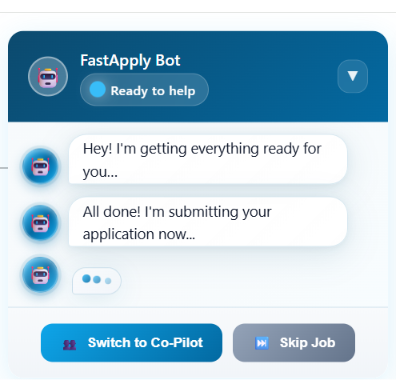
Pour les formulaires standard, cela fonctionne raisonnablement bien. Il a rempli la plupart des champs avec précision et a parcouru la demande à un rythme qui donnait l'impression (comme annoncé) de regarder quelqu'un d'autre faire vos documents.
Mais lorsque l'application a requis le téléchargement d'un CV, le bot s'est bloqué. Il n'a pas pu télécharger mon fichier et a ralenti le processus de candidature. Ainsi, si la candidature a un champ obligatoire pour le téléchargement du CV, FastApply pourrait ne pas être en mesure de la compléter sans intervention manuelle (du moins, ce n'a pas été le cas pour moi).
L'IA peut également occasionnellement remplir des champs que vous n'avez pas spécifiés, en inventant des informations plausibles mais inexactes. C'est un risque réel si vous utilisez le mode "Pilote automatique" sans examiner chaque soumission. Le mode "Copilote" existe précisément pour intercepter cela, et si vous débutez sur la plateforme, je recommanderais vivement de commencer par là.
Profils d'emploi
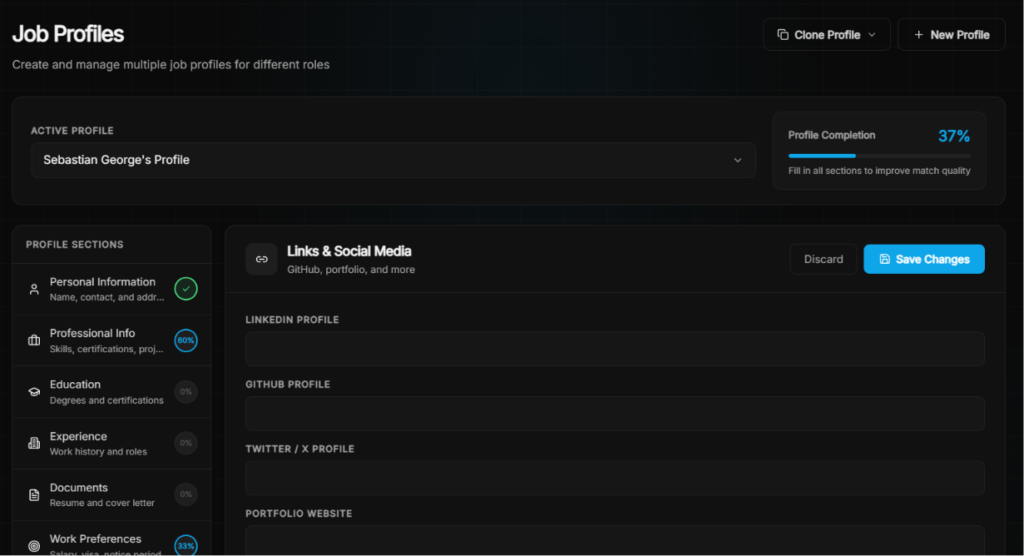
L'une des fonctionnalités les plus utiles de FastApply est la possibilité de créer plusieurs profils d'emploi, chacun avec son propre CV, ses préférences et ses critères de ciblage. Si vous postulez à des postes de marketing et de gestion de projet avec des CV différents, vous pouvez les gérer comme des profils distincts plutôt que de changer constamment les paramètres.
Créateur de CV
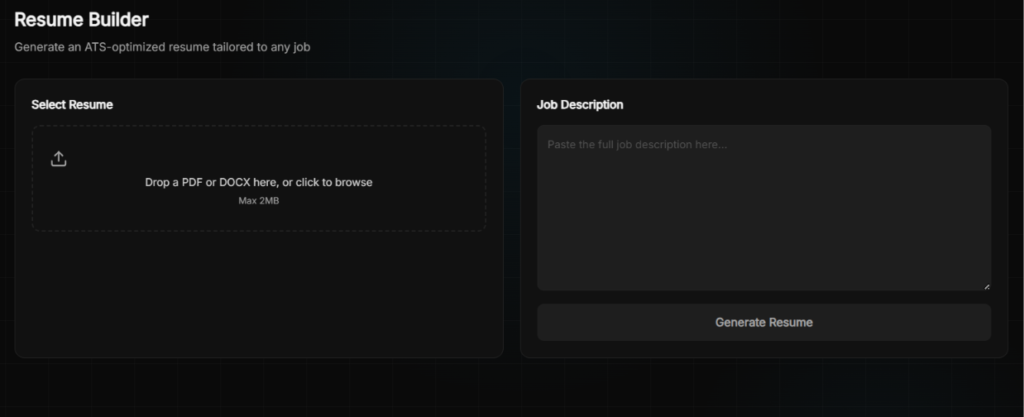
Le générateur de CV vous permet de déposer votre CV existant et de coller une description de poste, puis génère une version optimisée pour l'ATS et adaptée à ce rôle spécifique.
Suivi des emplois
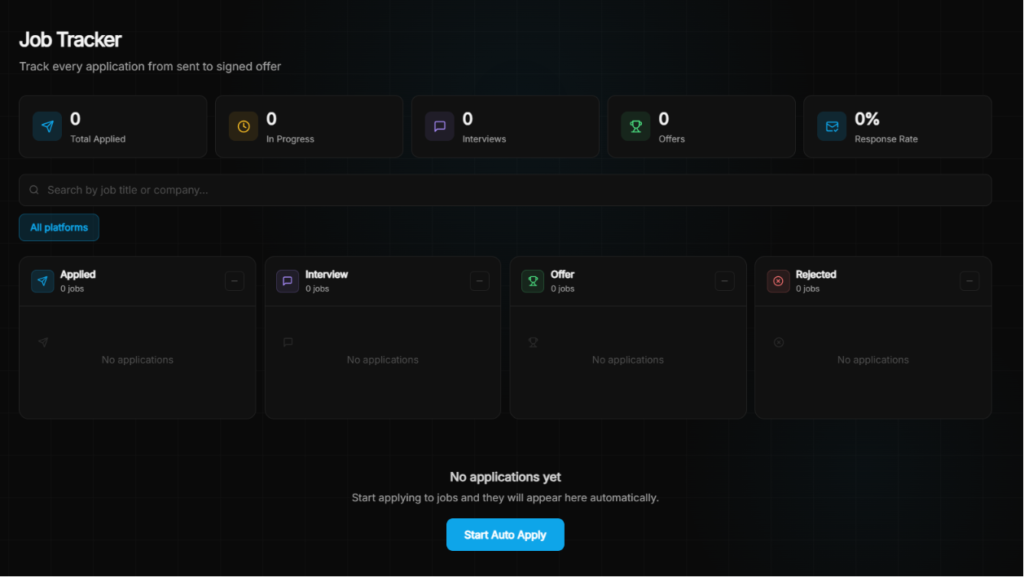
Chaque candidature soumise (que ce soit par Auto-Pilot ou Co-Pilot) est automatiquement enregistrée dans le Job Tracker. Le tableau de bord affiche quatre colonnes : Postulé, Entretien, Offre et Rejeté, ainsi qu'un indicateur de taux de réponse en haut. Il vous permet également de filtrer par plateforme et de rechercher par titre de poste ou nom d'entreprise.
Que disent les clients de FastApply ?
La base d'avis indépendants de FastApply est mince. Leur page Trustpilot ne contient qu'un petit nombre d'avis, et les témoignages sur leur propre site sont sélectionnés. Ce contexte est important.
| Revoir la source | Évaluation |
| Trustpilot | Avis limités — signaux mitigés |
| Chrome Web Store | Retours précoces positifs |
| Product Hunt | Listé et actif |
Ce que les utilisateurs aiment
L'expérience Co-Pilote
Plusieurs utilisateurs mentionnent que regarder le bot remplir les formulaires et pouvoir intervenir en cas de besoin est vraiment satisfaisant par rapport au travail manuel fastidieux. Un utilisateur a écrit : “J'adore le fait qu'il ait pu remplir les formulaires d'embauche avec précision, exactement comme je le voulais, et les soumettre. Je n'ai eu qu'à m'asseoir et regarder.”
Couverture de plateforme étendue
Avec plus de 20 plateformes prises en charge, y compris des systèmes ATS comme Greenhouse, Lever et Workday que la plupart des outils ne touchent pas, FastApply atteint des parties du marché du travail que les outils axés uniquement sur LinkedIn manquent entièrement.
Faible barrière à l'entrée
Cinq applications gratuites sans carte de crédit constituent un véritable différenciateur. Dans un domaine où la plupart des outils vous demandent de vous engager financièrement avant même d'avoir vu les résultats, le niveau gratuit de FastApply constitue un véritable filet de sécurité.
Ce que les utilisateurs trouvent frustrant
L'automatisation de LinkedIn a disparu (pour l'instant)
À compter de mai 2026, FastApply a retiré l'automatisation LinkedIn pour se conformer aux conditions d'utilisation de LinkedIn. Ils ont ajouté huit nouvelles plateformes pour compenser (Workday, iCIMS, OracleCloud, Monster, Personio, JazzHR, Rippling, Jobvite), mais LinkedIn est un endroit où réside une grande partie des offres d'emploi, et son absence se fait sentir. Il n'y a pas de calendrier sur quand, ni si, elle reviendra.
Malheureusement, il s'agissait de l'une de leurs fonctionnalités les plus utilisées et citées, qui est maintenant mise de côté, comme le partage un utilisateur de son expérience :
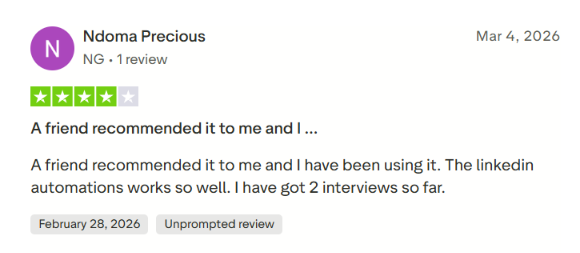
Un autre utilisateur sur Chrome Web Store exprimé :
“L'automatisation LinkedIn fonctionne, aucune des autres ne fonctionne aussi bien que l'automatisation LinkedIn. Ziprecruiter fonctionnait, mais a cessé de fonctionner ce week-end le 12/12/25.”
Les crédits expirent mensuellement
Les crédits inutilisés ne peuvent pas être reportés. Si vous avez une semaine d'application lente, ces crédits sont perdus. C'est une plainte légitime, surtout sur le plan de démarrage où 200 crédits ne vous donnent pas beaucoup de marge.
Préoccupations en matière d'assistance à la clientèle
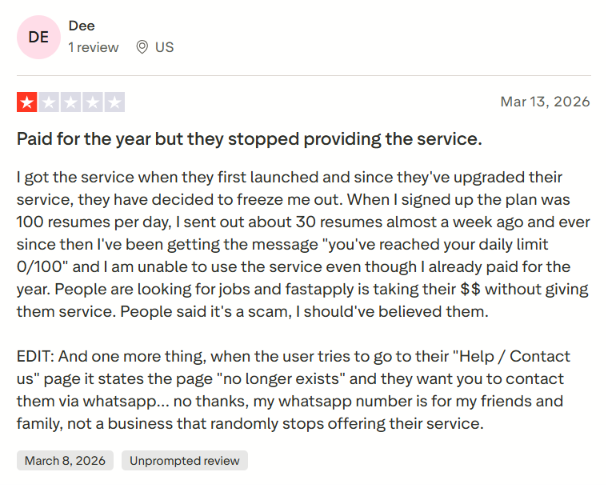
La critique indépendante la plus sérieuse que j'ai trouvée décrit un utilisateur qui a payé pour une année complète, a rencontré un bug de limite quotidienne affichant “ 0/100 ” restants malgré une utilisation minimale du service, et n'a ensuite pas pu accéder à la page Aide/Contact. L'équipe de support a répondu publiquement et a proposé d'enquêter. Mais l'expérience souligne que pour un outil gérant un enjeu aussi important que votre recherche d'emploi, la fiabilité du support compte.
La fiabilité de l'automatisation varie selon la plateforme. Plusieurs utilisateurs ont noté que les performances variaient considérablement d'un site d'emploi à l'autre — certaines plateformes fonctionnant sans problème, tandis que d'autres étaient boguées ou peu fiables. Un utilisateur a observé : “L'automatisation LinkedIn fonctionne… aucune des autres ne fonctionne aussi bien.” C'était avant que l'automatisation LinkedIn ne soit supprimée, ce qui ne fait qu'aiguiser la préoccupation quant à la cohérence sur les plateformes restantes.
Échec du téléchargement de CV
Comme je l'ai personnellement constaté, le bot peut se bloquer lorsqu'une application exige le téléchargement d'un fichier. Ce n'est pas un cas extrême. La plupart des applications sérieuses demandent le téléchargement d'un CV et lorsque cela échoue, l'application reste bloquée à mi-chemin de la soumission.
Voici une autre critique d'utilisateur partageant la même expérience :

Quand utiliser FastApply et quand passer à autre chose
Choisissez FastApply si :
- Vous recherchez l'offre d'entrée de gamme la plus abordable pour l'application automatique de l'IA. Le tarif de $14 par mois et les 5 crédits gratuits offerts pour commencer constituent une offre véritablement compétitive.
- Vous postulez sur un large éventail de plateformes au-delà de LinkedIn et vous souhaitez une compatibilité avec les systèmes de suivi des candidats (ATS) tels que Greenhouse, Workday et Lever.
- Vous gérez plusieurs recherches d'emploi simultanément et avez besoin de profils et de CV distincts pour chacune.
Mais si l'approche de FastApply, dépendante du navigateur et limitée en termes de crédit, commence à sembler comme un plafond, il existe une option plus solide qui mérite d'être connue.
JobCopilot : la meilleure alternative à FastApply
JobCopilot est une plateforme de candidature basée sur l'IA qui automatise les candidatures directement sur les pages « Carrières » des entreprises, et non sur les sites d'offres d'emploi. Il vous suffit de télécharger votre CV et de configurer vos filtres de recherche : copilot se charge ensuite de trouver et de postuler chaque jour à votre place aux postes qui vous correspondent.
JobCopilot repose sur l'idée que vous devez garder le contrôle sur l'endroit et la manière dont vous postulez, sans être obligé de rester devant un onglet de navigateur ouvert.
Voici ici où ça comble les lacunes que FastApply laisse ouvertes :
Emplois vérifiés uniquement, pas de bruit de site d'emploi
JobCopilot s'applique exclusivement aux offres d'emploi publiées sur les pages carrières officielles des entreprises (et non sur les sites d'offres d'emploi). Cela signifie : pas d'annonces frauduleuses, pas de doublons, pas d'offres périmées. Chaque candidature est directement transmise à un poste réel et vérifié, à la source même. FastApply fonctionne sur les principaux sites d'offres d'emploi, ce qui lui confère une large portée mais vous expose également à davantage de « bruit ».
Apprentissage automatique qui devient plus intelligent avec le temps
Chaque fois que vous modifiez une réponse à une offre d'emploi dans JobCopilot, l'IA en tire des enseignements. Chaque fois que vous postulez à une offre d'emploi ou que vous la rejetez, votre copilot adapte ses recommandations en conséquence. FastApply personnalise votre CV en fonction de chaque offre, mais il ne construit pas de modèle durable reflétant votre style d'écriture ou vos véritables aspirations. JobCopilot, lui, le fait.
Mode Révision sans dépendance du navigateur
Le mode « Review-First » de JobCopilot vous permet d’approuver des demandes sans avoir besoin d’ouvrir ni de laisser tourner votre navigateur. La fonctionnalité Co-Pilot de FastApply vous oblige à rester connecté à une session Chrome active, ce qui est utile mais limitatif pour quiconque souhaite bénéficier d’une véritable automatisation en arrière-plan.
Une boîte à outils de carrière complète au-delà des candidatures
JobCopilot regroupe un simulateur d'entretien d'embauche basé sur l'IA, un coach en négociation salariale, un conseiller en réorientation professionnelle, un test de personnalité professionnelle, un assistant de réseautage, et bien plus encore. La suite d'outils de FastApply est axée sur la phase de candidature.
Couverture mondiale de l'entreprise
JobCopilot passe au crible plus de 500 000 pages de recrutement d'entreprises dans tous les pays. FastApply couvre plus de 20 sites d'offres d'emploi, ce qui représente une couverture étendue, mais ne permet pas d'atteindre l'ensemble des entreprises qui recrutent discrètement sans publier d'annonces sur les agrégateurs.
Le principe « JobCopilot » prend tout son sens si :
- Soyez attentif à postuler uniquement à des offres d'emploi vérifiées et réelles plutôt qu'à tout ce qui est proposé par les sites d'emploi.
- Un IA qui apprend votre voix, vos préférences et vos critères d'emploi au fil du temps, plutôt que de traiter chaque candidature comme un nouveau départ.
- Vous recherchez des postes affichés discrètement sur les pages carrière des entreprises avec moins de concurrence.
- Automatisation en arrière-plan qui ne nécessite pas que votre ordinateur portable reste ouvert et actif.
Automatisez vos demandes d'emploi grâce à l'IA 🚀
Essayez le Copilote IA leader pour les demandeurs d'emploi - autonome, sûr, entièrement personnalisé, et qui a bénéficié de la confiance de plus de 100 000 utilisateurs pour décrocher des entretiens plus rapidement.
Check Out JobCopilot →FAQ
Puis-je bloquer les entreprises sur FastApply auxquelles je ne veux pas postuler ?
Oui. Il y a un champ « Blacklist d'entreprises » directement sur l’écran de sélection des plateformes. Vous tapez les noms d’entreprises séparés par des virgules et FastApply ignorera ces annonces. Utile pour exclure votre employeur actuel ou les entreprises auxquelles vous avez déjà postulé.
FastApply fonctionne-t-il pour les chercheurs d'emploi non américains ?
Oui, dans une certaine mesure. La configuration de la localisation collecte votre pays, votre ville et votre fuseau horaire, et la plateforme prend en charge un filtre "Distant partout" pour les postes entièrement à distance à l'échelle mondiale. Plusieurs plateformes prises en charge, telles que Workday, Greenhouse, Lever et SmartRecruiters, sont utilisées par des entreprises du monde entier. Cela dit, si votre marché du travail repose fortement sur des sites d'emploi locaux qui ne figurent pas dans la liste des plateformes prises en charge par FastApply, vos résultats seront limités.
Puis-je utiliser FastApply sur mobile ?
Non. FastApply est une extension Chrome et nécessite un ordinateur de bureau ou portable sous Google Chrome. Il n'y a pas d'application mobile.