
Careerflow claims 1.2 million job seekers have used it, and some of them actually landed at top companies. Spotify, Tesla, Bloomberg, Microsoft, Adobe, Google.
Whether Careerflow is right for you depends on what you’re actually trying to do. If you want to sharpen your LinkedIn profile and keep applications organized in one place, that’s one thing. If you want something to apply to jobs for you while you sleep, that’s a different expectation, and it’s worth knowing which one Careerflow is built for.
So in this article, I signed up, ran my own resume and profile through it, and documented what it asks for, what it does well, and where it falls short.
I looked at its standout features such as:
- LinkedIn optimizer
- Resume tools
- Job tracker
- Extension Chrome
I also checked pricing against its own documentation and weighed it through the lens of an active job hunt. Let’s get to the review.
TL;DR
Careerflow is a genuinely useful career toolkit, and its LinkedIn optimizer is the best reason to use it. The profile score and section-by-section guidance are strong, the resume tools and job tracker are solid, and a generous free plan lets you test almost everything before paying.
The catch is what it doesn’t do. Despite the “career copilot” framing, Careerflow never applies to jobs for you. You still find, open, and submit every application yourself. The autofill just speeds up the form once you’re on it. Pricing is also inconsistent across its own pages, and there’s no easy way to delete your account.
À qui il est destiné :
- Job seekers who want to fix their LinkedIn profile
- People who want free resume and ATS feedback before applying
- Anyone who wants to organize their own search in one place
- Early-stage or passive job seekers building their presence
Les principales caractéristiques en un coup d'œil
| Fonctionnalité | Careerflow |
| LinkedIn optimizer | Live profile score with a section-by-section checklist. Its standout feature |
| Créateur de curriculum vitae | Four ways to start, plus a scored resume analysis with specific fixes |
| Application automatique | Not available. Autofill speeds up forms you open yourself, but nothing is applied on your behalf |
| Job application autofill | Works on major ATS sites (Greenhouse, Lever, Ashby, and more) via the Chrome extension |
| Job tracker | Kanban board with manual and extension-based job adding, notes, and tasks |
| Find recruiters | Builds LinkedIn X-Ray searches through Google to surface people to reach out to |
| Mock interview | AI practice scenarios by type and role, on the top tier |
| Job filtering | Basic. Little beyond a date range and location |
| Tarification | Three plans with a free tier, though rates are inconsistent across pages |
| Account deletion | No self-serve option. Requires emailing support |
Pour
- The LinkedIn optimizer is excellent, with a live score and specific, actionable guidance for each profile section
- A generous free plan lets you test nearly every tool before paying
- Fast, painless onboarding with no forced upgrade to look around
- Resume analysis gives concrete fixes, not vague feedback
- Handy extras like Super Search and Find Recruiters that speed up manual searching
- A full career suite including resume, cover letter, tracker, and interview tools in one place
Cons
- It doesn’t auto-apply to jobs for you, so the manual grind of finding and submitting is still all on you
- Pricing is inconsistent across Careerflow’s own pages
- No self-serve account deletion, plus user-reported billing and refund friction
- AI suggestions can feel generic rather than tailored to your industry
- Weak job filtering with little beyond date and location
Pourquoi vous pouvez faire confiance à cet avis
This review comes from actually using Careerflow, not skimming its landing page or regurgitating other reviews on the internet (and no, it’s not AI slop). Here’s what went into it:
- Tested on a real LinkedIn profile: not a dummy one, since the optimizer grades a live profile and a throwaway would tell you nothing.
- Mapped the free-versus-paywall line: so you know what you get for nothing and what premium actually unlocks before you enter a card.
- Verified claims against Careerflow’s own docs: Anything I couldn’t confirm directly, I’ve flagged rather than stated as fact.
- Judged every feature on what matters in a job hunt: whether it saves real time, cuts stress, and moves you closer to an interview.
Careerflow Pricing
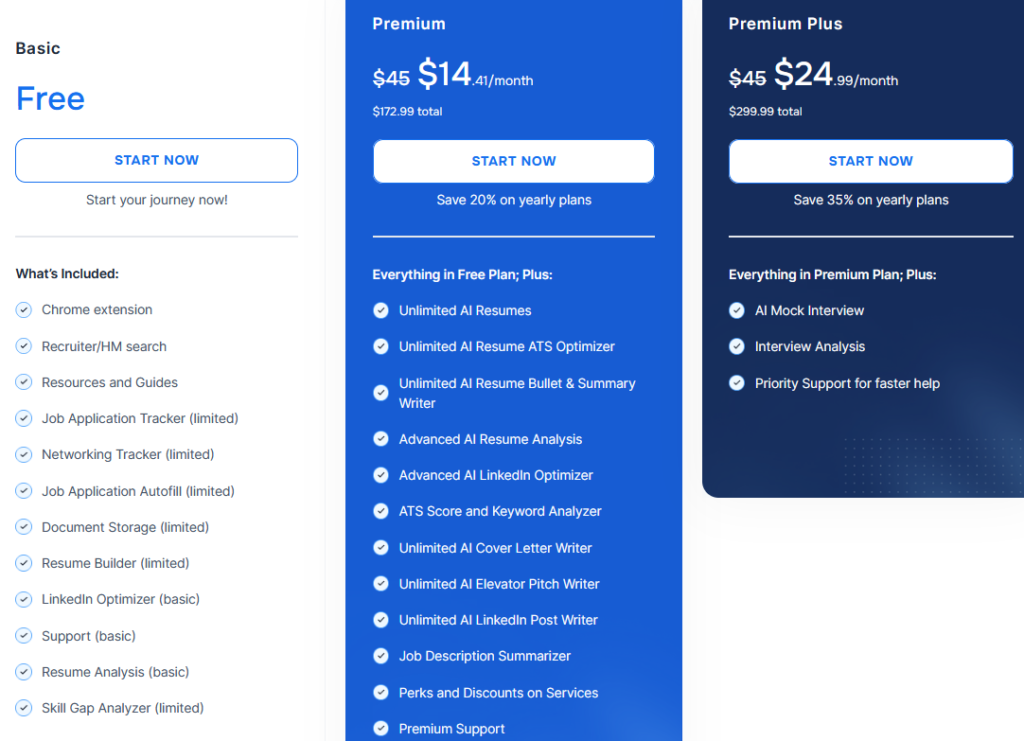
Careerflow runs on three plans, and the first thing worth knowing is that the pricing isn’t consistent across its own pages. I saw two different sets of numbers, so I’m showing both, and you should check the actual rate at checkout before committing.
The plans themselves are the same in both places. Here’s what each one includes.
In the Free tier, you get the Chrome extension, recruiter and hiring manager search, the job application tracker, networking tracker, job application autofill, resume builder, LinkedIn optimizer, resume analysis, and skill gap analyzer. The catch is that most of these are marked as limited or basic, so you get a working version of nearly everything and the full version of nothing.
In the Premium plan, you get unlimited AI resumes, the advanced resume analysis and advanced LinkedIn optimizer, the ATS score and keyword analyzer, unlimited AI cover letters, elevator pitch and LinkedIn post writers, and the job description summarizer. If the free tier is a demo, Premium is the actual product.
Premium Plus adds the AI mock interview, interview analysis, and priority support on top of everything in Premium.
The pricing is different on different pages
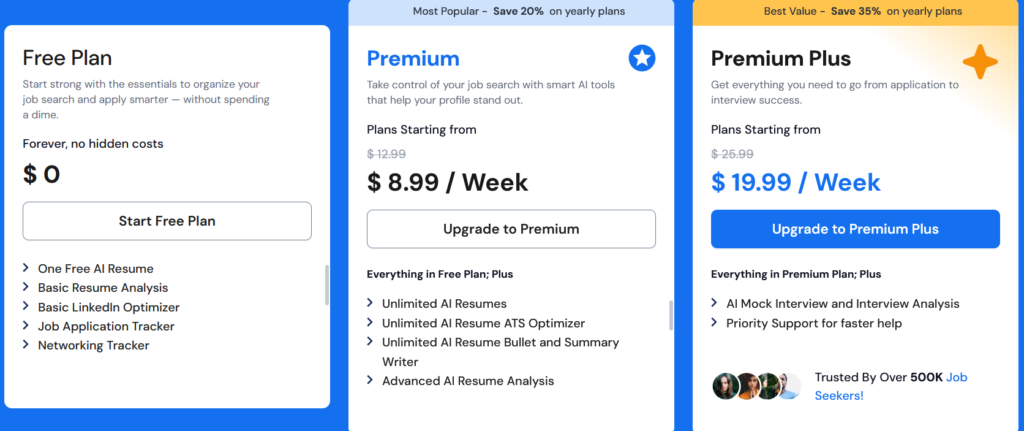
On one page, Careerflow priced Premium at $14.41 a month, billed yearly at $172.99 total. On the signup page I actually landed on, the same Premium plan was shown as $8.99 a week, with a struck-through $12.99. Those don’t reconcile. Annualize the weekly rate, and it comes out far above the yearly total quoted on the other page.
Same story on the top tier. One page listed Premium Plus at $24.99 a month, $299.99 yearly. The signup page showed it as $19.99 a week against a struck-through $25.99.
I can’t tell you which price you’ll get, since it may depend on region, timing, or which page you enter through. What I can tell you is to read the billing cadence carefully. A weekly price like $8.99 is designed to feel small, but weekly billing adds up to far more over a year than the monthly figure suggests.
Principaux enseignements pour votre budget
- The free plan is enough to test the thing Careerflow is known for: You can run the LinkedIn optimizer and see your profile score without paying, though the deeper section-by-section fixes sit behind Premium.
- Premium is the plan that actually does the work: The free tier’s limits on resumes, ATS scoring, and LinkedIn optimization cap you fast during an active hunt.
- Premium Plus is only worth it for interview prep: The jump buys you the mock interviewer and interview analysis, nothing else. If you’re not at the interview stage, skip it.
- Confirm the price before you pay: Given the inconsistent rates, check the exact number and billing period at checkout rather than trusting the headline figure.
Careerflow Onboarding
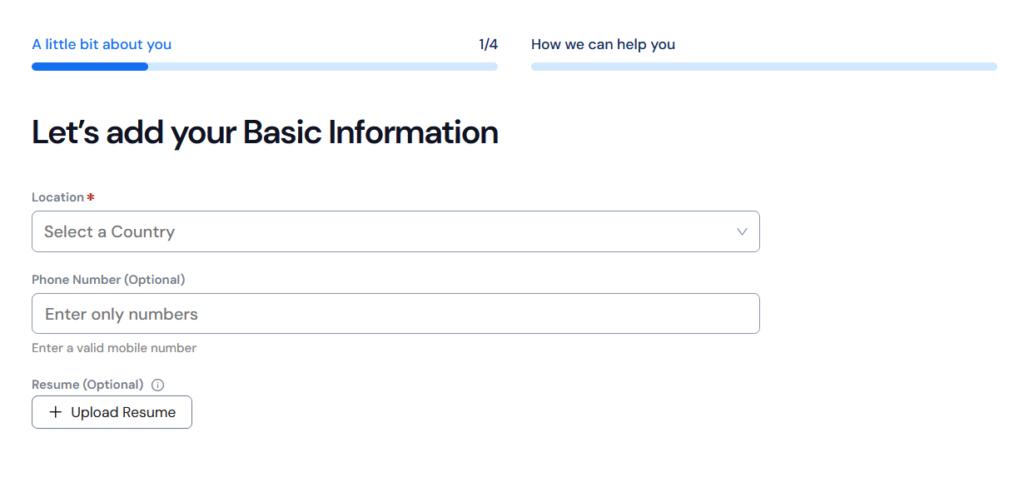
Careerflow’s onboarding is short and low-effort. It runs a four-step “A little bit about you” flow before dropping you into the dashboard. Here’s what it actually asked for.
Step 1: Basic information
The first screen asks for your location (required), plus an optional phone number and an optional resume upload. That’s it. You can move forward without handing over a resume, though uploading one early is what feeds the resume tools later, so there’s little reason to skip it if you have one ready.
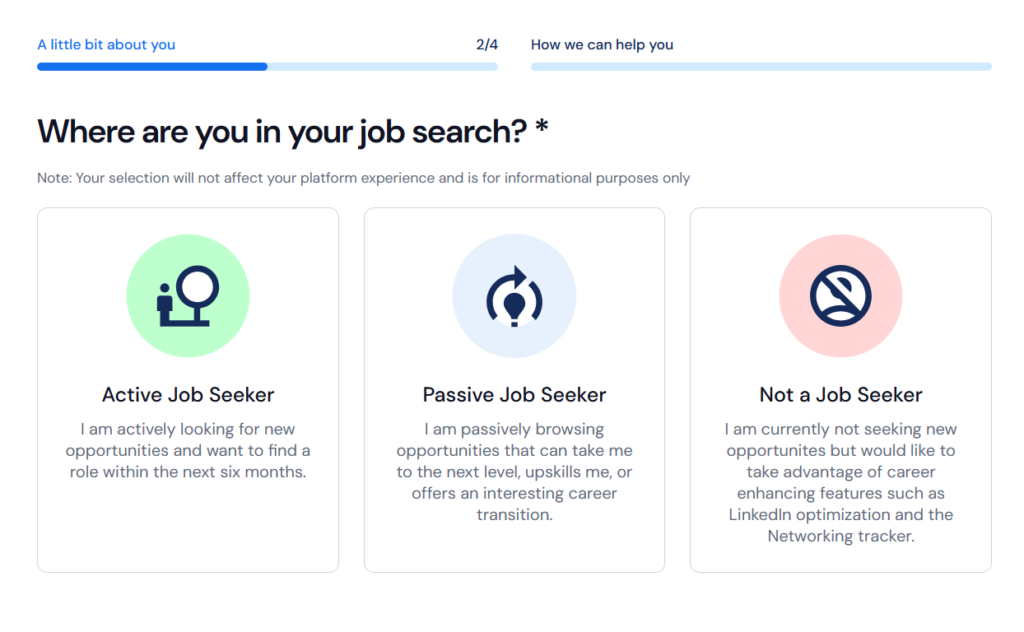
Step 2: Where you are in your job search
Next it asks whether you’re an active job seeker, a passive one, or not a job seeker at all. Worth noting, the screen states outright that your selection won’t affect your platform experience and is for informational purposes only. So this one is Careerflow gathering data about you, not tailoring anything.
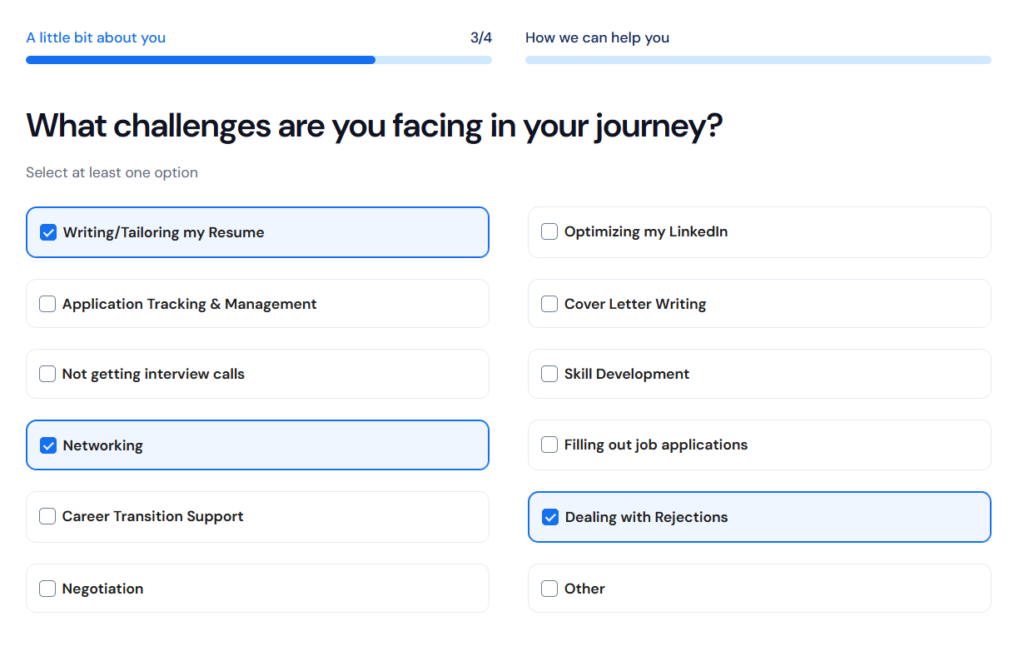
Step 3: What challenges you’re facing
Here you select the problems you want help with, and you can choose more than one. This is the screen that best reveals what Careerflow thinks it’s for. Almost every option is about presenting yourself better or staying organized.
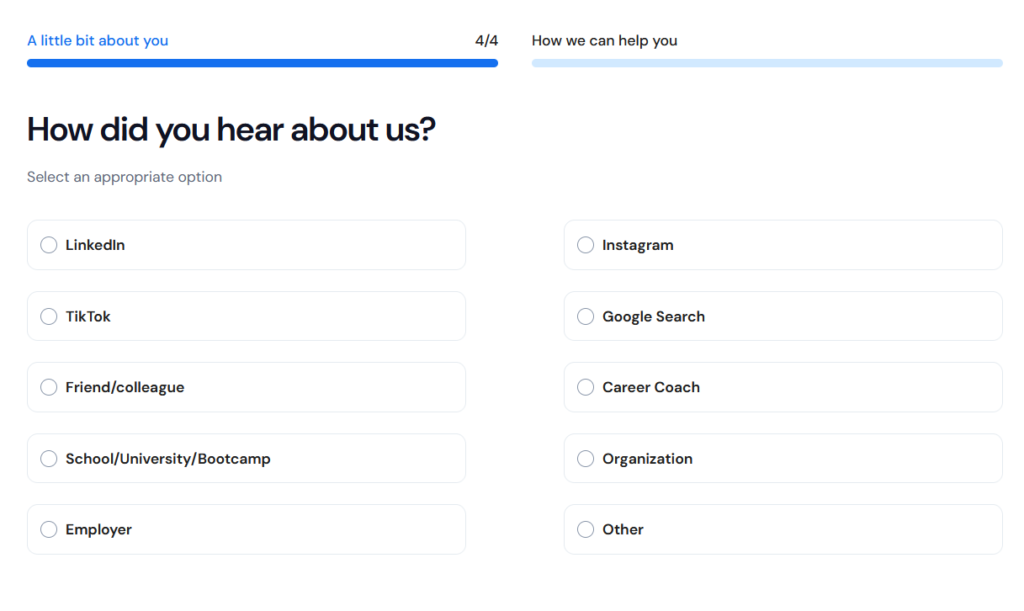
Step 4: How you heard about us
The last step is a marketing question asking where you found Careerflow, with options like LinkedIn, Instagram, TikTok, Google Search, a friend, a career coach, and so on. It has nothing to do with setting up your account and everything to do with Careerflow’s own attribution tracking.
Features of Careerflow
Careerflow packs a lot of tools into one dashboard, so here’s a look at the ones that actually matter during a job hunt and how they held up in testing.
LinkedIn Optimizer
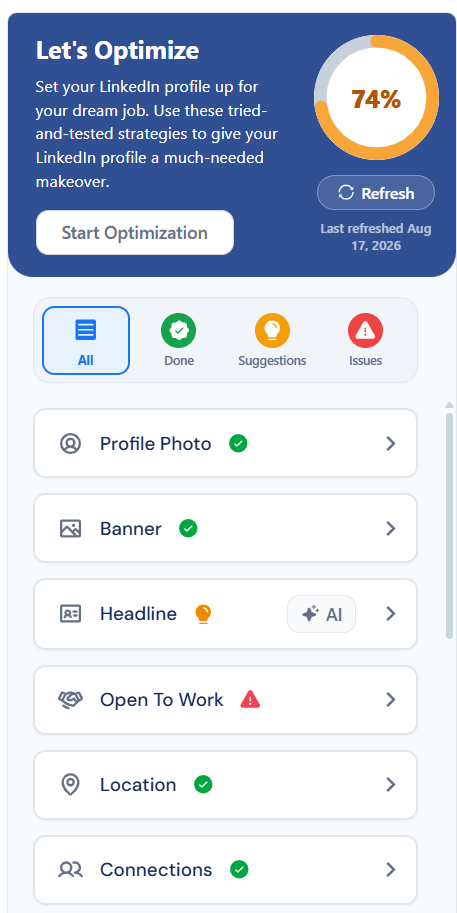
This is the feature Careerflow is best known for. It’s the strongest thing the platform does, imo. It works through the Chrome extension and gives your profile a live score. Mine came back at 74 percent, with a “Last refreshed” date so you know the feedback is current, plus a refresh button to re-scan after you make changes.
The score sits atop a section-by-section checklist covering your profile photo, banner, headline, Open to Work status, location, connections, and more. Each item is tagged as done, a suggestion, or an issue, so you can see at a glance exactly what’s holding your profile back. On my test profile, it flagged the Open to Work section as an issue while marking the photo, banner, location, and connections as done.
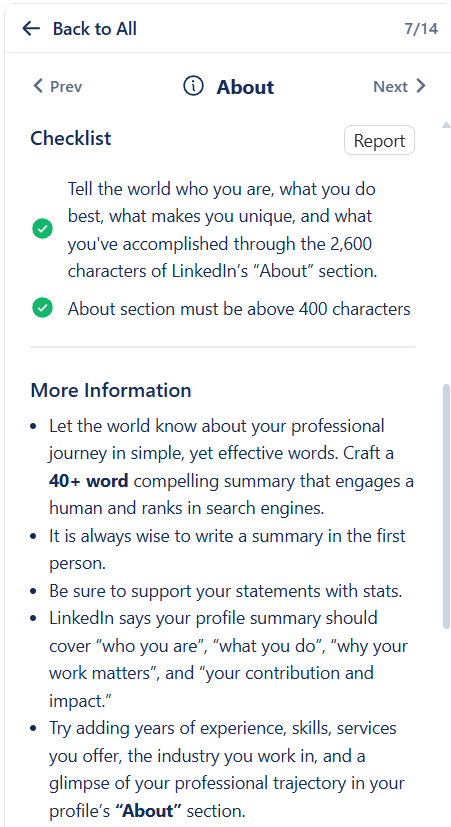
Where it goes from useful to genuinely good is the depth behind each item. Click into a section like About, and you don’t just get a pass or fail. You get a checklist of specific requirements, such as keeping the section above 400 characters, plus a “More Information” panel explaining how to actually write it.
It walks you through crafting a 40-plus-word summary, writing in the first person, backing up statements with stats, and covering who you are, what you do, and why your work matters. Some sections also have an AI button that drafts the content for you.
Créateur de CV
When you go to create a resume, Careerflow gives you four ways to start. You can:
- Select an existing resume from your Careerflow account or device
- Build one by pulling details from your LinkedIn profile
- Start with an AI prompt where you tell the AI what you want
- Choose a blank template and fill it in yourself.
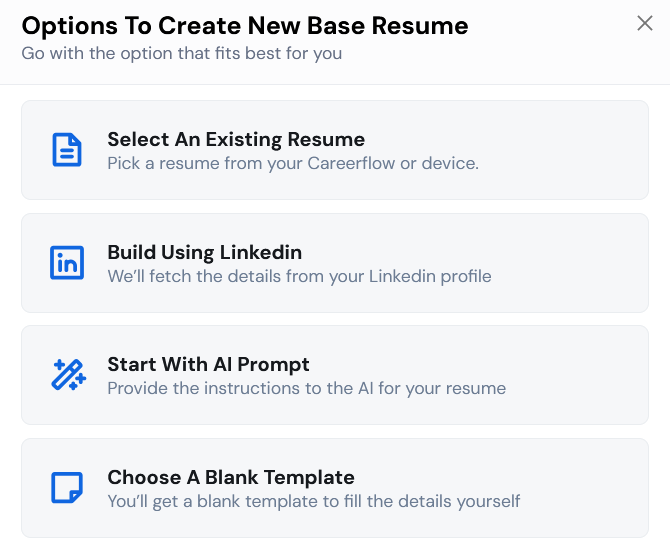
The LinkedIn option is the fastest if your profile is already detailed, since it fetches everything for you rather than making you retype it.
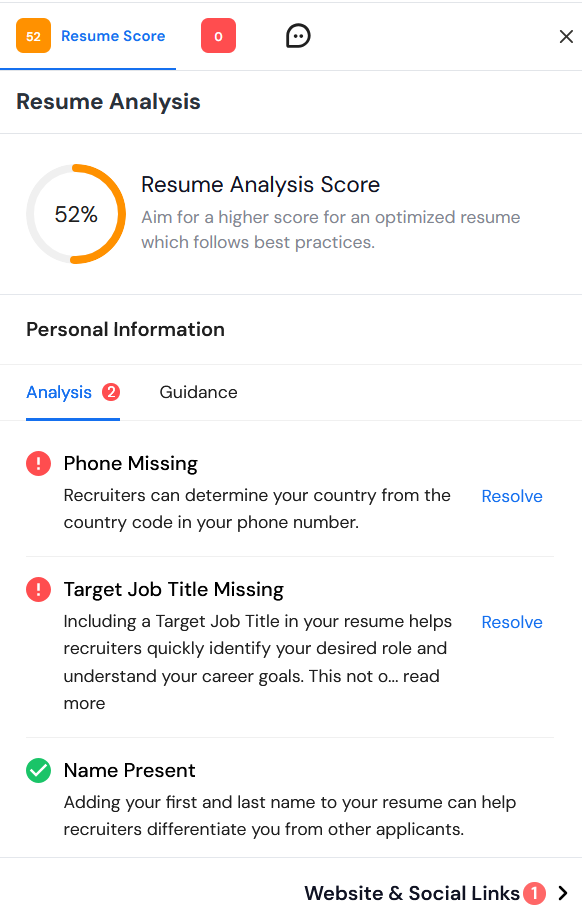
The more useful part is the resume analysis. Careerflow scores your resume out of 100 and breaks the feedback down section by section. My test resume came back at 52 percent, with the tool flagging specific gaps like a missing phone number and a missing target job title, each with a “Resolve” link that takes you straight to the fix. It also confirms what you got right, so it’s not just a list of complaints.
Job Application Autofill
Careerflow’s Chrome extension includes an autofill feature, and this is the closest the platform gets to automating applications. It stops well short of applying for you.
Autofill runs on a fixed list of supported sites, which are the major applicant tracking systems: Ashby, Breezy, Freshteam, Greenhouse, JazzHR, JobScore, Jobvite, Lever, Okta, Pinpoint, Rippling, SmartRecruiters, and more. On those sites, you open a job application yourself, then click Autofill, and Careerflow fills in your details and drafts answers to the role’s questions using the information from your profile.
Suivi des candidatures
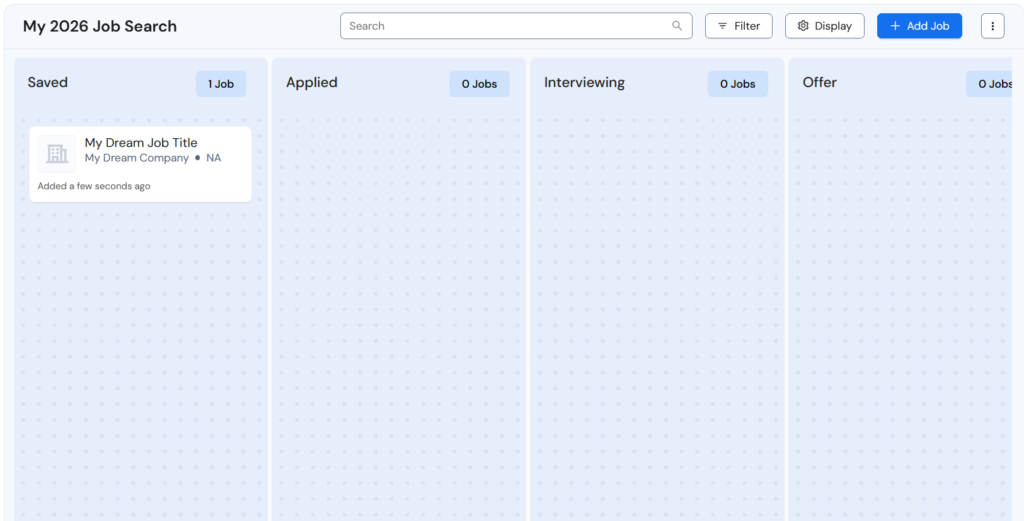
Careerflow’s job tracker is a Kanban-style board that keeps your applications organized in one place. It’s laid out in columns, so you can drag a job from stage to stage as it moves through the pipeline and see your whole search at a glance instead of tracking it in a spreadsheet.
Jobs land here two ways. It lets you import listings from job portals as you browse, and you can also add jobs manually with the “Add Job” button. When I added one by hand, it opened a full job detail view with tabs for Overview, Company, Notes, Contacts, Documents, and Tasks, plus a timeline logging when the job was created.
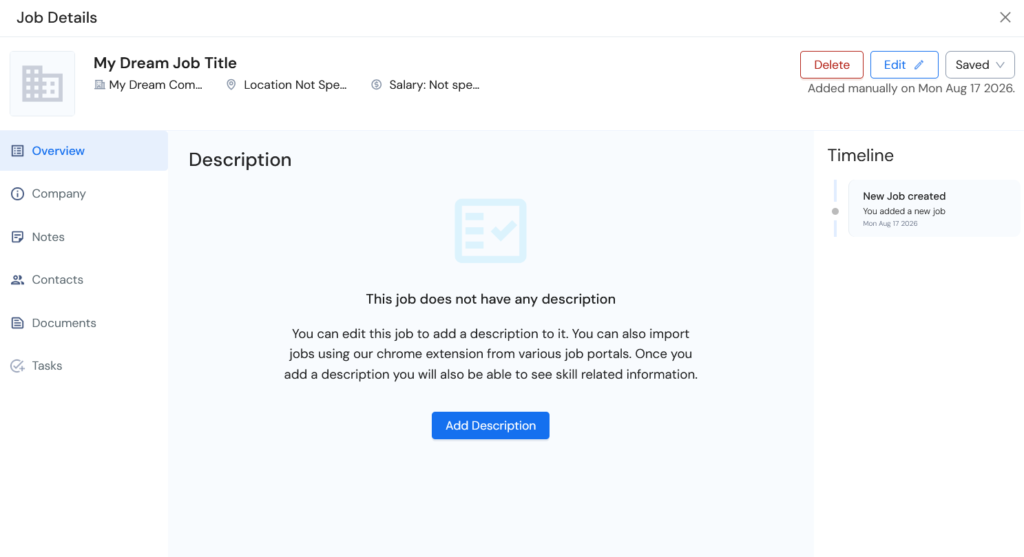
You can attach a description, notes, and follow-up tasks to each entry, which is genuinely handy for staying on top of who you’ve contacted and what’s next.
There is a limit worth naming, though. Because Careerflow doesn’t apply to jobs for you, nothing lands in the Applied column on its own. You move each card yourself as you go. The tracker is a place to record and organize the work you’re doing, not a log of work the tool did for you.
Find Recruiters
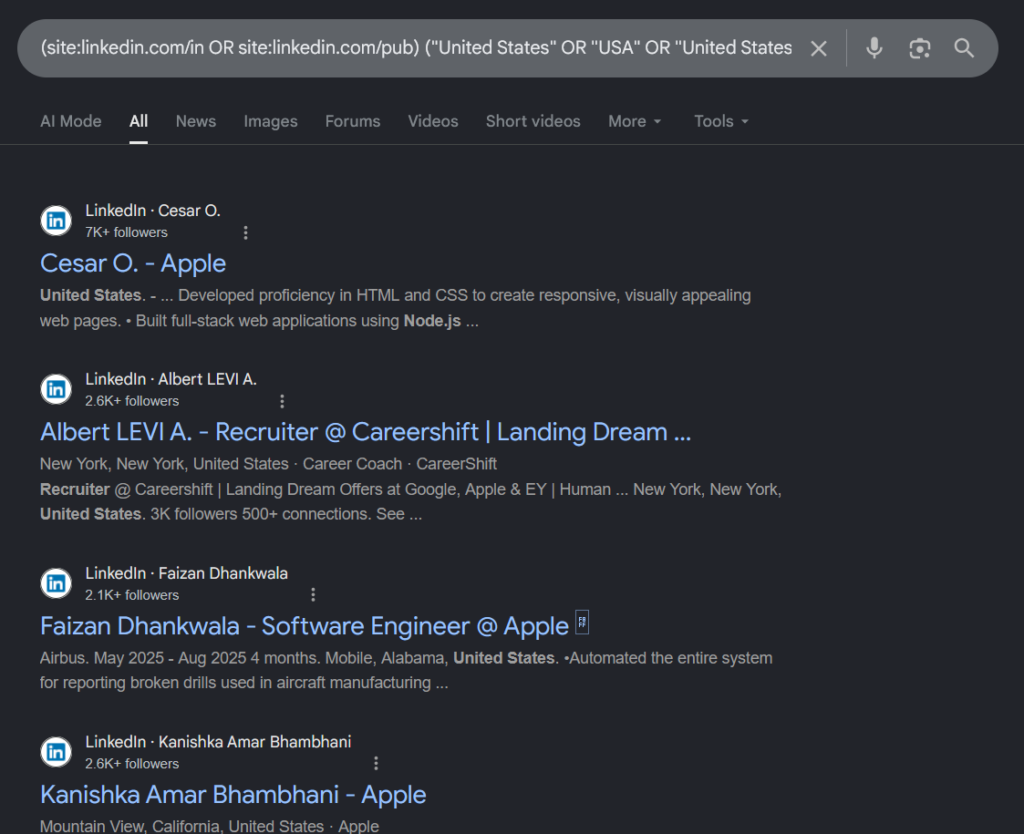
Careerflow has a Find Recruiters tool that runs recruiter-focused X-Ray searches on LinkedIn profiles through Google. You fill in a company, skills, location, and role, with optional keywords to include or exclude and an exact-match toggle, then hit search.
Behind the scenes, it builds a Google site search query and opens the results, surfacing LinkedIn profiles that match. In my test, it returned real recruiter and employee profiles at the target company.
It’s a clever way to find the right person to reach out to, which matters since networking often beats cold applications. The honest caveat is that it’s a search-query builder, not a private recruiter database.
Mock Interview
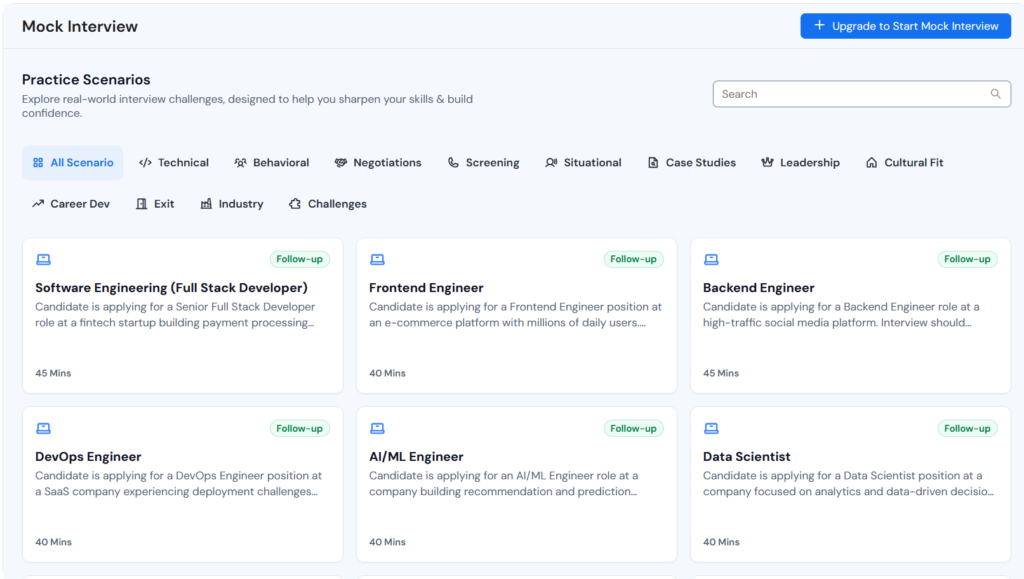
On the higher tier, Careerflow includes an AI mock interview tool with a large library of practice scenarios. They’re sorted by type, covering technical, behavioral, negotiations, screening, situational, case studies, leadership, cultural fit, and more, and by role.
Careerflow: What Works and What Doesn’t
No tool is all upside, so here’s an honest breakdown of where Careerflow earns its place and where it leaves you wanting more.
Careerflow Pros: Where It Stands Out
Super Search feature
Buried in the Chrome extension is a handy tool called Super Search that lets you run one search across multiple job boards at once.
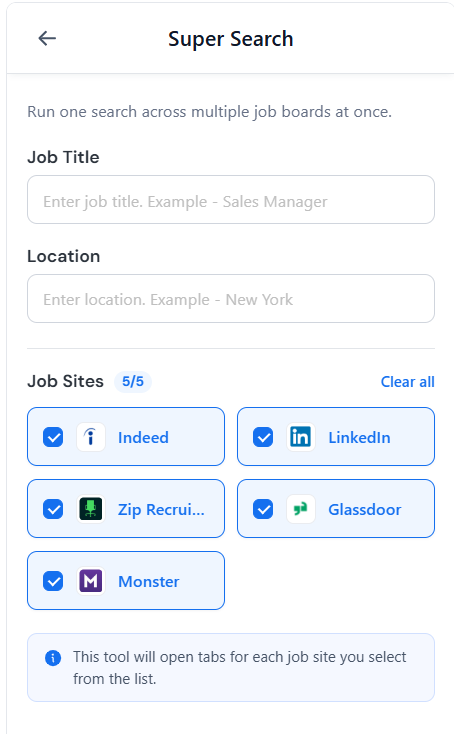
You enter a job title and location, tick which sites you want (Indeed, LinkedIn, ZipRecruiter, Glassdoor, and Monster), and it opens a tab for each one with your search already run. It won’t apply to you, and it’s really just a shortcut, but if you’re the type who checks the same five boards every morning, it saves you from the repetitive setup.
Very quick to get started
Onboarding is about as painless as it gets. Four short screens; only your location is actually required, and you’re into the dashboard. There’s no lengthy configuration, no filters to wrestle with, no forced upgrade before you can look around.
The LinkedIn optimizer is well liked
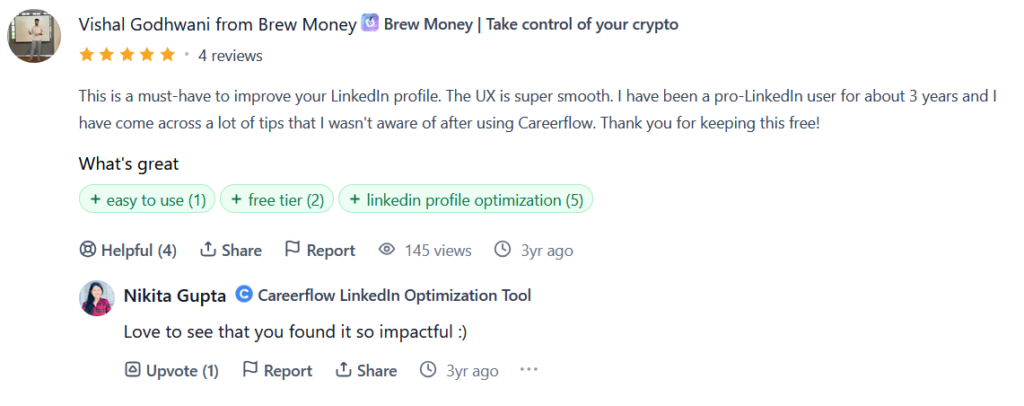
The LinkedIn tool isn’t just my pick as the standout. Users have praised it for years. One reviewer, a self-described pro-LinkedIn user for three years, called it a must-have and said the experience was smooth and surfaced tips he wasn’t aware of, and thanked Careerflow for keeping it free. The praise centers on ease of use, the free tier, and LinkedIn optimization itself.
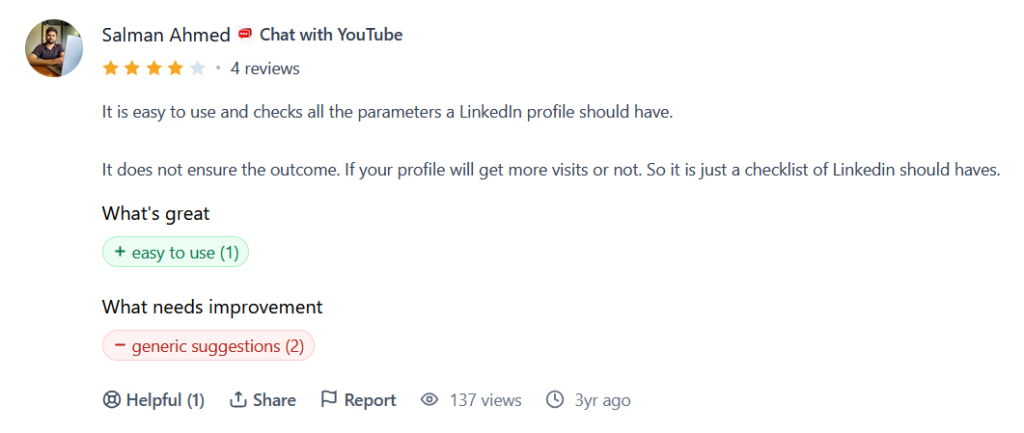
It’s worth showing the other side too, in the spirit of a fair review. Another user rated it four stars and made a sharp point that the tool is easy to use and checks all the parameters a LinkedIn profile should have, but it doesn’t guarantee the outcome. So, it’s essentially a checklist of LinkedIn should-haves rather than a promise of more profile visits.
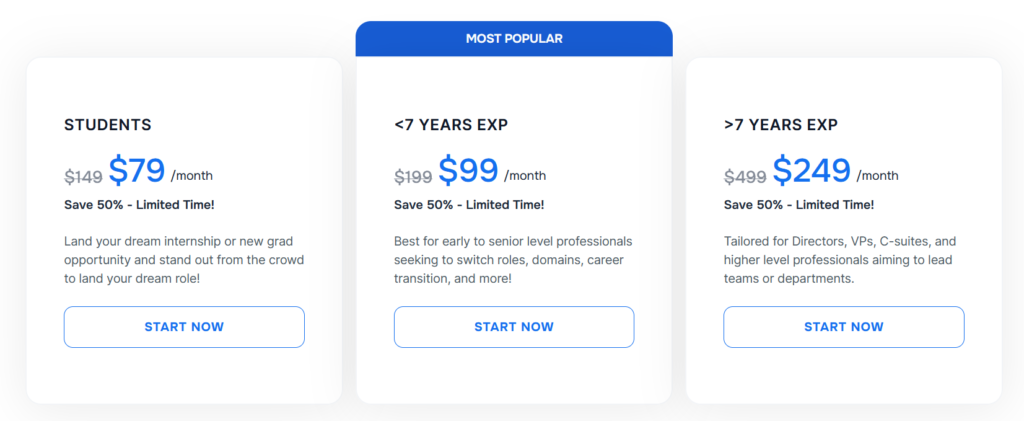
For anyone who wants the profile rewrite done for them rather than guided, Careerflow also sells a done-for-you LinkedIn Makeover service, priced separately by experience level (students, under 7 years, and over 7 years), though the rates are far higher than the software subscription.
Features for organizations
Careerflow isn’t just a solo tool. It offers a full suite of services for organizations such as university career centers, coaching practices, bootcamps, outplacement services, and workforce programs.
Careerflow Cons: Where It Falls Short
No account deletion and privacy concerns
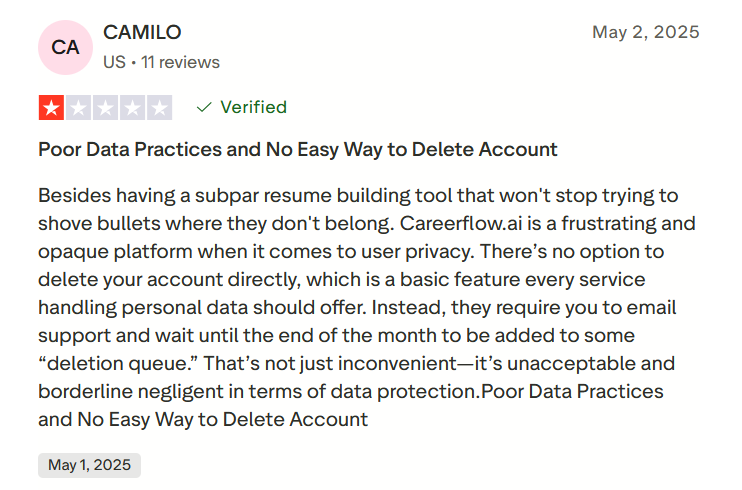
This one I can confirm from the pattern in user reports and my own poking around. There’s no button to delete your account directly. One verified reviewer described the process bluntly, saying Careerflow requires you to email support and wait until the end of the month to be added to a deletion queue, and called that unacceptable for a service handling personal data.
For a tool built entirely around your resume, LinkedIn, and contact details, not being able to remove your own account on demand is a real mark against it.
It doesn’t apply to jobs for you
This is the big one. For all the “career copilot” language, Careerflow never actually applies to jobs on your behalf. The autofill feature helps you fill a form faster once you’ve opened it yourself, and Super Search opens job-board tabs for you, but the finding, opening, reviewing, and submitting is all manual.
If you came here hoping to set up a tool to send applications while you’re busy or asleep, Careerflow simply doesn’t do that. It’s a toolkit for doing the work faster, not a system that does the work for you.
Inconsistent pricing and surprise charges
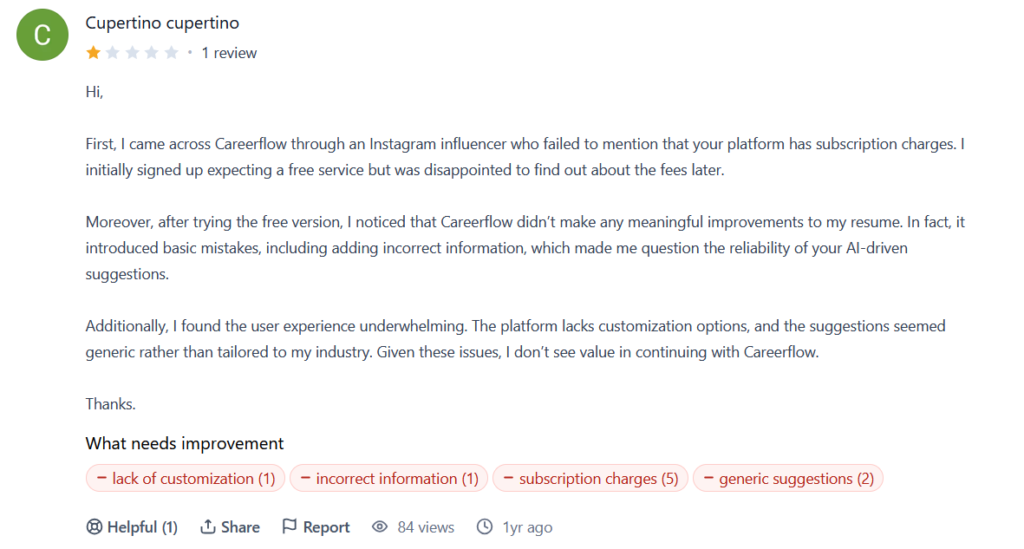
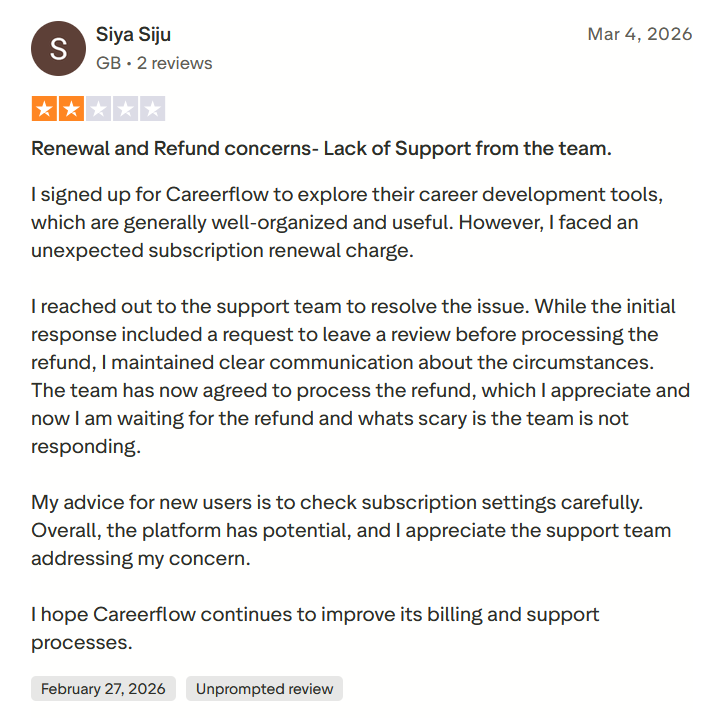
Beyond the two different price sets I ran into earlier, users report billing friction. One reviewer signed up expecting a free service after seeing an Instagram influencer who didn’t mention subscription charges, only to find out about the fees later. Another described an unexpected renewal charge and a slow refund process, advising new users to check their subscription settings carefully.
Between the mismatched prices on Careerflow’s own pages and these billing complaints, the pricing experience is the weakest part of the platform. Read the terms before you enter a card.
Weak job filtering
If you do use Careerflow’s job board, the filtering options are limited. The filter panel offers little beyond a posted-date range and a location field. There’s no real depth here, no seniority, industry, keyword, or match-quality controls of the kind you’d want to actually narrow a search. It’s fine for a quick browse but not built for someone trying to target roles precisely.
Here’s the example:
When to Use Careerflow and When to Switch
Careerflow is a strong tool, but it’s built for one kind of job seeker and not another. Whether it’s right for you comes down to how much of the work you want to do yourself. Here’s how to tell which side you fall on.
Choose Careerflow if:
- You want to fix your LinkedIn profile. This is the strongest reason to use Careerflow. The optimizer scores your profile, walks you through each section, and tells you exactly what to change; the basic version is free. If you suspect your profile is quietly costing you interest from recruiters, start here.
- You want to stay organized. The Kanban tracker, networking tools, and recruiter finder are useful for someone who wants to run their own search in a tidy, structured way rather than across scattered tabs and spreadsheets.
- You’re early in the process or not job hunting full-time. If you’re passively browsing, upskilling, or building your professional presence, Careerflow’s toolkit fits that pace well.
But what if you don’t just want to polish your profile and organize your search, and you actually want applications handled for you?
What if the manual part, the finding, opening, and filling out of every single application, is exactly the part you were hoping a tool would take off your plate?
JobCopilot: The Best Careerflow Alternative
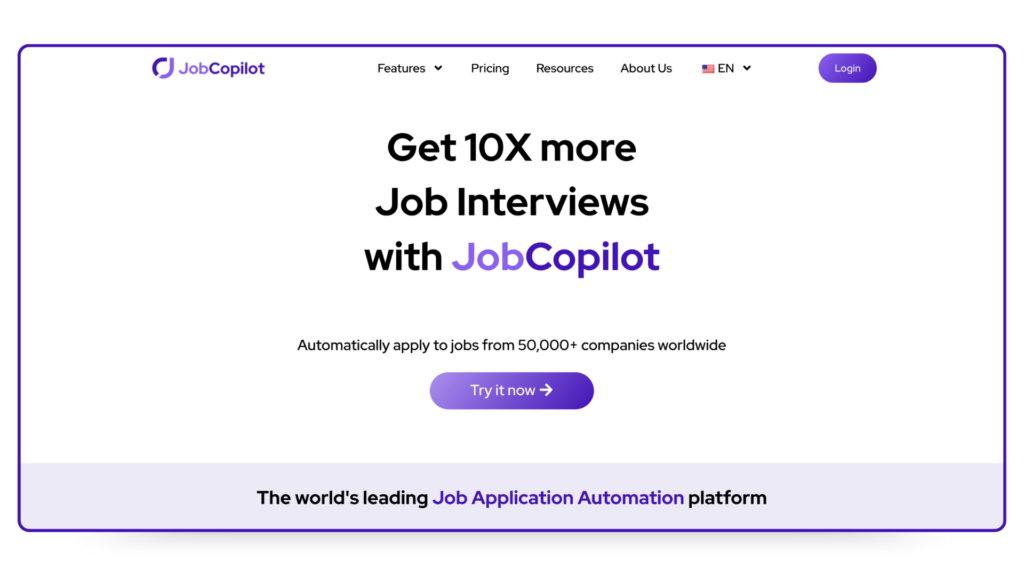
Careerflow makes you a better applicant to some extent. It doesn’t do the applying. Everything it offers is a tool you drive yourself, and once you’ve optimized your profile and resume, you’re still facing the same grind of finding roles and filling out forms one by one.
That’s the gap JobCopilot is built to close. Instead of handing you tools and leaving the work to you, it acts as an end-to-end job application system.
- It applies to relevant roles you define, not everything. You configure what you’re looking for and how selective the AI should be, and JobCopilot works within that. It’s not a mass-apply tool. It automates applications to roles that genuinely match what you told it you want, so you stay active in competitive markets without spraying applications at jobs you’d never take.
- Verified jobs only. JobCopilot pulls roles directly from official company career pages rather than job boards cluttered with scams and duplicates, so what you apply to is real.
- You stay in control. A review-first mode lets you see and edit the AI’s application answers before anything goes out, and those edits teach your copilot your tone and preferences over time. You decide whether applications are submitted automatically or held for your review.
- It learns what you actually want. Every job you apply to or discard is a signal, and your copilot uses it to surface closer matches, so relevance improves the more you use it.
- Worldwide coverage and deep filters. It searches roles from companies across the globe and lets you target by timezone, seniority, keywords, job description language, and more, which is a level of filtering Careerflow’s thin job filters don’t come close to.
- A full career toolkit too. Beyond applications, JobCopilot bundles a CV builder, cover letter tools, pratique de l'entretien, salary benchmarks, and more, so you get the document and prep tools Careerflow is known for alongside the automation it lacks.
Consider JobCopilot the better fit if you:
- Want relevant applications handled for you rather than doing every one by hand.
- Care about applying only to verified roles from real employers.
- Want to review and edit each application while still saving the hours that manual applying eats up.
- Would rather your tool get more accurate the more you use it, instead of handing you a static checklist.
Automatisez vos demandes d'emploi grâce à l'IA 🚀
Essayez le Copilote IA leader pour les demandeurs d'emploi - autonome, sûr, entièrement personnalisé, et qui a bénéficié de la confiance de plus de 100 000 utilisateurs pour décrocher des entretiens plus rapidement.
Check Out JobCopilot →FAQ
Is Careerflow free?
Yes, there’s a free plan that stays free, and it includes limited or basic versions of most tools, including the LinkedIn optimizer and job tracker. Full features like unlimited AI resumes and the advanced optimizer require a paid plan.
Does Careerflow apply to jobs for you?
No. Careerflow helps you fill out applications faster through its autofill feature, but you still find, open, review, and submit every application yourself. It’s a toolkit, not an auto-apply service.
Is the Careerflow Chrome extension safe to use?
The extension is the core of how Careerflow works, powering autofill, the profile score, and job saving. It’s listed on the Chrome Web Store with a good publisher record. As with any extension that reads your LinkedIn and application data, review the permissions before installing.
Can I use Careerflow without LinkedIn?
Yes, but you’ll miss its best feature. The LinkedIn optimizer is the standout, so using Careerflow without connecting LinkedIn leaves you with just the resume, tracker, and document tools.