
Swooped’s core feature is its AI resume builder, but it also promises AI-powered job search and one-click application tools.
I tested the platform and its Chrome extension to see how well those claims hold up in real-world job hunting.
Here’s what I found.
TL;DR
Swooped is a job search platform that helps with your resume and cover letter. It also autofills job applications for you without auto-application features.
Their Chrome extension speeds up filling forms on jobs you find yourself. But it doesn’t auto-apply, doesn’t learn from your edits, and its own job listings have drawn user complaints that you shouldn’t rely on it as your main source of opportunities.
A chi è meglio per:
- Job seekers who want their resume scored and optimized before they start applying.
- People who already find their own job listings and just want the application forms filled faster
- Anyone who wants a single place to track saved jobs, notes, contacts, and interview prep
- Job seekers comfortable staying hands-on, since Swooped fills applications but doesn’t submit or adapt on its own
Le caratteristiche principali in sintesi:
Caratteristiche principali in sintesi
| Caratteristica | Swooped.co |
| Creatore di curriculum | AI resume analysis and optimizer with before/after scoring |
| Corrispondenza tra lavoro e lavoro | Surfaces job matches based on your profile and preferences |
| Applicazione automatica | Not available; autofills applications for you to review and submit |
| Estensione per Chrome | Autofills applications on external job pages, Chrome only |
| Adaptive learning | None; doesn’t learn from your edits over time |
| Monitoraggio delle offerte di lavoro | Saved, Applied, Interviewing, Closed stages with notes and contacts per job |
| Collegamento in rete | Ready-made message templates for outreach and referrals |
| Prezzi | Free plan plus Monthly, Quarterly, and Annual paid tiers |
| Politica di rimborso | 7-day money-back guarantee on all paid plans |
Pro
- Resume analysis gives a clear, scored before-and-after.
- Chrome extension saves time filling forms on jobs found outside the platform.
- Job tracker holds packet, notes, contacts, and interview prep per role in one place.
- Ready-made networking message templates with customizable variables.
- 7-day money-back guarantee on every paid tier, no credit card required to start.
Contro
- Autofills applications but never submits them, so you’re still applying manually.
- No adaptive learning; the tool doesn’t improve from your edits over time.
- Extension only works on Chrome.
- No dedicated remote-only job filter.
- User reviews and Reddit discussion have raised questions about whether some listed jobs are genuinely open.
Perché fidarsi di questa recensione
This isn’t a “word salad” spun up by AI, nor an affiliate write-up dressed as a review. I actually signed up, used the platform, and documented what happened. Everything below comes from real hands-on time with Swooped (not marketing copy).
Here’s what went into it:
- I tested it myself: I used Swooped’s resume builder, job search, and Chrome extension on my own job hunt, and recorded exactly what the tools did, where they worked, and where they came up short.
- Claims were checked against Swooped’s own documentation: Pricing, feature limits, and how the tools actually behave were verified against Swooped’s official product pages, not blog roundups or aggregator sites.
- I work in the job search space: I spend my time looking closely at how these tools serve real job seekers, so every feature here is judged on what actually matters during an active hunt.
Swooped.co Pricing
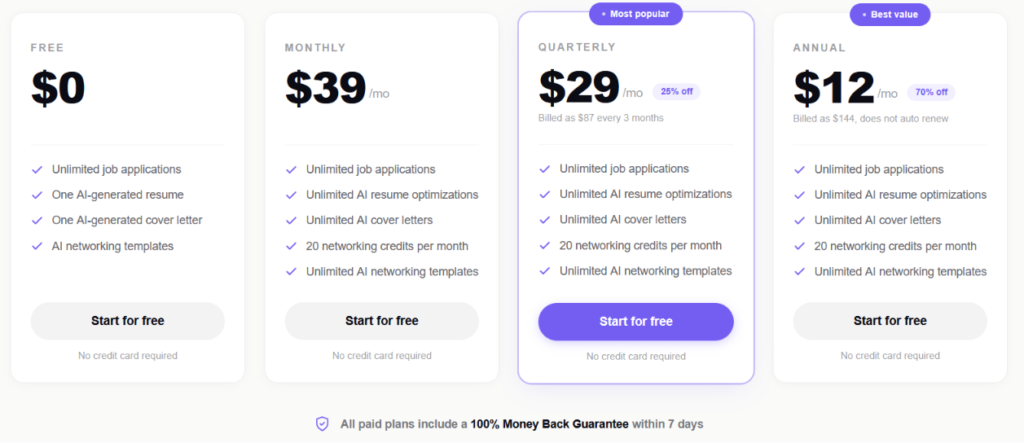
Swooped runs on four tiers: a free plan and three paid options billed monthly, quarterly, or annually. Every paid tier unlocks the same core feature set, unlimited job applications, unlimited AI resume optimizations, unlimited AI cover letters, 20 networking credits a month, and unlimited AI networking templates. What changes across tiers is the price, not the features.
Here’s the breakdown:
| Piano | Prezzo | Billing | What’s Included |
| Gratuito | $0 | — | Unlimited job applications, one AI-generated resume, one AI-generated cover letter, AI networking templates |
| Mensile | $39/mo | Billed monthly | Unlimited job applications, unlimited AI resume optimizations, unlimited AI cover letters, 20 networking credits/month, unlimited AI networking templates |
| Trimestrale | $29/mese | Billed as $87 every 3 months (25% off) | Same as Monthly |
| Annuale | $12/mo | Billed as $144, does not auto-renew (70% off) | Same as Monthly |
All paid plans come with a 100% money-back guarantee within 7 days, and none of the tiers require a credit card to start.
Punti chiave per il tuo budget:
The free plan is more limited than it looks. Unlimited job applications sounds generous, but you only get one AI-generated resume and one AI-generated cover letter total, not unlimited optimizations. So if you’re actively tailoring documents for different roles, free runs out fast.
The Monthly plan at $39 makes sense if you want to test the paid features without committing further, but it’s the most expensive way to pay per month by a wide margin.
If you’re unsure whether Swooped fits your workflow, the 7-day money-back guarantee applies across every paid tier, so Annual doesn’t carry more risk than Monthly if you end up wanting out.
How Does Swooped.co Work?
Swooped optimizes your resume and cover letter, then autofills applications for you. It’s worth being clear on one thing up front: it does not auto-apply. It prepares and fills out applications, but you’re the one hitting submit.
Passo 1: Carica il tuo curriculum
The first thing Swooped asks for is your resume. The onboarding begins with a “First Run Setup” screen that promises you can apply to 5 jobs in 3 minutes. You can drag and drop a file or click to upload, and it accepts PDFs or DOCX files up to 5MB.
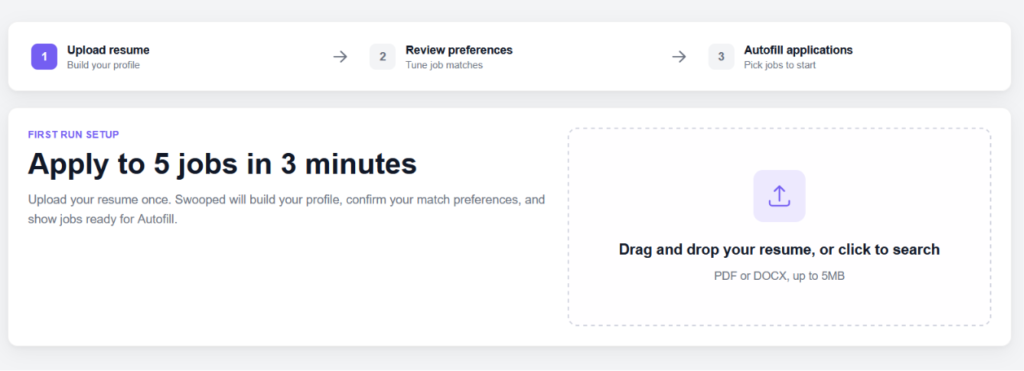
From here, Swooped uses the resume to build your profile, which feeds everything that follows.
Step 2: Review Your Match Preferences
Once your profile is built, Swooped drops you into a preferences screen before any jobs reach your queue. This is where you tell it what to look for. You set target job titles, a target location, workplace flexibility, and experience levels. Most of the fields will already be filled using your resume information.
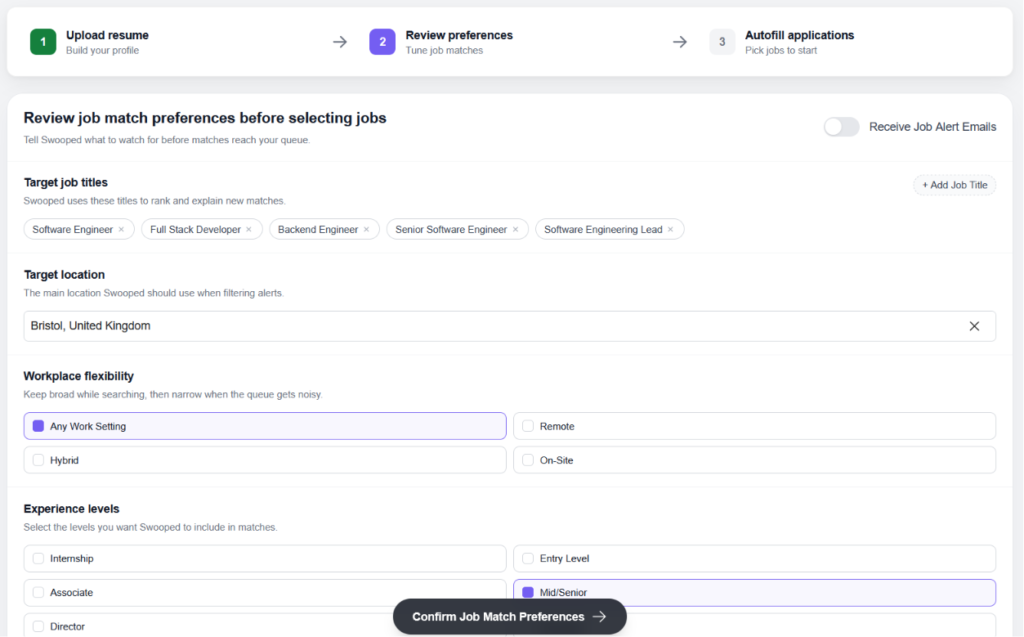
The titles are used to rank and explain new matches, and you can add multiple ones. The workplace and experience-level filters let you keep things broad at first and tighten up later if the queue gets noisy.
Step 3: Autofill Applications
With preferences confirmed, Swooped shows you jobs that are ready for autofill. Each listing displays the role, company, location, posting date, and salary where it’s available, with a “Prepare Application” button on the right.
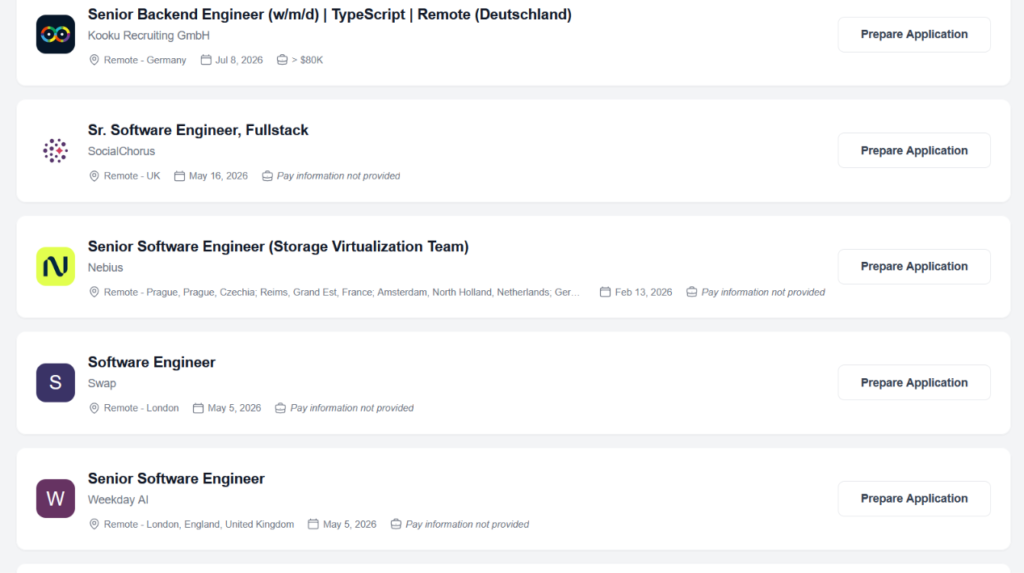
This is the autofill (not an auto-apply feature). Swooped preps the application, but you review and submit each one yourself.
The Dashboard
Everything ties together on the dashboard. It surfaces your job matches, gives you quick access to the AI resume optimizer and cover letter generator, and tracks your pipeline across Saved, Applied, and Interviewing stages. There’s also a weekly applications counter set against a goal.
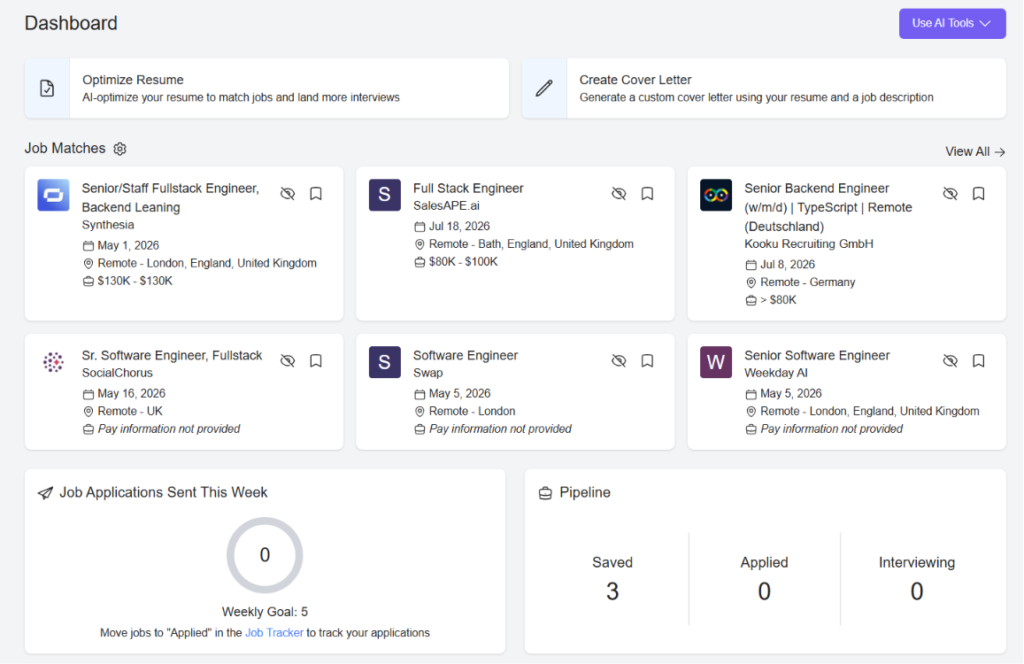
Swooped.co Chrome Extension
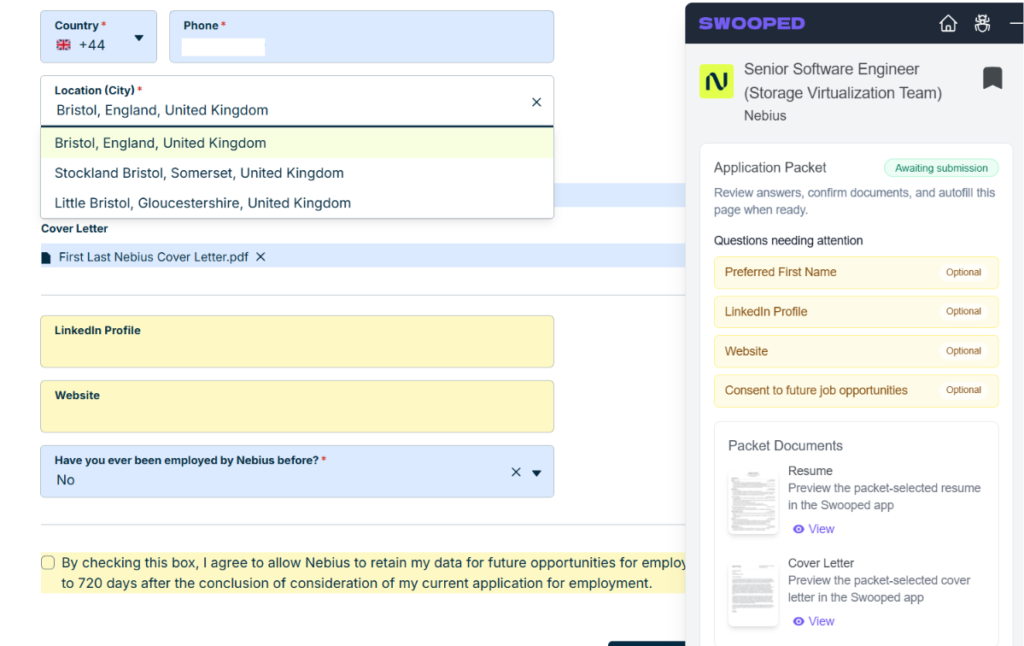
Beyond the main platform, Swooped offers a Chrome extension that handles applications on job pages outside the dashboard. When you land on a listing, the extension opens a panel on the right side of the screen and builds what it calls an Application Packet for that specific role.
The packet pulls together your resume and cover letter and flags any questions that still need attention. In my case, it surfaced a handful of optional fields like Preferred First Name, LinkedIn Profile, Website, and a consent-to-future-opportunities checkbox, marking each as optional so you know what’s required versus what you can skip.
Once the packet is complete and everything reads as expected, the status flips from “Awaiting submission” to “Ready,” and you get an Autofill Application button along with an option to view the full packet.
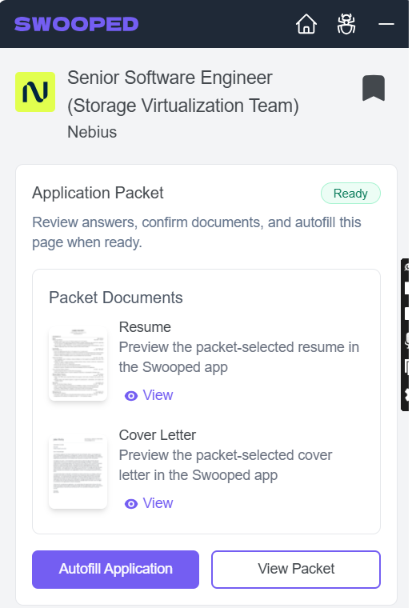
When you hit autofill, it works through the form field by field. You can watch it happen on screen, with details dropping into each box one after another rather than all at once. How long it takes depends on the application. A short form wraps up in a minute or two, while a longer one with more fields can run several minutes.
It’s a genuinely useful step for jobs you find on your own, since it means you’re not retyping the same details on every career page.
Feedback on the extension leans positive on the tracking and organization side.
Automatizzare le domande di lavoro con l'intelligenza artificiale 🚀
Provate il copilota AI leader per chi cerca lavoro - autonomo, sicuro, completamente personalizzato, e fidato da oltre 100.000 utenti per ottenere colloqui più velocemente.
Scopri JobCopilot →Swooped.co: What Works and What Doesn’t
Swooped’s ratings look strong at a glance, but they’re worth putting in context.
| Source | Valutazione |
| Trustpilot | 3.8/5 ⭐️ |
| Chrome Web Store (extension) | 4.8/5 ⭐️ |
The Chrome Web Store score comes from just 4 ratings against roughly 10,000 users, so it isn’t a meaningful sample. The Trustpilot score of 3.8 is a more grounded read, since it reflects a wider spread of user experiences.
Swooped Pros: Where It Stands Out
A few parts of Swooped genuinely earned their keep during testing. Here’s where it does well.
Decent Resume Analysis Score
Swooped scores your resume and shows a before-and-after when it optimizes. My original resume came in at 74, and the optimized version jumped to 100, with the biggest lift on the Skills breakdown, which went from 15/35 to a full 35/35. Content and length/format saw smaller bumps.
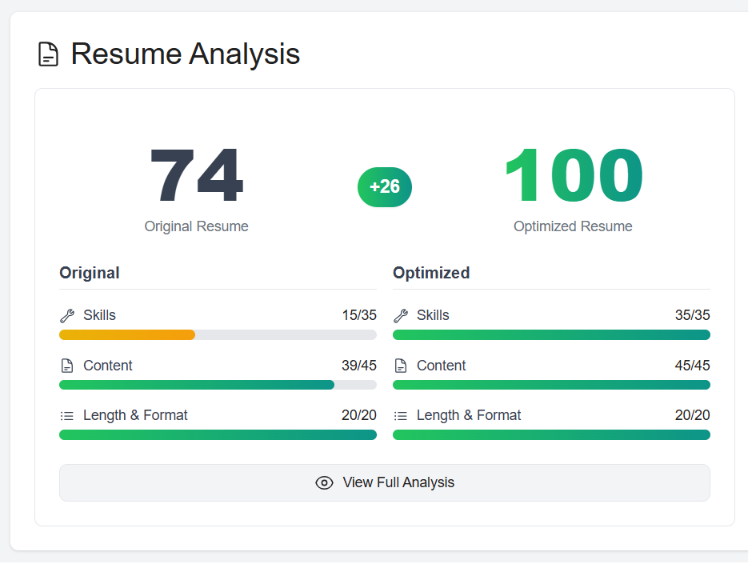
It’s not as descriptive as some standalone CV review tools, which tend to explain exactly what’s weak and why line by line. But for a quick read on where your resume stands and what to prioritize, it does a decent job.
Tracciabilità del lavoro
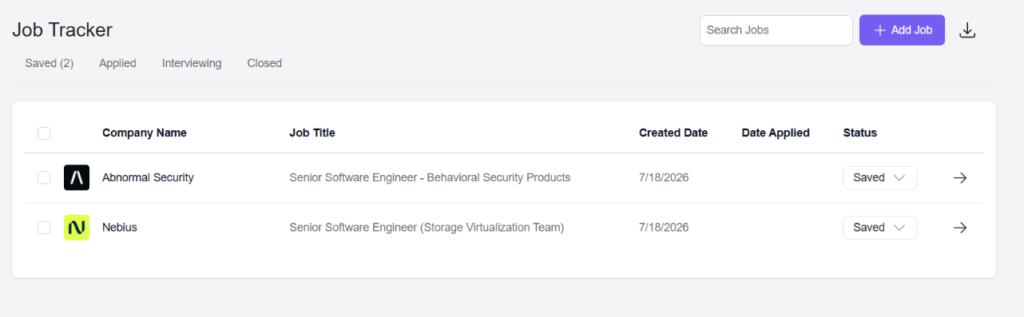
The tracker sorts jobs across Saved, Applied, Interviewing, and Closed stages, and lets you add jobs manually alongside the ones Swooped saves for you.
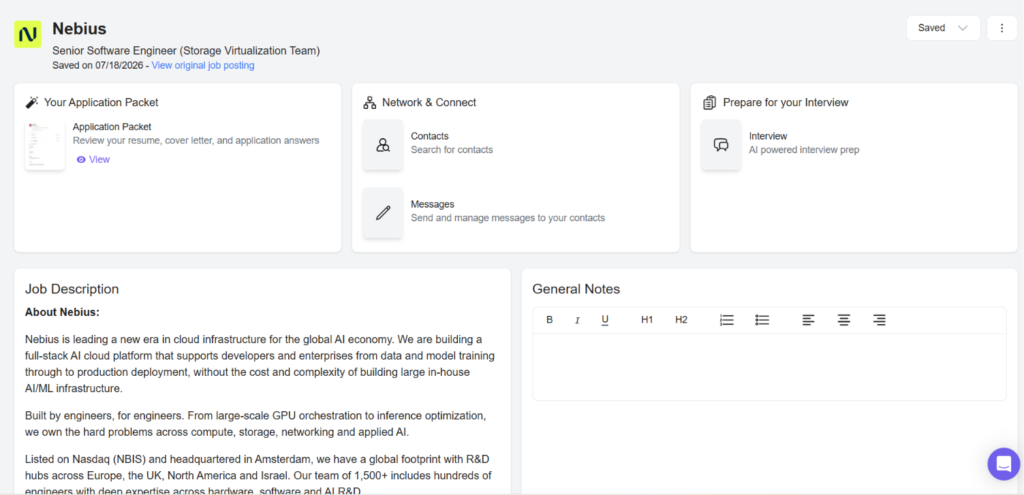
What stood out is how much lives inside each individual job. Open a saved role, and you get its Application Packet, a Network & Connect section for finding and messaging contacts, an AI interview prep option, the full job description, and a notes field. So it’s not just tracking status; it’s holding everything tied to that specific application in one place.
Message Templates
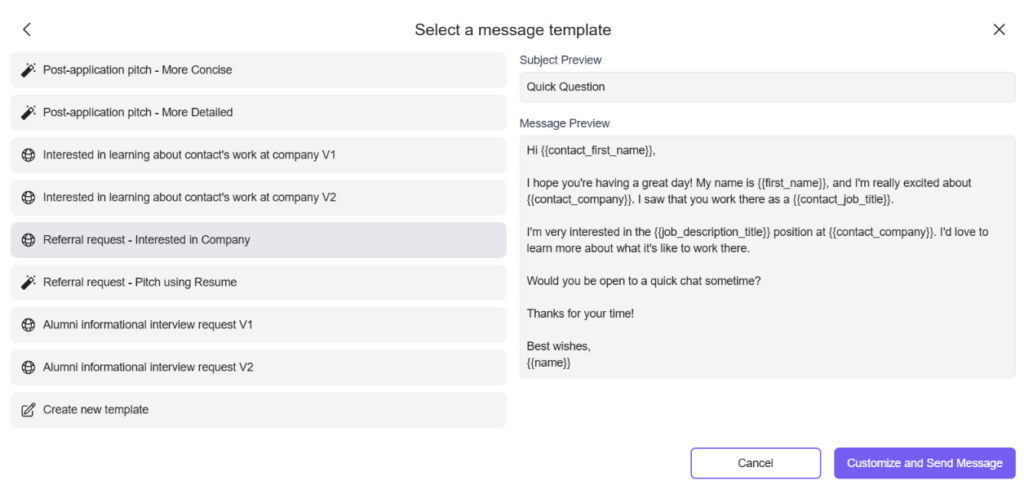
This one’s a nice addition. Swooped includes a set of ready-made message templates for networking and follow-up, covering things like post-application pitches, referral requests, and alumni informational interview requests.
Each uses fill-in variables like contact name, company, and job title, so you can customize quickly rather than writing every outreach from scratch. You can also build your own template if the presets don’t fit.
Swooped Cons: Where It Falls Short
No tool is without trade-offs, and Swooped has a few worth knowing before you commit.
Chrome-Only Extension
The autofill extension only works on Chrome. If you use Firefox, Safari, or Edge as your main browser, you’re out of luck unless you switch.
No Adaptive Learning
Swooped doesn’t learn from you as you go. It fills applications from the profile and resume you give it, but editing an answer on one application doesn’t teach it to write the next one more like you. There’s no memory of your preferences or writing habits building up over time, so you’re reviewing and correcting the same kinds of things across applications rather than watching the tool get smarter.
No Remote-Only Job Filter
The filters let you pick workplace flexibility across different locations, but there’s no clean way to lock the search to remote roles only and trust that’s all you’ll get. For anyone specifically hunting remote work, that missing filter means more manual sorting through matches that don’t fit.
Questions Raised About Job Listings
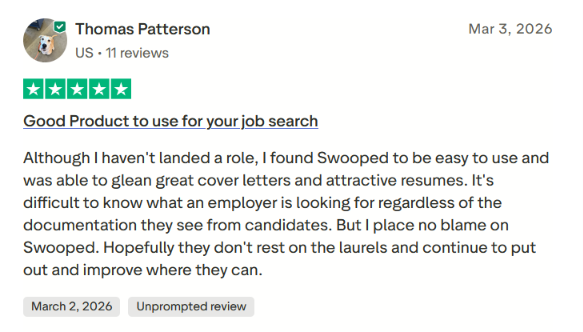
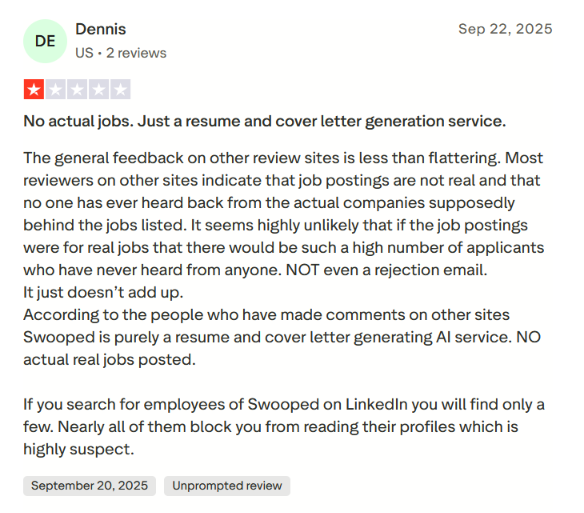
This is the one worth taking seriously. A recurring complaint across user reviews is that Swooped’s job listings may not lead anywhere. One Trustpilot reviewer, Dennis, left a one-star review arguing that Swooped is essentially a resume and cover letter generation service rather than a source of real job opportunities, pointing to a pattern of applicants never hearing back from the companies listed.
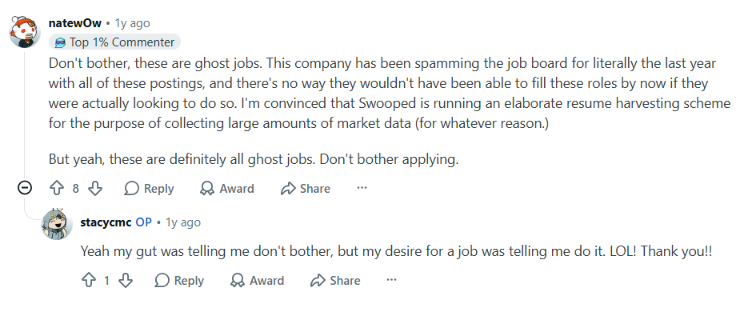
Separately, Swooped’s job postings on LinkedIn have drawn their own scrutiny. In a Reddit job-search thread, users questioned whether those LinkedIn listings lead anywhere, with one commenter calling them ghost jobs and claiming the same roles had been reposted for a long stretch without being filled.
When to Use Swooped.co and When to Switch
Choose Swooped if:
- You mainly want resume and cover letter help: Swooped’s strongest work is on the documents. The resume analysis gives you a quick score and a clear before-and-after, and the cover letter generator pulls from that same profile.
- You find your own jobs and just want the forms filled: The Chrome extension is useful if you’re already browsing career pages and don’t want to retype the same details every time. It preps the application so you can review and submit.
- You want a place to keep applications organized: The job tracker holds each role’s packet, notes, contacts, and interview prep in one spot, so it works as a light hub for a hunt you’re mostly running yourself.
But Swooped asks a lot of you to stay in the loop. It doesn’t apply for you, it doesn’t learn from your edits, and its own job discovery has raised enough questions that you can’t lean on it as your main source of roles.
So what if you want something that actually finds relevant jobs and moves applications forward without you steering every step?
JobCopilot: The Best Swooped.co Alternative
If you’re actively job hunting and want the search and the applying handled, not just the paperwork, an end-to-end system like JobCopilot fits better.
- Verified jobs only: JobCopilot pulls roles directly from official company career pages rather than job boards, so you sidestep the scam listings, duplicates, and dead postings that fuel the “are these jobs even real” complaints around other tools.
- Applies to relevant roles, with your rules: JobCopilot automatizza le applicazioni only to the jobs you’ve defined through its filters, and you control how selective the AI is. It’s not a spray-and-pray machine. It focuses on matches that actually fit what you’re looking for.
- Review Mode and full control: You can have JobCopilot auto-fill applications for you to review before anything is submitted, or let it run fully automated once you trust it. Either way, you see and edit the AI’s answers before they go out.
- It actually learns you: Every edit you make to an application answer teaches your copilot your preferences, and every job you apply to or discard sharpens what it recommends next, powered by machine learning.
- Worldwide coverage and remote targeting. JobCopilot searches roles from company career pages across any country, and lets you configure a copilot to search remote jobs specifically, closing the exact gaps
- A full career toolkit, not just documents. Beyond applying, JobCopilot bundles a CV builder, cover letter builder, interview roleplay practice, a networking assistant with ready-to-use LinkedIn message templates, salary benchmarks, and more.
JobCopilot can be the better fit if you:
- Want relevant opportunities surfaced and applied to, not just resumes polished.
- Value reviewing and editing each application before it’s sent.
- Want a tool that adapts to how you write and what you’re actually looking for over time.
- Are searching remote or across countries and need coverage Swooped doesn’t offer.
Automatizzare le domande di lavoro con l'intelligenza artificiale 🚀
Provate il copilota AI leader per chi cerca lavoro - autonomo, sicuro, completamente personalizzato, e fidato da oltre 100.000 utenti per ottenere colloqui più velocemente.
Scopri JobCopilot →Domande frequenti
Does Swooped offer a refund if you’re not satisfied?
Yes. Swooped offers a 7-day money-back guarantee on all paid plans. Refunds aren’t automatic and need to be requested within 7 days of purchasing a paid subscription.
Does Swooped work on browsers other than Chrome?
No. The autofill extension is Chrome-only, so the hands-off form-filling on outside job pages isn’t available if you use Firefox, Safari, or Edge.
Is Swooped worth it if you already have a strong resume?
If your resume is already solid, the resume optimizer and score have less to offer. In that case Swooped’s value shifts to the autofill extension and job tracker, which are useful for organization and cutting down repetitive form-filling, but won’t meaningfully change an already-strong document.