
Cuando empecé a investigar FastApply, me pareció prometedor por sus funciones de solicitud automática y creación de currículums. Así que pasé por la incorporación yo mismo, probé la función de solicitud automática, investigué los precios y busqué lo que decían los usuarios independientes reales.
La imagen es más mixta de lo que sugiere el marketing. Hay fortalezas genuinas aquí, pero también algunos puntos de fricción que no se mencionan en ninguna parte.
Aquí está todo lo que encontré.
TL;DR
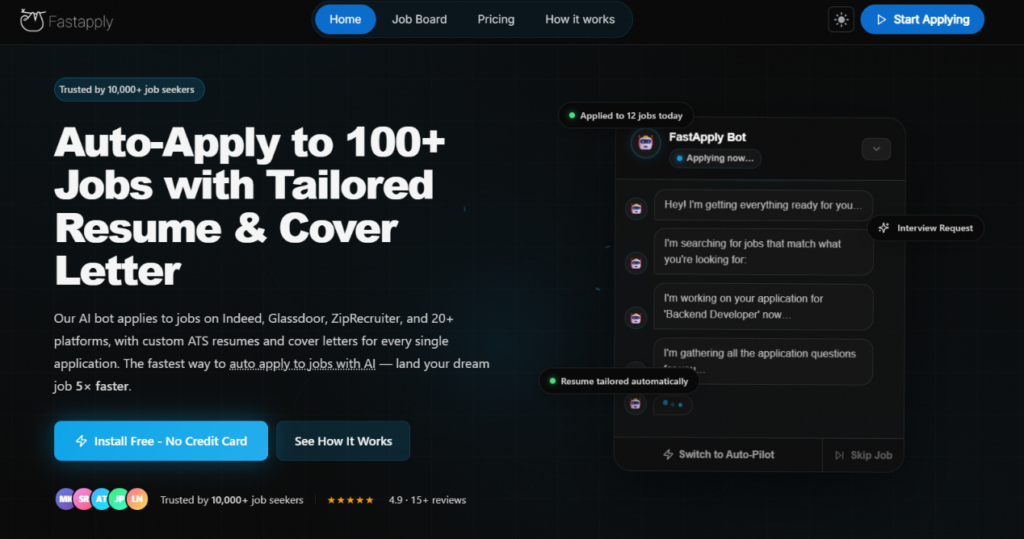
FastApply es una plataforma de solicitud de empleo con IA que automatiza las solicitudes de empleo en más de 20 plataformas, con currículums y cartas de presentación adaptados por IA para cada envío. El precio de entrada es bajo y la prueba gratuita (5 solicitudes, sin necesidad de tarjeta) es una forma de bajo riesgo para probarla.
Pero el modelo basado en créditos puede volverse caro más rápido de lo que esperas, la automatización de LinkedIn se ha suspendido por motivos de cumplimiento, y la experiencia de auto-aplicación está más cerca de un autocompletado inteligente que de una automatización verdaderamente manos libres.
Automatiza tus solicitudes de empleo con IA 🚀.
Pruebe el Copiloto de IA líder para solicitantes de empleo: autónomo, seguro, totalmente personalizado, y en el que confían más de 100.000 usuarios para conseguir entrevistas más rápido.
Echa un vistazo a JobCopilot →Para quién es mejor:
- Buscadores de empleo que desean postularse en múltiples plataformas sin tener que completar manualmente los mismos formularios repetidamente.
- Personas que solicitan una amplia gama de puestos en varios portales de empleo simultáneamente.
- Buscadores de empleo cómodos gestionando un sistema basado en créditos y supervisando su uso.
Las principales características de un vistazo:
| Función | Aplicación Rápida |
| Aplicación automática | Sí — más de 20 plataformas, incluyendo Indeed, Glassdoor, ZipRecruiter, Dice, Greenhouse, Lever, Workday y más |
| Adaptación del currículum | A medida de la IA por aplicación (planes Pro y Élite) |
| Carta de presentación | IA generada por trabajo (planes Pro y Élite) |
| Volumen de aplicación | 200/mes (Starter), 500/mes (Pro), 1.000/mes (Elite) |
| Modo Copiloto | Sí — revisar y aprobar antes de cada envío |
| Modo Piloto Automático | Sí, entrega completamente sin intervención |
| Seguimiento del empleo | Panel de control integrado estilo kanban |
| Creador de currículos | Sí — sube el currículum + pega la descripción del puesto para generar una versión adaptada |
| Perfiles de empleo múltiples | Sí — crea y gestiona perfiles separados para diferentes funciones |
| Prueba gratuita | 5 aplicaciones gratuitas, no se requiere tarjeta de crédito |
| Programa de Referencias | Gana 50 créditos por cada referencia exitosa |
Pros
- 5 aplicaciones gratuitas sin necesidad de tarjeta de crédito
- Amplia cobertura de plataforma en más de 20 bolsas de trabajo, incluyendo sistemas ATS más nuevos como Workday, Greenhouse y Lever
- Múltiples perfiles de trabajo te permiten ejecutar diferentes búsquedas en paralelo con diferentes currículums.
- Programa de referencias te permite ganar créditos invitando a otros
Contras
- La automatización de LinkedIn ha sido eliminada temporalmente por cumplimiento de los Términos de Servicio.
- La experiencia de autoaplicación es más un autocompletado basado en el navegador en piloto automático que una automatización real en segundo plano.
- La carga del currículum durante las solicitudes puede fallar.
- La IA puede alucinar ocasionalmente y rellenar campos que no has especificado.
- El equipo de atención al cliente ha recibido quejas por falta de respuesta.
- Las reseñas independientes son escasas.
Por qué puede confiar en esta reseña
Probé la incorporación de FastApply personalmente, pasé por el flujo de solicitud automática en una oferta de trabajo activa y cotejé sus precios y afirmaciones de características con su página de precios pública y preguntas frecuentes.
También revisé lo que han dicho usuarios independientes en Trustpilot, Reddit y sitios de comparación de terceros.
Donde no pude verificar algo, lo indiqué. Donde mi experiencia difirió de la publicidad, lo señalé.
Precios FastApply
El precio de FastApply es realmente uno de los más accesibles en este sector. Los planes se basan en créditos de aplicación mensuales y, lo que es crucial, puedes empezar con 5 aplicaciones gratuitas y sin tarjeta de crédito.
| Plan | Precio (mensual) | Aplicaciones/Mes | Perfiles de Resumen | Características principales |
| Prueba gratuita | $0 | 5 (único) | 1 | Solicitud Automática, Rastreador de Trabajo, acceso básico |
| Pack de inicio | $14 al mes | 200 | 3 perfiles, 3 cargas de CV | Más de 12 bolsas de trabajo, seguimiento de solicitudes inteligente, soporte por correo electrónico |
| Paquete Pro | $29/mes | 500 | 7 perfiles, 5 cargas de CV | Todas las funciones de Inicio + carta de presentación personalizada con IA por trabajo |
| Paquete Élite | $49 al mes | 1,000 | 10 perfiles, 10 cargas de CV | Todas las funciones Pro + currículum personalizado con IA por puesto de trabajo, soporte prioritario |
| Empresa | Personalizado | Sin límites | Personalizado | Todas las funciones Élite + gestión de equipos, integraciones personalizadas, gestor de cuenta dedicado, acceso a API, SSO |
Puntos clave para tu presupuesto:
El plan Starter $14 parece barato sobre el papel. Pero 200 créditos al mes equivalen aproximadamente a entre 6 y 7 solicitudes al día, lo cual es menos de lo que parece si estás buscando trabajo activamente. Y lo que es más importante, los créditos pueden caducar al final de cada mes de facturación, independientemente de su uso. Si tienes una semana tranquila, esos créditos no se acumulan. Estás pagando por un límite máximo que quizá nunca llegues a utilizar por completo.
El plan Pro, con un precio de $29 al mes, incluye cartas de presentación generadas por IA para cada solicitud, y es ahí donde FastApply empieza a marcar una diferencia significativa respecto a hacerlo manualmente.
El plan Elite, a $49 al mes, es el primer nivel en el que se incluyen la personalización del currículum y de la carta de presentación para cada solicitud. Para una búsqueda de empleo activa y seria, este es el plan más adecuado.
El programa de referidos te permite ganar 50 créditos gratis por cada amigo que complete la configuración y active la aplicación automática. Su amigo recibe 10 créditos gratis al registrarse y tú ganas 20 más cuando mejoran a un plan de pago. Es una forma legítima de ampliar tu grupo de créditos si conoces a otros buscadores de empleo.
¿Cómo funciona FastApply?
FastApply se ejecuta como una extensión de Chrome, no como una aplicación independiente. Una vez instalado y configurado, monitorea los portales de empleo y se postula en tu nombre (Piloto Automático) o pre-rellena las solicitudes para que las revises y envíes (Copiloto). Así es como se desarrollaron la incorporación y la experiencia.
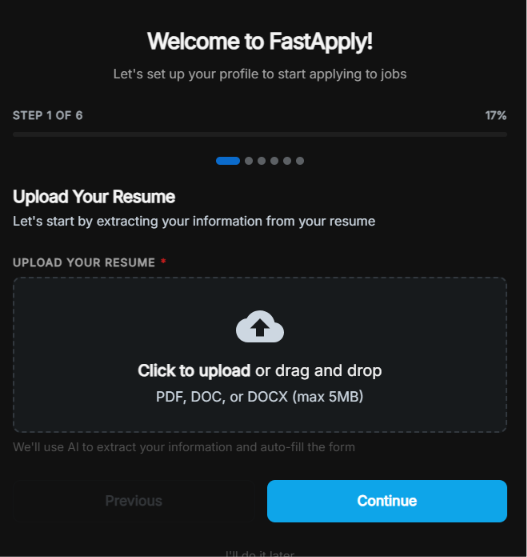
Paso 1: Sube tu currículum
La primera pantalla le pide que cargue su currículum en formato PDF, DOC o DOCX (máximo 5 MB). FastApply utiliza inteligencia artificial para extraer su información y autocompletar la configuración del perfil que sigue. Puede omitir esto y completarlo manualmente, pero cargar el currículum agiliza todo el proceso.
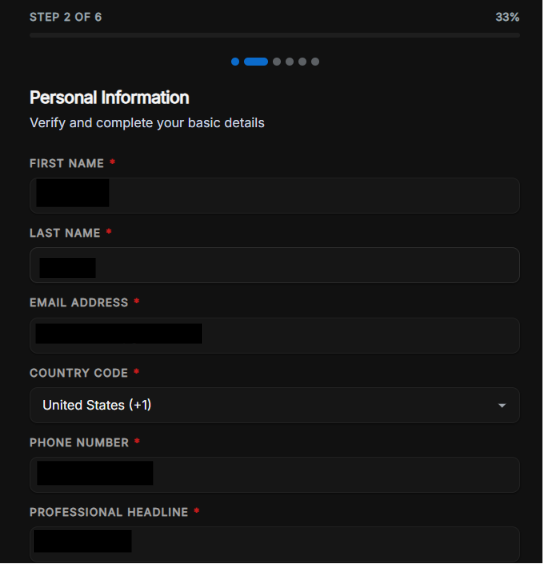
Paso 2: Información personal
El segundo paso recopila lo básico: nombre, apellido, correo electrónico, código de país, número de teléfono y un titular profesional. Se pre-rellena desde tu currículum vitae siempre que sea posible. Notablemente, también solicita tu titular profesional de antemano, lo que influye en cómo la IA formula tus solicitudes.
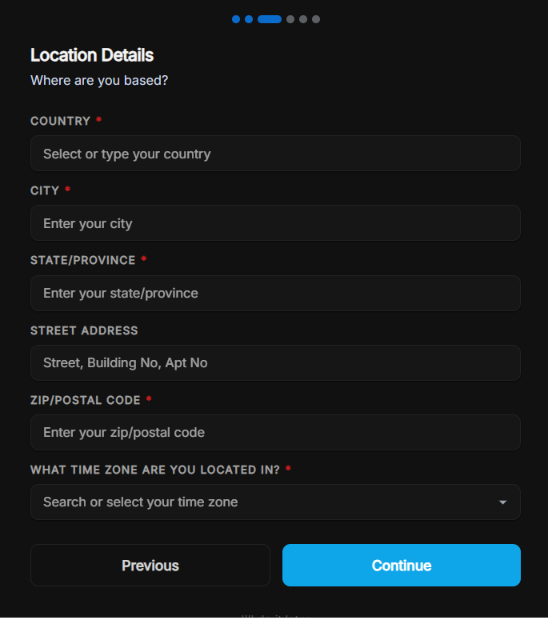
Paso 3: Detalles de la ubicación
FastApply recopila tu ubicación completa: país, ciudad, estado/provincia, dirección de calle, código postal y, crucialmente, tu zona horaria.
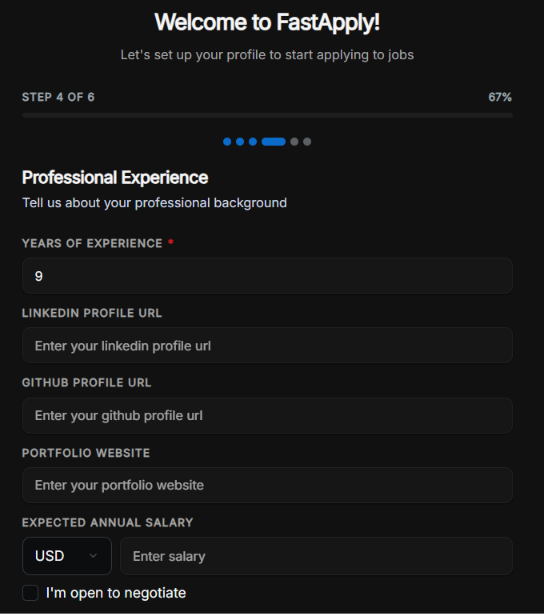
Paso 4: Experiencia profesional
En este paso se incluyen los años de experiencia, la URL del perfil de LinkedIn, la URL del perfil de GitHub, la página web del portafolio y el salario anual esperado. También puedes marcar la casilla “Estoy abierto a negociar” para dejar el campo del salario abierto a negociación. Cuanto más completa esté esta sección, con mayor precisión rellenará la IA los formularios de solicitud en tu nombre.
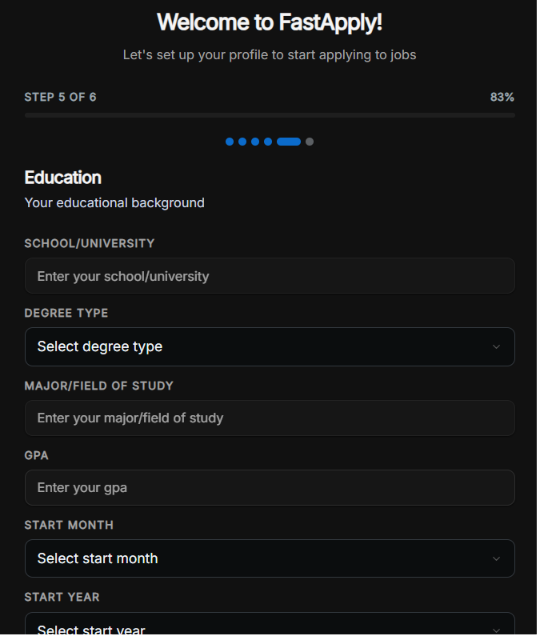
Paso 5: Educación
Centro educativo (escuela o universidad), tipo de titulación, especialidad o área de estudio, nota media (GPA) y fechas de inicio y finalización. El campo «nota media (GPA)» es relativamente nuevo. FastApply lo ha añadido específicamente para mejorar la precisión en las solicitudes que lo requieren. Dejar estas secciones en blanco puede hacer que la IA omita esos campos o, en algunos casos, genere un valor erróneo. Más información al respecto a continuación.
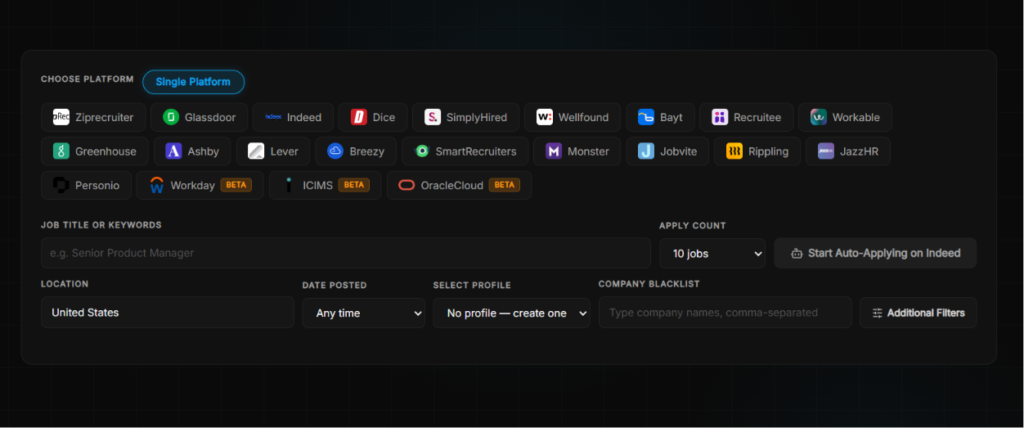
Paso 6: Selección de la plataforma y aplicación automática
Una vez completada la configuración, debes seleccionar las plataformas a las que quieres dirigirte, introducir tu puesto de trabajo o palabras clave, indicar tu ubicación y elegir a cuántas ofertas quieres presentar tu candidatura por sesión. El selector de plataformas muestra todas las bolsas de empleo compatibles.
También tienes un campo de lista negra de empresas donde puedes escribir nombres de empresas para excluir.
¿Qué ocurre realmente durante la aplicación automática?
Aquí es donde tengo que ser honesto sobre la brecha entre el marketing y la experiencia.
El bot FastApply no funciona silenciosamente en segundo plano mientras tú sigues con tu día a día. Abre una nueva ventana del navegador, accede a la oferta de empleo y empieza a rellenar los campos uno por uno. Puedes verlo en tiempo real. El bot rellena el formulario de solicitud de forma metódica, extrayendo la información de tu perfil para completar cada campo.
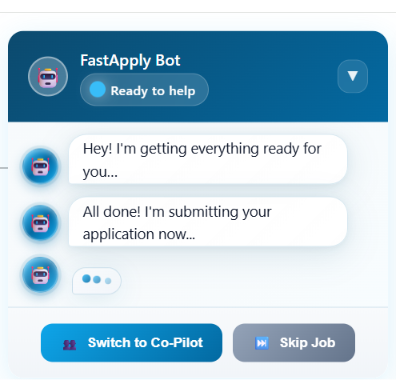
En el caso de los formularios estándar, esto funciona bastante bien. Rellenó la mayoría de los campos con precisión y avanzó por la solicitud a un ritmo que daba la sensación (tal y como se anunciaba) de estar viendo cómo otra persona se encarga de tus trámites.
Pero cuando la aplicación requirió la carga de un currículum, el bot se atascó. No pudo subir mi archivo y detuvo la aplicación. Por lo tanto, si la solicitud de empleo tiene un campo obligatorio para cargar el currículum, FastApply podría no ser capaz de completarla sin intervención manual (al menos no lo hizo, en mi caso).
La IA también puede completar ocasionalmente campos que no has especificado, inventando información que suena plausible pero es inexacta. Este es un riesgo real si estás operando en modo de "piloto automático" sin revisar cada envío. El "modo copiloto" existe precisamente para detectar esto, y si eres nuevo en la plataforma, te recomiendo encarecidamente que empieces por ahí.
Perfiles de empleo
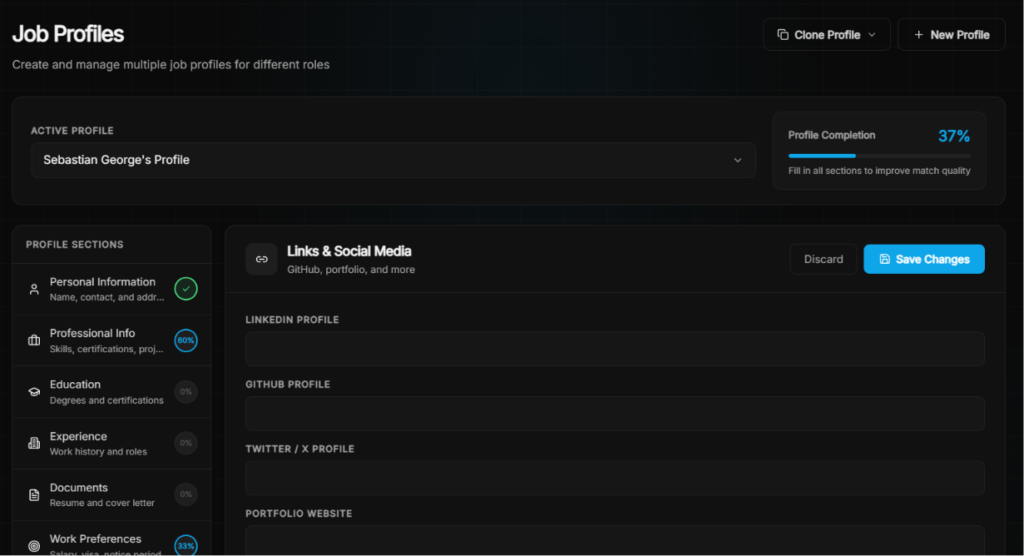
Una de las características más útiles de FastApply es la capacidad de crear múltiples perfiles de trabajo, cada uno con su propio currículum, preferencias y criterios de selección. Si estás solicitando puestos tanto en marketing como en gestión de proyectos con currículums diferentes, puedes ejecutarlos como perfiles separados en lugar de cambiar constantemente la configuración.
Creador de currículos
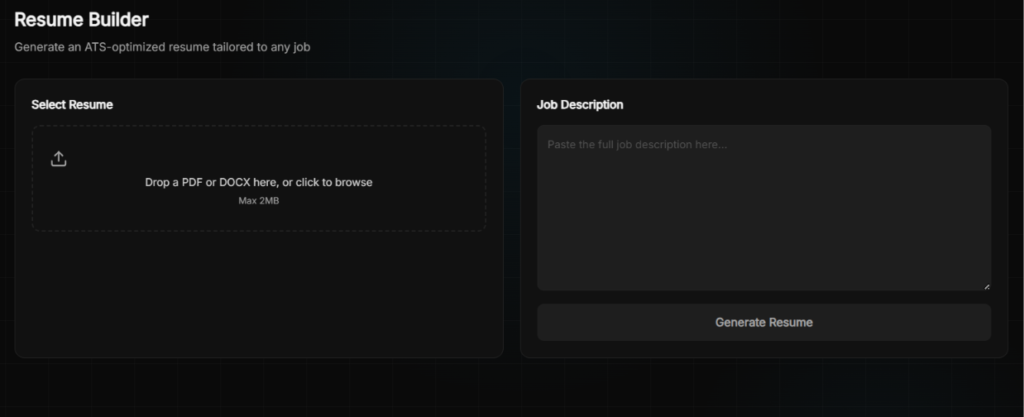
El generador de currículums te permite subir tu currículum actual y pegar la descripción del puesto de trabajo; a continuación, genera una versión optimizada para los sistemas de selección automática (ATS) y adaptada a ese puesto concreto.
Seguimiento del empleo
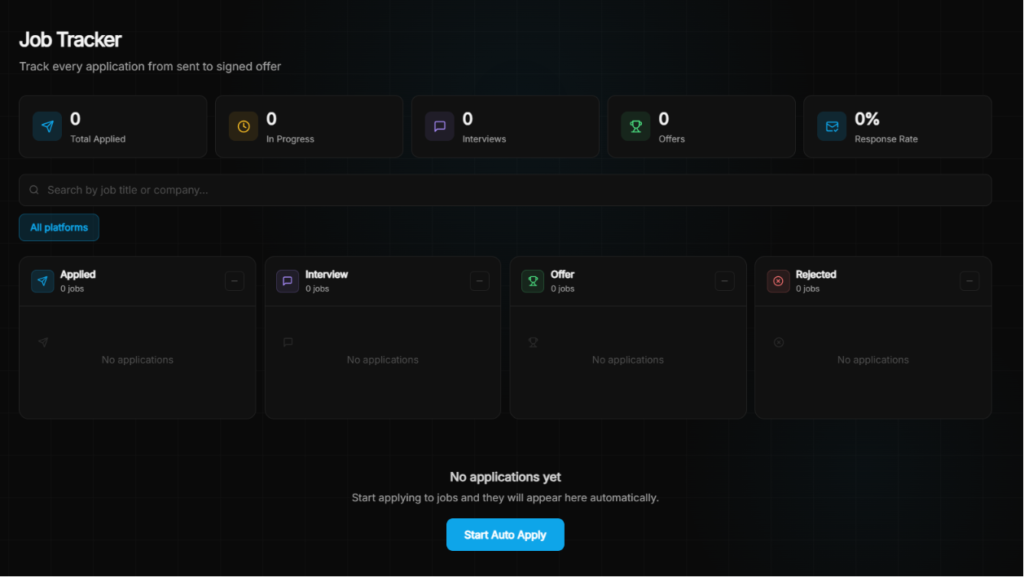
Cada solicitud enviada (ya sea a través de Auto-Pilot o Co-Pilot) se registra automáticamente en el Job Tracker. El panel muestra cuatro columnas: Aplicado, Entrevista, Oferta y Rechazado, además de una métrica de tasa de respuesta en la parte superior. También te permite filtrar por plataforma y buscar por título de trabajo o nombre de empresa.
¿Qué dicen los clientes sobre FastApply?
La base de reseñas independientes de FastApply es escasa. Su página de Trustpilot tiene un número reducido de reseñas, y los testimonios en su propio sitio están seleccionados. Ese contexto es importante.
| Fuente de la reseña | Calificación |
| Trustpilot | Reseñas escasas: señales contradictorias |
| Chrome Web Store | Primeras opiniones positivas |
| Product Hunt | Listado y activo |
Lo que les gusta a los usuarios
La experiencia del Copiloto
Varios usuarios señalan que ver cómo el bot rellena las solicitudes y poder intervenir cuando es necesario resulta realmente satisfactorio en comparación con el tedioso trabajo manual. Un usuario escribió: “Me encanta que haya podido llenar los formularios de trabajo con precisión tal como quería y enviarlos. Solo tuve que sentarme a mirar.”
Amplia cobertura de plataforma
Con más de 20 plataformas compatibles, incluidos sistemas ATS como Greenhouse, Lever y Workday que la mayoría de las herramientas no tocan, FastApply llega a partes del mercado laboral que las herramientas exclusivas de LinkedIn pasan por alto por completo.
Baja barrera de entrada
Cinco aplicaciones gratuitas sin tarjeta de crédito son un verdadero factor diferenciador. En un espacio donde la mayoría de las herramientas te piden que comprometas dinero antes de haber visto resultados, el nivel gratuito de FastApply es una verdadera red de seguridad.
De qué se frustran los usuarios
La automatización de LinkedIn se ha ido (por ahora)
A partir de mayo de 2026, FastApply ha retirado la automatización de LinkedIn para cumplir con los Términos de Servicio de LinkedIn. Han añadido ocho nuevas plataformas para compensar (Workday, iCIMS, OracleCloud, Monster, Personio, JazzHR, Rippling, Jobvite), pero LinkedIn es donde reside una gran proporción de las ofertas de empleo, y su ausencia se hace notar. No hay un plazo establecido sobre cuándo, o si, regresará.
Desafortunadamente, esta fue una de sus características más utilizadas y citadas que ahora ha sido archivada, como comparte un usuario sobre su experiencia:
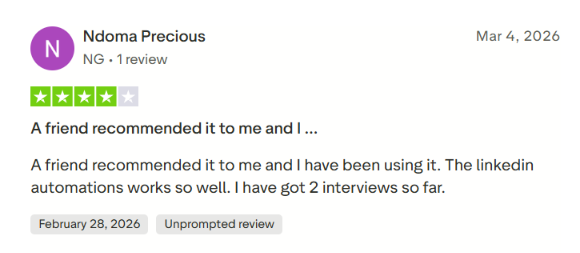
Otro usuario en Chrome Web Store expresado
“La automatización de LinkedIn funciona, ninguna de las otras funciona tan bien como la automatización de LinkedIn. Ziprecruiter estaba funcionando, pero dejó de funcionar este fin de semana el 12/12/25.”
Los créditos expiran mensualmente
Los créditos no utilizados pueden no acumularse. Si tiene una semana de aplicación lenta, esos créditos desaparecen. Esta es una queja legítima, especialmente en el plan Starter, donde 200 créditos no le brindan mucho margen.
Atención al cliente
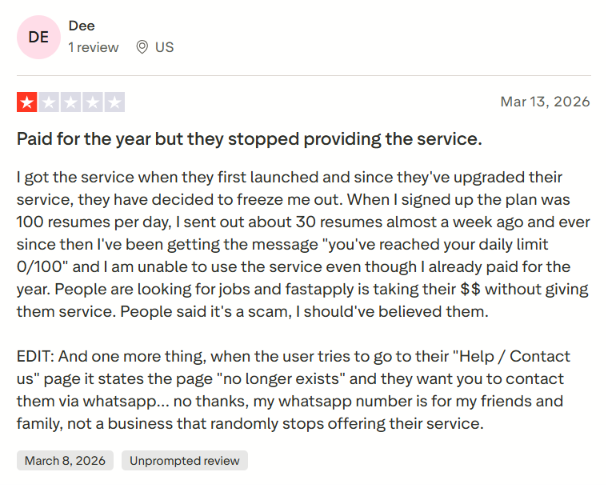
La reseña independiente más seria que he encontrado describe el caso de un usuario que pagó por un año completo, se topó con un error en el límite diario que mostraba “0/100” restante a pesar de haber utilizado el servicio muy poco y, a continuación, no pudo acceder a la página de Ayuda/Contacto. El equipo de atención al cliente respondió públicamente y se ofreció a investigar el caso. Pero esta experiencia pone de manifiesto que, en el caso de una herramienta que gestiona algo tan importante como la búsqueda de empleo, la fiabilidad de la atención al cliente es fundamental.
La fiabilidad de la automatización varía según la plataforma. Varios usuarios señalaron que el rendimiento varía considerablemente de una bolsa de empleo a otra: mientras que algunas plataformas funcionan sin problemas, otras presentan fallos o son poco fiables. Un usuario comentó: “La automatización en LinkedIn funciona... ninguna de las otras funciona tan bien.” Eso fue antes de que se eliminara la automatización en LinkedIn, lo que no hace sino acentuar la preocupación por la coherencia en las plataformas restantes.
Errores al subir el currículum
Como experimenté personalmente, el bot puede atascarse cuando una aplicación requiere la carga de un archivo. Este no es un caso extremo. La mayoría de las aplicaciones serias piden la carga de un currículum y cuando falla, la aplicación se queda atascada a mitad del envío.
Aquí hay otra reseña de un usuario que cuenta la misma experiencia:

Cuándo usar FastApply y cuándo cambiar
Elige FastApply si:
- Buscas la opción más económica para iniciarte en la aplicación automática de IA. $14 al mes y 5 créditos gratis para empezar es una oferta realmente competitiva.
- Estás enviando tu candidatura a una amplia variedad de plataformas, además de LinkedIn, y quieres que tu perfil aparezca en sistemas ATS como Greenhouse, Workday y Lever.
- Estás gestionando varias búsquedas de empleo a la vez y necesitas perfiles y currículos distintos para cada una de ellas.
Pero si el enfoque de FastApply, que depende del navegador y tiene un límite de crédito, empieza a parecerte un obstáculo, hay una opción más sólida que merece la pena conocer.
JobCopilot: la mejor alternativa a FastApply
JobCopilot es una plataforma de búsqueda de empleo basada en inteligencia artificial que automatiza el proceso de solicitud directamente en las páginas de empleo de las empresas, en lugar de en las bolsas de trabajo. Solo tienes que subir tu CV, configurar los filtros de búsqueda y tu copilot se encargará de buscar y presentar tu candidatura a puestos relevantes cada día en tu nombre.
JobCopilot se basa en la idea de que debes mantener el control sobre dónde y cómo realizas tus solicitudes, sin tener que estar atado a una pestaña abierta del navegador.
Aquí es donde cierra las brechas que FastApply deja abiertas:
Solo ofertas de empleo verificadas, sin publicidad innecesaria de bolsas de empleo
JobCopilot se aplica exclusivamente a las ofertas de empleo publicadas en las páginas oficiales de empleo de las empresas (no en portales de empleo). Eso significa que no hay anuncios fraudulentos, ni duplicados, ni ofertas caducadas. Cada solicitud se envía directamente a un puesto real y verificado, directamente desde la fuente. FastApply funciona en los principales portales de empleo, lo que le confiere un amplio alcance, pero también te expone a más información irrelevante.
Aprendizaje automático que se vuelve más inteligente con el tiempo
Cada vez que editas la respuesta a una oferta de empleo en JobCopilot, la IA aprende de ello. Cada vez que solicitas o descartas una oferta de trabajo, tu copilot ajusta sus recomendaciones. FastApply adapta tu currículum a cada oferta, pero no crea un modelo persistente de cómo escribes ni de lo que realmente quieres. JobCopilot sí lo hace.
Modo de revisión sin depender del navegador
El modo «review-first» de JobCopilot te permite aprobar solicitudes sin necesidad de tener el navegador abierto y en ejecución. La función Co-Pilot de FastApply te mantiene vinculado a una sesión activa de Chrome, lo cual resulta útil pero limitante para cualquiera que desee una verdadera automatización en segundo plano.
Un conjunto completo de herramientas profesionales que va más allá de las solicitudes de empleo
JobCopilot incluye un simulador de entrevistas con IA, un asesor para la negociación salarial, un asesor para el cambio de carrera, un test de personalidad profesional, un asistente para establecer contactos y mucho más. El conjunto de herramientas de FastApply se centra en la fase de solicitud.
Cobertura mundial de la empresa
JobCopilot busca en más de 500 000 páginas de empleo de empresas de cualquier país. FastApply abarca más de 20 portales de empleo, lo cual es una amplia cobertura, pero no llega a todo el conjunto de empresas que contratan de forma discreta sin publicar sus ofertas en los agregadores.
El principio JobCopilot tiene más sentido si:
- Procura presentar tu candidatura solo a ofertas de empleo reales y verificadas, en lugar de a todas las que aparecen en las plataformas de empleo.
- Busca una IA que aprenda tu voz, preferencias y criterios de trabajo con el tiempo en lugar de tratar cada solicitud como un nuevo comienzo.
- Buscas puestos publicados discretamente en las páginas de empleo de las empresas con menos competencia.
- ¿Quieres una automatización en segundo plano que no requiera que tu portátil permanezca abierto y activo?.
Automatiza tus solicitudes de empleo con IA 🚀.
Pruebe el Copiloto de IA líder para solicitantes de empleo: autónomo, seguro, totalmente personalizado, y en el que confían más de 100.000 usuarios para conseguir entrevistas más rápido.
Echa un vistazo a JobCopilot →Preguntas frecuentes
¿Puedo añadir a la lista negra en FastApply las empresas a las que no quiero enviar mi solicitud?
Sí. Hay un campo "Lista negra de empresas" directamente en la pantalla de selección de plataformas. Escribe los nombres de las empresas separados por comas y FastApply omitirá esas listas. Útil para excluir a tu empleador actual o a empresas a las que ya te hayas postulado.
¿Funciona FastApply para quienes buscan empleo fuera de EE. UU.?
Sí, hasta cierto punto. La configuración de ubicación recopila tu país, ciudad y zona horaria, y la plataforma admite un filtro "Remoto en cualquier lugar" para puestos remotos a nivel mundial. Varias plataformas admitidas, como Workday, Greenhouse, Lever y SmartRecruiters, son utilizadas por empresas de todo el mundo. Dicho esto, si tu mercado laboral depende en gran medida de bolsas de trabajo locales que no están en la lista de FastApply, tus resultados serán limitados.
¿Puedo utilizar FastApply en el móvil?
No. FastApply es una extensión de Chrome y requiere un ordenador de escritorio o portátil con Google Chrome. No existe una aplicación móvil.